
带有机车卷轴的水平滚动粘滞段
希望使用机车滚动框架(https://github.com/locomotivemtl/locomotive-scroll)在粘性div中创建具有以下结构的水平滚动部分。我的HTML如下:
<div id="sec01" class="the-height-400vh-section"><!-- this has the same height as does the 400vh width, timing should match -->
    <div class="the-sticky-div" id="sticky"  data-scroll data-scroll-sticky data-scroll-target="#sec01"><!-- this is stickying to viewport while we scroll -->
        <div class="the-overflow-hidden-mask">
            <div class="the-width-400vh-scrollable-div" data-scroll data-scroll-direction="horizontal" data-scroll-speed="12" data-scroll-target="#sec01"><!-- we're scrolling this 400vh to the right while we're scrolling the 400vh height of the parent -->
                <div class="the-content">
                    <div class="a-block"></div>
                    <div class="a-block"></div>
                    <div class="a-block"></div>
                    <div class="a-block"></div>
                </div>
            </div>
        </div>
    </div>
</div>
并应用了以下CSS:
.the-sticky-div {
  position: absolute;
  top: 0;
  height: 100vh;
  width: 100%;
  overflow-x: hidden;
  background: #ccc;
  z-index: 1;
}
.the-overflow-hidden-mask {
  position: relative;
  z-index: 200;
  overflow: hidden;
  width: 100%;
  height: 100%;
  background: #000;
}
.the-height-400vh-section {
  position: relative;
  display: flex;
  height: 400vh;
  margin-left: 0px;
  justify-content: center;
  align-items: center;
  border-top: 60px none rgba(36, 36, 36, 0.09);
  background-color: #fff;
}

.the-width-400vh-scrollable-div {
  display: flex;
  width: 400vh;
  position:relative;
  height: 100%;
  flex-wrap: wrap;
  align-items: center;
  will-change: transform;
}
.the-content {
  display: flex;
  width: 100%;
  height: 100%;
  padding-bottom: 10vh;
  justify-content: flex-start;
  align-items: flex-end;
  .a-block {
    overflow: hidden;
    width: 100vw;
    height: 100vh;
    left:0;
    margin-right: 40px;
    margin-left: 40px;
    flex: 0 0 auto;
    border-radius: 6px;
    background-color: hsla(0, 0%, 87.1%, 0.72);
    box-shadow: 0 0 100px 8px rgba(205, 43, 177, 0.25);
  }
}
这背后的逻辑应如下:
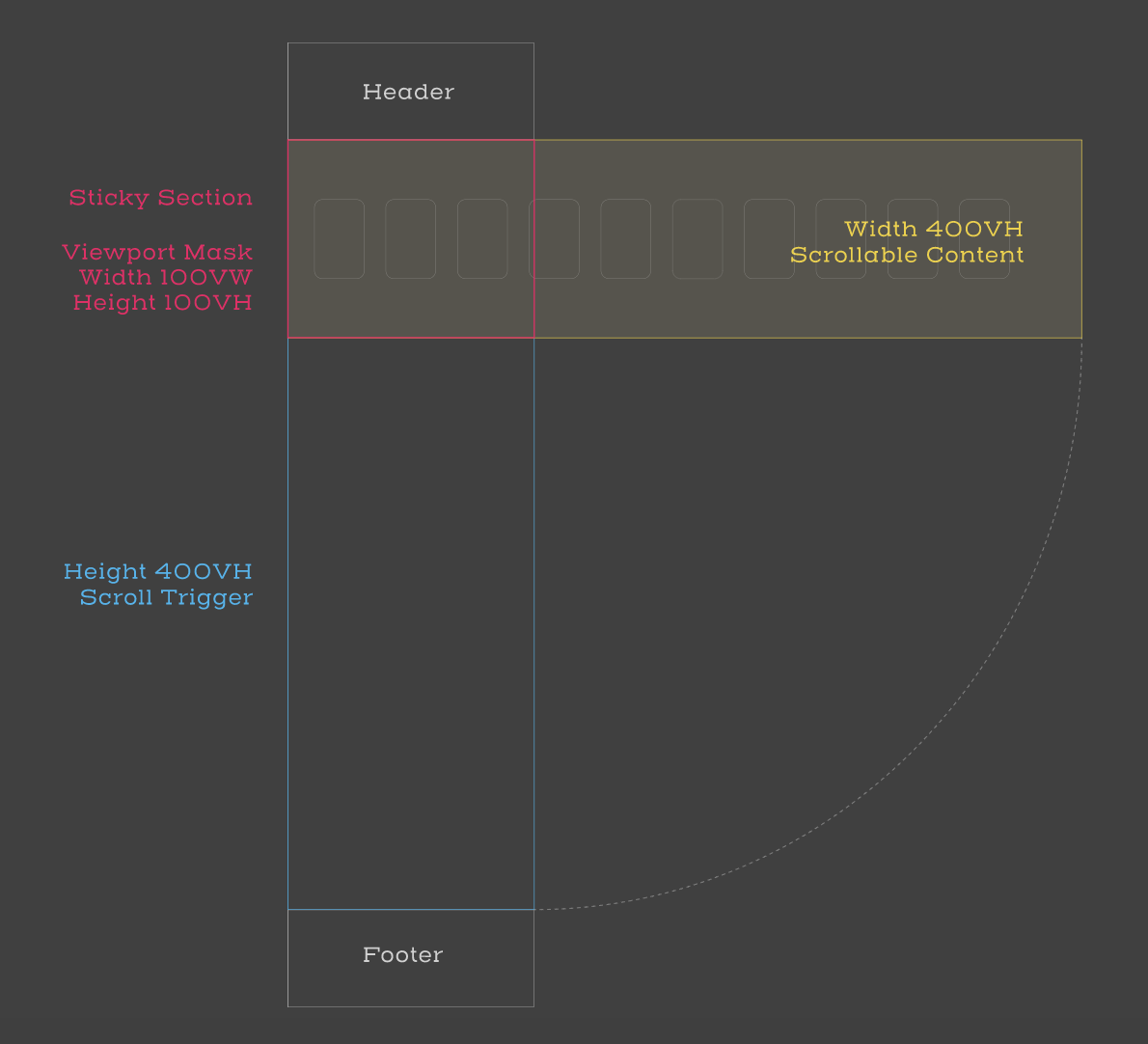
但是我有两个主要问题:
- 水平卷轴过早地初始化
- 水平内容从右边滑行,而不是处于开始滚动的初始位置。
任何想法,用当前的解决方案,以实现类似的最终结果,即www.reformcollective.com (部分进入屏幕,滚动开始,滚动结束时,最后一节被查看)。
提前感谢
回答 3
Stack Overflow用户
发布于 2020-03-11 00:40:36
Stack Overflow用户
发布于 2020-04-07 22:58:43
我一直在为一个项目做同样的事情。
偏移似乎是由数据滚动速度引起的。速度越高,屏幕右侧的偏移量就越大。
在您的示例中,我目前正在对“宽度-400 in滚动-div”类上的数据滚动位置=“top”进行实验。
这种方法的水平滚动div开始在正确的位置,但它立即开始滚动从屏幕顶部。因此,只有当您的水平滚动div在顶部,而不是放置在更深的页面。
也许这会给你一些想法,如果你还没有解决它。如果你想出了办法,请分享你的解决方案。这对我和其他人都是非常有帮助的!
Stack Overflow用户
发布于 2020-09-10 14:04:26
为我工作的方式:
- 消除机车水平滚动;
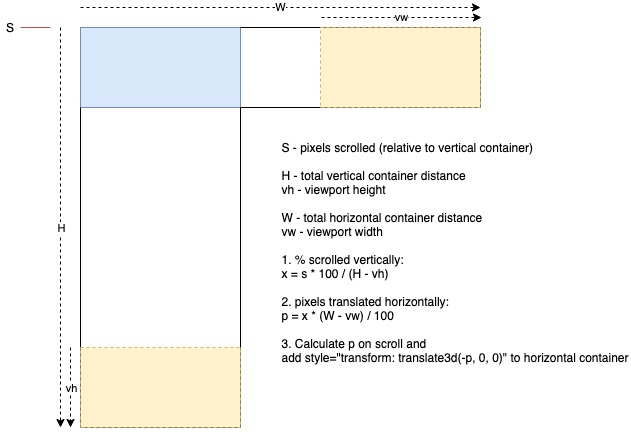
- 增加机车滚动处理程序,使您有当前滚动y的位置;
- 在滚动处理程序中添加一些数学/逻辑,以回答以下问题:
“必须平移多少像素水平截面,要知道平移距离必须与垂直像素滚动成正比”
- 在滚动-翻译你的水平部分;
还要记住,视口不是正方形,所以垂直滚动的距离比水平滚动的距离要大。
基本上,我没有找到一个方法来处理这个问题使用机车水平滚动。
https://stackoverflow.com/questions/60103416
复制相似问题
腾讯云开发者

Copyright © 2013 - 2026 Tencent Cloud. All Rights Reserved. 腾讯云 版权所有
深圳市腾讯计算机系统有限公司 ICP备案/许可证号:粤B2-20090059  粤公网安备44030502008569号
腾讯云计算(北京)有限责任公司 京ICP证150476号 | 京ICP备11018762号