
UIContextMenuActionProvider在项目上放置不需要的复选标记图标
UIContextMenuActionProvider在项目上放置不需要的复选标记图标
提问于 2020-02-06 10:55:43
问题
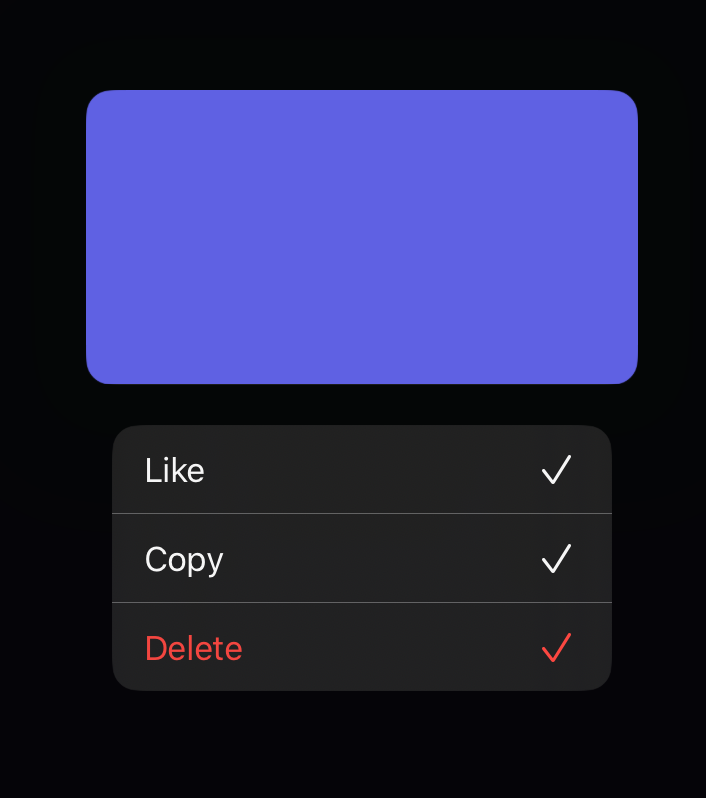
我是在实现UIContextMenuInteraction,最后我也无法解释或找到修复的行为。从屏幕截图中可以看到菜单项有检查点的问题。这不是故意的,这些复选标记是自动添加的。理想情况下,我希望使用SF Symbols,但是我添加的任何图像最终都是这个标记。即使我将图像设置为零,它仍然添加了这个奇怪的复选标记。
执行的附加步骤:重新安装SF符号和SF,清理生成,重新启动xCode /模拟器
转载:模拟器iOS 13.3,iPhone 7 iOS 13.3
系统: Catalina 10.15.1,xCode 11.3.1
代码:
import UIKit

class ViewController: UIViewController {

  let sampleView = UIView(frame: CGRect(x: 50, y: 300, width: 300, height: 200))

  override func viewDidLoad() {
    super.viewDidLoad()

    view.addSubview(sampleView)
    sampleView.backgroundColor = .systemIndigo


    let interaction = UIContextMenuInteraction(delegate: self)
    sampleView.addInteraction(interaction)
  }
}

extension ViewController: UIContextMenuInteractionDelegate {

  func contextMenuInteraction(
    _ interaction: UIContextMenuInteraction,
    configurationForMenuAtLocation location: CGPoint
  ) -> UIContextMenuConfiguration? {

    let actionProvider: UIContextMenuActionProvider = { [weak self] _ in

      let like = UIAction(
        title: "Like",
        image: UIImage(systemName: "heart"),
        identifier: nil,
        discoverabilityTitle: nil,
        attributes: [],
        state: .on
      ) { _ in

      }

      let copy = UIAction(
        title: "Copy",
        image: nil,
        identifier: nil,
        discoverabilityTitle: nil,
        attributes: [],
        state: .on
      ) { _ in

      }

      let delete = UIAction(
        title: "Delete",
        image: UIImage(systemName: "trash"),
        identifier: nil,
        discoverabilityTitle: nil,
        attributes: [.destructive],
        state: .on
      ) { _ in

      }

      return UIMenu(
        title: "",
        image: nil,
        identifier: nil,
        options: [],
        children: [
          like, copy, delete
        ]
      )
    }


    let config = UIContextMenuConfiguration(identifier: nil, previewProvider: nil, actionProvider: actionProvider)

    return config

  }

}
回答 1
Stack Overflow用户
回答已采纳
发布于 2020-02-06 13:16:47
您需要将UIAction.state从.on更改为.off,以消除复选标记。
页面原文内容由Stack Overflow提供。腾讯云小微IT领域专用引擎提供翻译支持
原文链接:
https://stackoverflow.com/questions/60093347
复制相关文章
相似问题
腾讯云开发者

Copyright © 2013 - 2026 Tencent Cloud. All Rights Reserved. 腾讯云 版权所有
深圳市腾讯计算机系统有限公司 ICP备案/许可证号:粤B2-20090059  粤公网安备44030502008569号
腾讯云计算(北京)有限责任公司 京ICP证150476号 | 京ICP备11018762号