
在PolicyParameter类型的对象上找不到成员' type‘
在PolicyParameter类型的对象上找不到成员' type‘
提问于 2020-02-06 10:06:52
我很难通过Azure管道来处理这些问题和部署。现在,当已经定义的type被定义时,它正在期待已定义的。
我使用Azure策略部署模板(创建和分配任务都有第3版)错误消息:
InvalidRequestContent :请求内容无效,无法反序列化:“无法找到”PolicyParameter“类型的对象上的”成员“类型”。路径‘position ties.properties s.envValue.type’,第9行,位置15。
教授
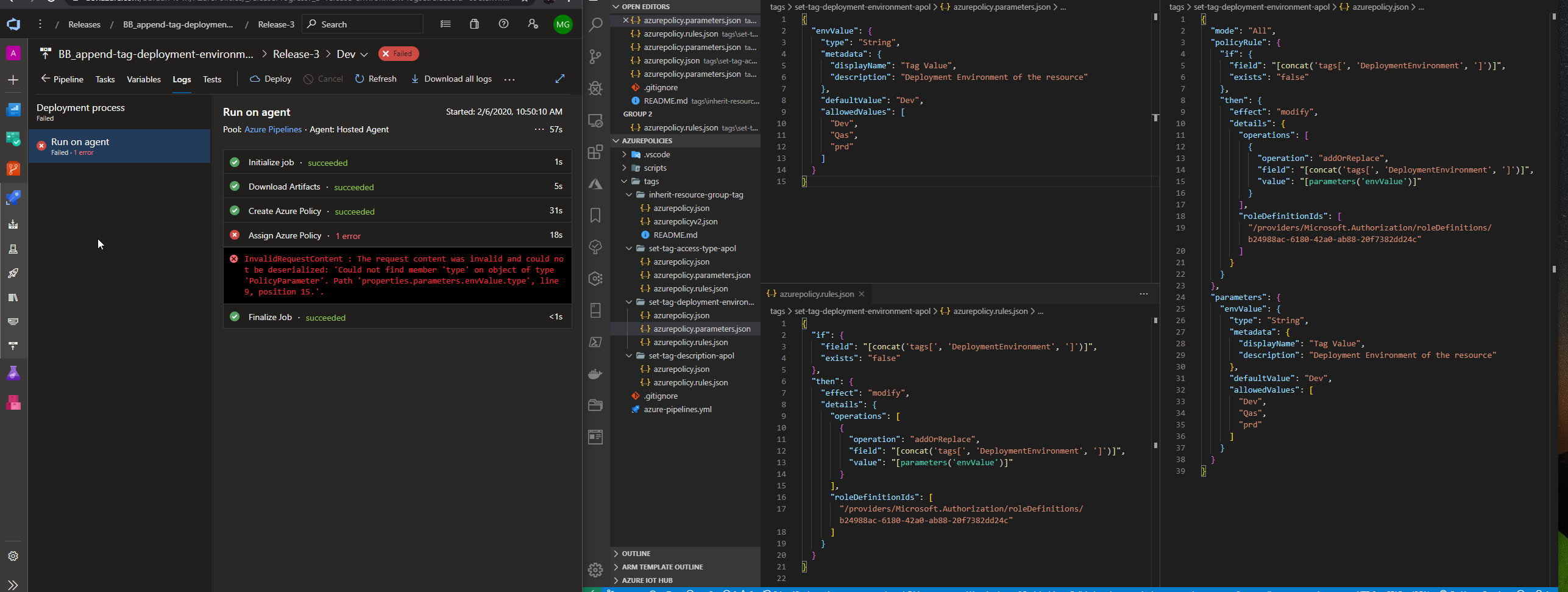
我的情妇档案怎么了?
{
  "envValue": {
    "type": "String",
    "metadata": {
      "displayName": "Tag Value",
      "description": "Deployment Environment of the resource"
    },
    "defaultValue": "Dev",
    "allowedValues": [
      "Dev",
      "Qas",
      "prd"
    ]
  }
}
我的任务:
# Input variables: set these values in the variables section of the release pipeline

#   AssignmentName        - [required] Policy assignment name
#   AssignmentDisplayName - [optional] Policy assignment display name
#   AssignmentDescription - [optional] Policy assignment description
#   PolicyName            - [optional] Name of policy definition to assign
#   PolicySetName         - [optional] Name of policy set definition to assign
#   ResourceGroupName     - [optional] Name of resource group the policy [set] definition will be applied to
#   SubscriptionId        - [optional] Id of subscription the policy [set] definition will be applied to
#   ManagementGroupName   - [optional] Name of management group the policy [set] definition will be applied to
#  PolicyParameters      - [optional] Policy parameter values in JSON string format

# Notes:
#   Refer to https://learn.microsoft.com/en-us/azure/azure-policy/ for documentation on the Powershell cmdlets and the JSON input formats

$assignmentName = "$(AssignmentName)"
$assignmentDisplayName = "$(AssignmentDisplayName)"
$assignmentDescription = "$(AssignmentDescription)"
$policyName = "$(PolicyName)"
$policySetName = "$(PolicySetName)"
$resourceGroupName = "$(ResourceGroupName)"
$subscriptionId = "$(SubscriptionId)"
$managementGroupName = "$(managementGroupName)"
$policyParameters = "$(PolicyParameters)"

if (!$assignmentName)
{
    throw "Unable to create policy assignment: required input variable value `$(AssignmentName) was not provided"
}

if (!$policyName -and !$policySetName)
{
    throw "Unable to create policy assignment: neither `$(PolicyName) nor `$(PolicySetName) was provided. One or the other must be provided."
}

if ($policyName -and $policySetName)
{
    throw "Unable to create policy assignment: `$(PolicyName) '$policyName' and `$(PolicySetName) '$policySetName' were both provided. Either may be provided, but not both."
}

if ($subscriptionId -and $managementGroupName)
{
    throw "Unable to create policy assignment: `$(SubscriptionId) '$subscriptionId' and `$(ManagementGroupName) '$managementGroupName' were both provided. Either may be provided, but not both."
}

if ($managementGroupName -and $resourceGroupName)
{
    throw "Unable to create policy assignment: `$(ManagementGroupName) '$managementGroupName' and `$(ResourceGroupName) '$resourceGroupName' were both provided. Either may be provided, but not both."
}

if ($managementGroupName)
{
    $scope = "/providers/Microsoft.Management/managementGroups/$managementGroupName"
    $searchParameters = @{ManagementGroupName=$managementGroupName}
}
else
{
    if (!$subscriptionId)
    {
        $subscription = Get-AzureRmContext | Select-Object -Property Subscription
        $subscriptionId = $subscription.Id
    }

    $scope = "/subscriptions/$subscriptionId"
    $searchParameters = @{SubscriptionId=$subscriptionId}

    if ($resourceGroupName)
    {
        $scope += "/resourceGroups/$resourceGroupName"
    }
}

$cmdletParameters = @{Name=$assignmentName; Scope=$scope}
if ($assignmentDisplayName)
{
    $cmdletParameters += @{DisplayName=$assignmentDisplayName}
}

if ($assignmentDescription)
{
    $cmdletParameters += @{Description=$assignmentDescription}
}

if ($policyName)
{
    $policyDefinition = Get-AzureRmPolicyDefinition @searchParameters | Where-Object { $_.Name -eq $policyName }
    if (!$policyDefinition)
    {
        throw "Unable to create policy assignment: policy definition $policyName does not exist"
    }

    $cmdletParameters += @{PolicyDefinition=$policyDefinition}
}

if ($policySetName)
{
    $policySetDefinition = Get-AzureRmPolicySetDefinition @searchParameters | Where-Object { $_.Name -eq $policySetName }
    if (!$policySetDefinition)
    {
        throw "Unable to create policy assignment: policy set definition $policySetName does not exist"
    }

    $cmdletParameters += @{PolicySetDefinition=$policySetDefinition}
}

if ($policyParameters)
{
    $cmdletParameters += @{PolicyParameter=$policyParameters}
}

&New-AzureRmPolicyAssignment @cmdletParameters回答 2
Stack Overflow用户
发布于 2020-02-14 23:27:58
看起来,创建策略定义任务成功了,这意味着您的参数和规则应该已经建立好了。问题发生在赋值时,这意味着您可能正在向管道发送策略参数(而不是字符串格式)。
Stack Overflow用户
发布于 2020-06-16 00:50:17
有点晚了,但我今天碰到了这个。分配的参数文件应该如下所示:
{
 "envValue":{
    "value": "Dev"
  }
}
您要传递的是参数定义,而不是实际参数。遵循与手臂模板相同的模式。
页面原文内容由Stack Overflow提供。腾讯云小微IT领域专用引擎提供翻译支持
原文链接:
https://stackoverflow.com/questions/60092383
复制相关文章
相似问题
腾讯云开发者

Copyright © 2013 - 2026 Tencent Cloud. All Rights Reserved. 腾讯云 版权所有
深圳市腾讯计算机系统有限公司 ICP备案/许可证号:粤B2-20090059  粤公网安备44030502008569号
腾讯云计算(北京)有限责任公司 京ICP证150476号 | 京ICP备11018762号