
如何从PostgreSQL 12而不是PostgreSQL 10连接到数据库
如何从PostgreSQL 12而不是PostgreSQL 10连接到数据库
提问于 2020-02-02 23:26:14
在Windows10中安装了PostgreSQL版本12.1 (从此页下载)
但是有两个服务器,如下所示:
(为什么安装PostgreSQL 10?)
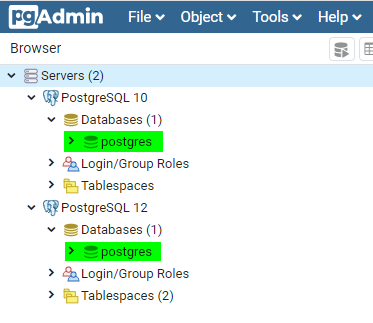
在.NET C#项目中,下面的代码自动连接到PostgreSQL 10下的数据库postgres
string Server = "localhost";
string Port = "5432";
string Username = "postgres";
string Password = "123456";
string Database = "postgres";
string connString =
String.Format(
    "Server={0};Port={1};Username={2};Password={3};Database={4};SSLMode=Prefer",
    Server,
    Port,
    Username,
    Password,
    Database);
using (var sqlConnection = new NpgsqlConnection(connString))
{
    sqlConnection.Open(); // here opens database postgres under PostgreSQL 10
}
如何更改代码以从PostgreSQL 12而不是PostgreSQL 10打开数据库postgres
回答 1
Stack Overflow用户
发布于 2020-02-03 09:22:40
sames框上的多个实例将同时运行在不同的端口上。不可能同时在同一个端口上运行2个pg实例,因此需要连接到pg12的端口。
就pg10而言,它之前一定存在过!这就解释了为什么你的应用程序默认连接到它,因为pg的默认端口是5432。
页面原文内容由Stack Overflow提供。腾讯云小微IT领域专用引擎提供翻译支持
原文链接:
https://stackoverflow.com/questions/60031567
复制相关文章
相似问题
腾讯云开发者

Copyright © 2013 - 2026 Tencent Cloud. All Rights Reserved. 腾讯云 版权所有
深圳市腾讯计算机系统有限公司 ICP备案/许可证号:粤B2-20090059  粤公网安备44030502008569号
腾讯云计算(北京)有限责任公司 京ICP证150476号 | 京ICP备11018762号