
文本不同时形成文本
我正在用Powershell做一张桌子,像这样:
Count Name
----- ----
    1 Cisco Spark Room 55, NetworkAddressMissing
    1 Cisco Spark Room 55, OK
    2 Cisco Spark Room Kit, NetworkAddressMissing
    2 Cisco TelePresence DX80, NetworkAddressMissing
    1 Cisco TelePresence DX80, NoHTTPSResponse
    4 Cisco TelePresence DX80, OK
   10 Cisco TelePresence MX200 G2, OK
   11 Cisco TelePresence MX200, OK
    3 Cisco TelePresence MX300 G2, NoHTTPSResponse
   48 Cisco TelePresence MX300 G2, OK
    6 Cisco TelePresence MX300, OK
    3 Cisco TelePresence Profile 52/55 C40, NetworkAddressMissing
Powershell脚本主要进入并获取一些数据,并对其进行分组。我得到了什么取决于后台系统里有什么。我被要求把结果分开让它更.美感。有人建议我们应该在不同的系统之间加上白线,或者把不同的系统设置成不同的颜色等等。这意味着我需要检查逗号上的“名称”的开头,看看它是同一个系统,还是一个不同的系统,是否需要某种分隔器。
显然,上面的桌子很长。它是通过Powershell实现的,我还使用Powershell将其转换为HTML,并使用一个小的CSS来使它更适合非技术人员。
对于如何按照建议进行形成有任何建议吗?
回答 1
Stack Overflow用户
发布于 2020-01-06 13:20:51
假设示例表输出是PSObjects数组的结果,如下所示:
$data = PsCustomObject@{ Count = 1;Name = 'Cisco Spark 55,NetworkAddressMissing'},PsCustomObject@{ Count = 1;Name = 'Cisco Spark 55,OK'},PsCustomObject@{ Count = 2;Name = 'Cisco Spark,NetworkAddressMissing'},PsCustomObject@{ Count = 2;Name = 'Cisco TelePresence DX80,NetworkAddressMissing'},PsCustomObject@{ Count = 1;Name = 'Cisco TelePresence DX80,NoHTTPSResponse'},PsCustomObject@{ Count = 4;名称= 'Cisco TelePresence DX80,OK'},PsCustomObject@{ Count = 10;Name = 'Cisco TelePresence MX200 G2,OK'},PsCustomObject@{ Count = 11;Name = 'Cisco TelePresence MX200,OK'},PsCustomObject@{ Count = 3;Name = 'Cisco TelePresence MX300 G2,NoHTTPSResponse'},PsCustomObject@{ Count = 48;Name = 'Cisco TelePresence MX300 G2,OK'},PsCustomObject@{ Count = 6;名称= 'Cisco TelePresence MX300,OK'},PsCustomObject@{ Count = 3;Name = 'Cisco TelePresence Profile 52/55 C40,NetworkAddressMissing'}
如果要在分组项之间留出空行,这可能会有所帮助:
# show headers on the first iteration only
$hideHeaders = $false
$data | Group-Object @{ Expression = {($_.Name -split ',')[0]}} | ForEach-Object {
    ($_.Group | Format-Table -AutoSize -HideTableHeaders:$hideHeaders | Out-String).TrimEnd()
    $hideHeaders = $true
}
输出:
点名NoHTTPSResponse 48 Cisco TelePresence MX300 G2,OK 6 Cisco TelePresence MX300,OK 3 Cisco TelePresence Profile 52/55 C40,NetworkAddressMissing
在重新阅读这个问题时,我理解您的表输出应该/可能是HTML。
在这种情况下,也许以下职能可以发挥作用:
$style = @"
<style type="text/css">
body {
font-family: Calibri, Verdana, Arial, Geneva, Helvetica, sans-serif;
font-size: 11pt;
color: black;
}
table, td, th {
border-style: solid;
font-family: Calibri, Verdana, Arial, Geneva, Helvetica, sans-serif;
font-size: 11pt;
margin: 8pt 0 8pt 0;
}
table {
border-width: 0 0 1px 1px;
border-spacing: 0;
border-collapse: collapse;
}
td, th {
margin: 0;
padding: 4px;
border-width: 1px 1px 0 0;
text-align: left;
}
th {
color: white;
font-weight: bold;
}
</style>
"@
# HTML start
$openHtml = @"
<!DOCTYPE html PUBLIC "-//W3C//DTD XHTML 1.0 Transitional//EN" "http://www.w3.org/TR/xhtml1/DTD/xhtml1-transitional.dtd">
<html xmlns="http://www.w3.org/1999/xhtml">
<head>
<title>Report</title>
<meta name="generator" content="PowerShell" />
<meta http-equiv="Content-Type" content="text/html; charset=utf-8">
$style
</head>
<body>
"@
# HTML close
$closeHtml = '</body></html>'
function ConvertTo-HTMLTable {
# Converts an object to a themed HTML table, mimicking the Excel "Table Style Normal"
# Accepts a System.Data.DataTable object or an array of PSObjects and converts to styled HTML table
[CmdletBinding(DefaultParameterSetName = 'ByTheme')]
Param (
[parameter(Mandatory = $true, Position = 0)]
[object[]]$Data,
[parameter(ParameterSetName = 'ByTheme')]
[ValidateSet('Black', 'LightBlue', 'Orange', 'Gray', 'Gold', 'Blue', 'Green')]
[string]$ThemeColor,
[parameter(ParameterSetName = 'ByCustomColors')]
[string]$HeaderColor,
[parameter(ParameterSetName = 'ByCustomColors')]
[string]$OddRowColor,
[parameter(ParameterSetName = 'ByCustomColors')]
[string]$EvenRowColor,
[parameter(ParameterSetName = 'ByCustomColors')]
[string]$BorderColor
)
# add type needed to replace HTML special characters into entities
Add-Type -AssemblyName System.Web
# define theme colors as array of hashtables
$colors = switch($ThemeColor) {
'Black' { @{ 'header' = '#D9D9D9'; 'oddrow' = '#000000'; 'evenrow' = $null; 'border' = '#000000'} }
'LightBlue' { @{ 'header' = '#5B9BD5'; 'oddrow' = '#DDEBF7'; 'evenrow' = $null; 'border' = '#000000'} }
'Orange' { @{ 'header' = '#ED7D31'; 'oddrow' = '#FCE4D6'; 'evenrow' = $null; 'border' = '#F4B084'} }
'Gray' { @{ 'header' = '#A5A5A5'; 'oddrow' = '#EDEDED'; 'evenrow' = $null; 'border' = '#C9C9C9'} }
'Gold' { @{ 'header' = '#FFC000'; 'oddrow' = '#FFF2CC'; 'evenrow' = $null; 'border' = '#FFD966'} }
'Blue' { @{ 'header' = '#4472C4'; 'oddrow' = '#D9E1F2'; 'evenrow' = $null; 'border' = '#8EA9DB'} }
'Green' { @{ 'header' = '#70AD47'; 'oddrow' = '#E2EFDA'; 'evenrow' = $null; 'border' = '#A9D08E'} }
default { @{ 'header' = $HeaderColor; 'oddrow' = $OddRowColor; 'evenrow' = $EvenRowColor; 'border' = $BorderColor} }
}
$sb = New-Object -TypeName System.Text.StringBuilder
[void]$sb.AppendLine('<table style="border-color: {0};">' -f $colors['border'])
if ($null -ne $Data) {
if (([object]$Data).GetType().FullName -eq 'System.Data.DataTable'){
# it is a DataTable; convert to array of PSObjects
$Data = $Data | Select-Object * -ExcludeProperty ItemArray, Table, RowError, RowState, HasErrors
}
$headers = $Data[0].PSObject.Properties | Select -ExpandProperty Name
[void]$sb.AppendLine(('<thead><tr style="background-color: {0};">' -f $colors['header']))
foreach ($column in $headers) {
$th = [System.Web.HttpUtility]::HtmlEncode($column)
[void]$sb.AppendFormat('<th style="border-color: {0};">{1}</th>', $colors['border'], $th)
}
[void]$sb.AppendLine('</tr></thead><tbody>')
$currentName = $Data[0].Name
$rowcolor = $colors['evenrow']
$Data | ForEach-Object {
# add inline style for different colored rows on each Name change
if ($_.Name -ne $currentName) {
if ($rowcolor -eq $colors['evenrow']) {
$rowcolor = $colors['oddrow']
}
else {
$rowcolor = $colors['evenrow']
}
$currentName = $_.Name
}
if ([string]::IsNullOrWhiteSpace($rowcolor)) {
$tr = '<tr>'
}
else {
$tr = '<tr style="background-color: {0};">' -f $rowcolor
}
[void]$sb.AppendLine($tr)
# now add the data cells
foreach ($column in $headers) {
[string]$val = $($_.$column)
if ([string]::IsNullOrWhiteSpace($val)) {
$td = '<td style="border-color: {0};"> </td>' -f $colors['border']
}
else {
# if it's a number, align to the right
[double]$num = 0
if ([double]::TryParse($val,[ref]$num)) {
$td = '<td style="border-color: {0}; text-align: right;">{1}</td>' -f $colors['border'], $val
}
else {
$val = [System.Web.HttpUtility]::HtmlEncode($val)
$td = '<td style="border-color: {0};">{1}</td>' -f $colors['border'], $val
}
}
[void]$sb.Append($td)
}
[void]$sb.AppendLine('</tr>')
}
[void]$sb.AppendLine('</tbody>')
}
[void]$sb.AppendLine('</table>')
return $sb.ToString()
}有了所有这些之后,您可以像这样转换原始数据(同样:我假设这是一个PSObjects数组):
# split the Name property into Name and Status and update the objects
$data | ForEach-Object {
    $name, $status = ($_.Name -split ',', 2).Trim()
    $_.Name = $name
    $_ | Add-Member -MemberType NoteProperty -Name 'Status' -Value $status
}

# convert the data to styled HTML table
$table = ConvertTo-HTMLTable -Data ($data | Sort-Object Name) -ThemeColor Blue

# complete the HTML
$html  = '{0}{1}{2}' -f $openHtml, $table, $closeHtml
接下来,您可以将其保存为html文件。
$html | Set-Content -Path 'D:\report.html'或者用发送邮件作为电子邮件发送给你的同事。
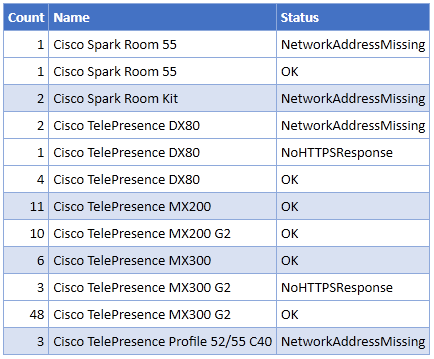
蓝色主题为您提供了以下输出
https://stackoverflow.com/questions/59612202
复制相似问题
腾讯云开发者

Copyright © 2013 - 2026 Tencent Cloud. All Rights Reserved. 腾讯云 版权所有
深圳市腾讯计算机系统有限公司 ICP备案/许可证号:粤B2-20090059  粤公网安备44030502008569号
腾讯云计算(北京)有限责任公司 京ICP证150476号 | 京ICP备11018762号