
使用列值python对excel文件进行排序
使用列值python对excel文件进行排序
提问于 2019-12-26 14:28:06
我有n个excel文件,我需要根据列的值对它们进行排序。实际上,在创建子文件夹时,我需要组织放在特定文件夹下的excel文件,每个子文件夹都包含具有相同DEPTNAME的excel文件,因为知道DEPTNAME是列名,每个excel文件都有m个工作表,但是所有的工作表都有相同的DEPTNAME。
示例:包含4个excel文件的文件夹:
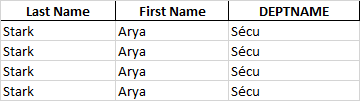
df1= pd.DataFrame({'Last Name':[‘Stark’, ‘Stark’, ‘ Stark’, ‘Stark’],
 'FirstName':['Arya', ,'Arya','Arya','Arya',],
 'DEPTNAME':['Sécu','Sécu','Sécu','Sécu']})
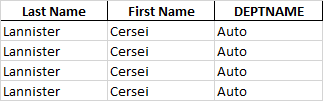
df2= pd.DataFrame({'Last Name':[‘Lannister’, ‘Lannister’, ‘ Lannister’, ‘Lannister’],
 'FirstName':['Cersei', ,'Cersei','Cersei','Cersei',],
 'DEPTNAME':['Auto','Auto','Auto','Auto']})
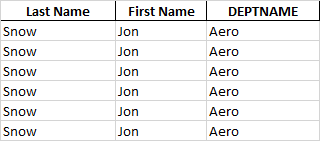
df3= pd.DataFrame({'Last Name':[‘Snow’, ‘Snow’, ‘ Snow’, ‘Snow’, ‘ Snow’, ‘Snow’],
         'FirstName':['Jon', 'Jon','Jon','Jon','Jon','Jon'],
         'DEPTNAME':['Aero','Aero','Aero','Aero','Aero','Aero']})
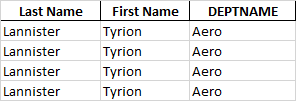
df4= pd.DataFrame({'Last Name':[‘Lannister’, ‘Lannister’, ‘ Lannister’, ‘Lannister’],
         'FirstName':['Tyrion', 'Tyrion','Tyrion','Tyrion',],
         'DEPTNAME':['Aero','Aero','Aero','Aero']})
现在我需要自动创建3个文件夹:Sécu、Aero和Auto。
Sécu将包含一个excel文件
Aero将包含两个excel文件
Auto将包含一个excel文件
是可行的吗?知道我的初始文件夹包含n个带有多个工作表的excel文件
回答 1
Stack Overflow用户
回答已采纳
发布于 2019-12-26 16:15:37
下面是一种将文件夹中的所有文件和每个文件中的所有工作表组合在一起的方法,然后在DEPTNAME上分组,文件名+对文件夹中的文件进行排序(注意:如果相同的DEPTNAME位于两个不同的excel文件中,则将它们保存为同一个文件夹中的两个不同的文件<- -根据请求):
def myf(folder,files_to_be_created_in_folder):
    """ folder is the path to input files and files_to_be_created_in_folder
         is the path where the directories are to be created"""
    folder = folder
    list_of_files=os.listdir(folder)
    combined_sheets={i[:-5]:pd.concat(pd.read_excel(os.path.join(folder,i),sheet_name=None)
        .values(),sort=False)for i in list_of_files}
    combined_all_files=pd.concat(combined_sheets.values(),keys=combined_sheets.keys())
    d={i:g for i,g in combined_all_files.groupby(['DEPTNAME'
             ,combined_all_files.index.get_level_values(0)])}
    to_create_folder=files_to_be_created_in_folder
    for k,v in d.items():
        newpath=os.path.join(to_create_folder,k[0])
        if not os.path.exists(newpath):
            os.makedirs(newpath)
v.to_excel(os.path.join(newpath,f"{k[1]}.xlsx"),index=False)myf(r'C:\path_to_files\test_folder',r'C:\path_to_write\New folder') #replace paths carefully为了进行测试,我尝试基于描述文件夹树的this解决方案打印文件夹树:
ptree(r'C:\path_to_files\test_folder')

test_folder/
|-- test_1.xlsx
|-- test_2.xlsx
|-- test_3.xlsx
|-- test_4.xlsx

ptree(r'C:\path_to_write\New folder') #this also has the test folder

New folder/
|-- Aero/
|   |-- test_3.xlsx
|   |-- test_4.xlsx
|-- Auto/
|   |-- test_2.xlsx
|-- Sécu/
|   |-- test_1.xlsx
|-- test_folder/
|   |-- test_1.xlsx
|   |-- test_2.xlsx
|   |-- test_3.xlsx
| |-- test_4.xlsx页面原文内容由Stack Overflow提供。腾讯云小微IT领域专用引擎提供翻译支持
原文链接:
https://stackoverflow.com/questions/59489774
复制相关文章
相似问题
腾讯云开发者

Copyright © 2013 - 2026 Tencent Cloud. All Rights Reserved. 腾讯云 版权所有
深圳市腾讯计算机系统有限公司 ICP备案/许可证号:粤B2-20090059  粤公网安备44030502008569号
腾讯云计算(北京)有限责任公司 京ICP证150476号 | 京ICP备11018762号