
如何在三维视图中显示设备屏幕中的三维模型
如何在三维视图中显示设备屏幕中的三维模型
提问于 2019-12-26 10:51:17
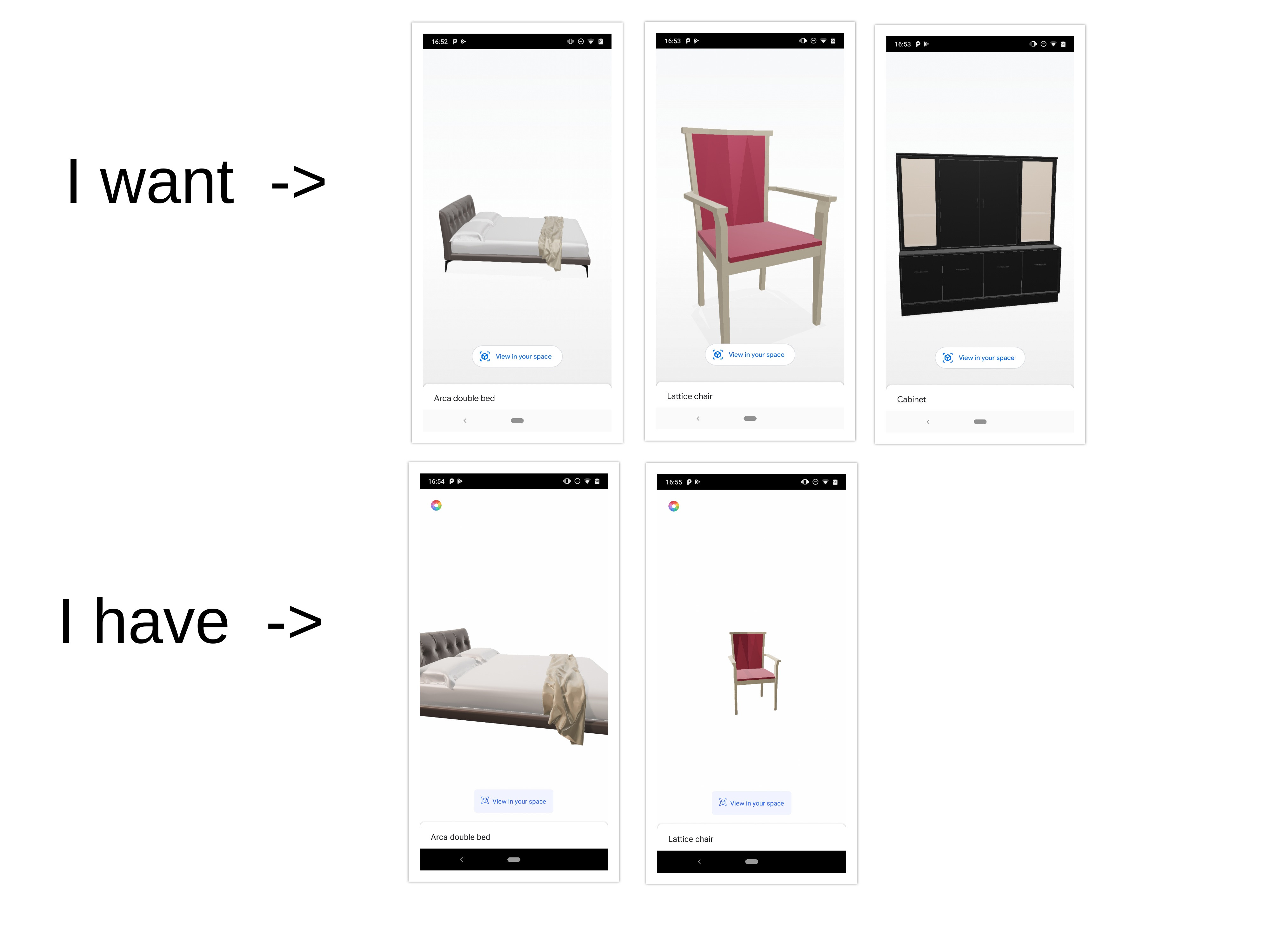
在我的演示项目(3D视图)。当模型显示时,有些模型显示大尺寸(屏幕外),有些模型太小。什么是最佳的比例,以适应模型在设备屏幕。
我的代码是..。
     private fun createRenderAble() {
        ModelRenderable.builder().setSource(
            this, RenderableSource.builder()
                .setSource(this, Uri.parse(model?.modelUri), RenderableSource.SourceType.GLB)
                .setRecenterMode(RenderableSource.RecenterMode.CENTER)
                .build()
        ).setRegistryId(model?.modelUri)
         .build()
         .thenAccept { renderable ->
                hideProgress()
                addNodeToScene(renderable)
            }
            .exceptionally {
                showToast(it.localizedMessage)
                hideProgress()
                null
            }
}

 private fun addNodeToScenee(renderable: ModelRenderable?) {
    val tempNode = Node()
    tempNode.renderable = renderable

    val collisionShape: Box = tempNode.collisionShape as Box
   // var radius = 1f

  //  if (collisionShape.size.x > 2.0) {
 //       radius = 3f
  //  }
  //  if (collisionShape.size.y > 1.3) {
   //     radius = 2f
   // }

     radius=collisionShape.size.x
    val node = DragTransformableNode(radius, transformationSystem).apply {
        setParent(sceneView.scene)
        this.renderable = renderable
        select()
    }

    sceneView.scene.addChild(node)
}
回答 1
Stack Overflow用户
回答已采纳
发布于 2019-12-26 11:38:18
您可以通过检查Renderable的大小来控制这一点。下面是帮助您解决问题的代码。设置可呈现节点后,执行以下操作。
        val collisionShape: Box = node.collisionShape as Box
        var radius = 1f
        if (collisionShape.size.x > 2.0) {
            radius = 3f
        }
        if (collisionShape.size.y > 1.3) {
            radius = 2f
        }
或
val collisionShape: Box = node.collisionShape as Box
radius=collisionShape.size.x说明:我在这里做的是检查可渲染的宽度是否超过2.0米,我将相机的半径设置为3f。这将帮助我们在屏幕上容纳完整的模型。身高(collisionShape.size.y)也是如此。
页面原文内容由Stack Overflow提供。腾讯云小微IT领域专用引擎提供翻译支持
原文链接:
https://stackoverflow.com/questions/59487356
复制相关文章
相似问题
腾讯云开发者

Copyright © 2013 - 2026 Tencent Cloud. All Rights Reserved. 腾讯云 版权所有
深圳市腾讯计算机系统有限公司 ICP备案/许可证号:粤B2-20090059  粤公网安备44030502008569号
腾讯云计算(北京)有限责任公司 京ICP证150476号 | 京ICP备11018762号