
使用ASP.NET Core到api (ASP.NET Core )用文件发布数据
使用ASP.NET Core到api (ASP.NET Core )用文件发布数据
提问于 2019-12-25 11:27:57
我需要用文件发布数据,但是我面临这个问题--所有数据都是空的。

当我用邮递员的时候,它就起作用了:
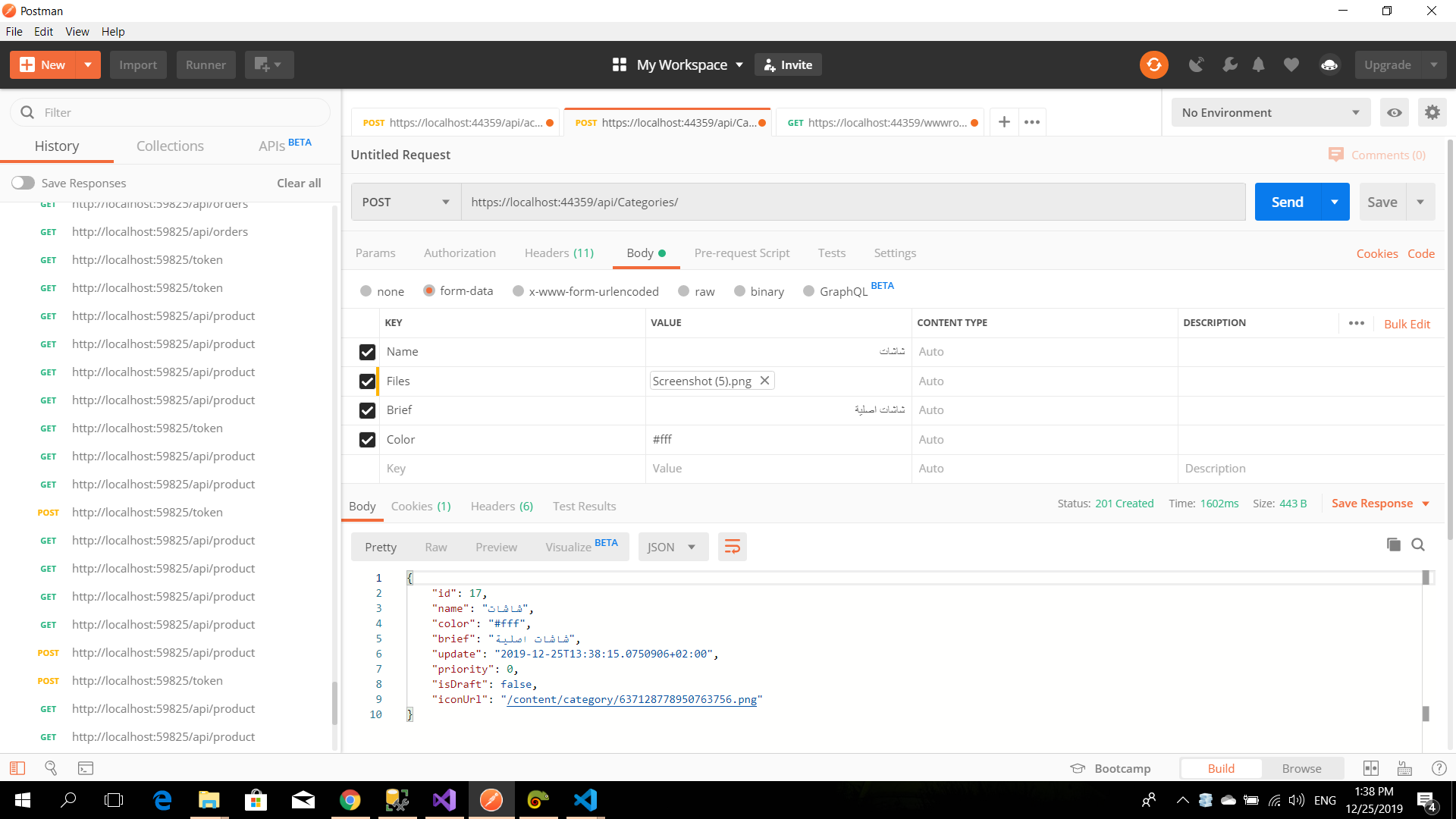
我在ASP.NET Core中的post函数:
    public async Task<ActionResult<Category>> PostCategory([FromForm]CategoryViewModel model)
    {
        Category category = new Category()
        {
            Brief = model.Brief,
            Color = model.Color,
            IsDraft = model.IsDraft,
            Name = model.Name,
            Priority = model.Priority,
            Update = DateTime.Now
        };

        if (model.Files != null)
        {
            category.IconUrl = ApplicationManager.UploadFiles(model.Files, "content/category")[0];
        }

        _context.Categories.Add(category);
        await _context.SaveChangesAsync();

        return CreatedAtAction("GetCategory", new { id = category.Id }, category);
    }
我在ASP.NET Core中的post功能:
    private ApiClient _client;
    _client = new ApiClient(new Uri("https:localhost:55436/api/"));

    public async Task<IActionResult> Create([FromForm]CategoryViewModel category)
    {
        var uri = new Uri(_appSettings.WebApiBaseUrl + "Categories");
        var response = await _client.PostAsync<Category, CategoryViewModel>(uri, category);
        return RedirectToAction("index");
}我的ApiClient课程:
public partial class ApiClient
{
    private readonly HttpClient _httpClient;
    private Uri BaseEndpoint { get; set; }

    public ApiClient(Uri baseEndpoint)
    {
        if (baseEndpoint == null)
        {
            throw new ArgumentNullException("baseEndpoint");
        }

        BaseEndpoint = baseEndpoint;
        _httpClient = new HttpClient();
    }

    /// <summary>
    /// Common method for making GET calls
    /// </summary>
    public async Task<T> GetAsync<T>(Uri requestUrl)
    {
        addHeaders();
        var response = await _httpClient.GetAsync(requestUrl, HttpCompletionOption.ResponseHeadersRead);
        response.EnsureSuccessStatusCode();
        var data = await response.Content.ReadAsStringAsync();
        return JsonConvert.DeserializeObject<T>(data);
    }

    public async Task<HttpResponseMessage> PostStreamAsync(Uri requestUrl, object content)
    {
        using (var client = new HttpClient())
        using (var request = new HttpRequestMessage(HttpMethod.Post, requestUrl))
        using (var httpContent = CreateHttpContentForStream(content))
        {
            request.Content = httpContent;

            using (var response = await client
                .SendAsync(request, HttpCompletionOption.ResponseHeadersRead)
                .ConfigureAwait(false))
            {
                response.EnsureSuccessStatusCode();
                return response;
            }
        }
    }

    public async Task<HttpResponseMessage> PostBasicAsync(Uri requestUrl, object content)
    {
        using (var client = new HttpClient())
        using (var request = new HttpRequestMessage(HttpMethod.Post, requestUrl))
        {
            var json = JsonConvert.SerializeObject(content);

            using (var stringContent = new StringContent(json, Encoding.UTF8, "application/json"))
            {
                request.Content = stringContent;

                using (var response = await client.SendAsync(request, HttpCompletionOption.ResponseHeadersRead)
                                                  .ConfigureAwait(false))
                {
                    response.EnsureSuccessStatusCode();
                    return response;
                }
            }
        }
    }

    public static void SerializeJsonIntoStream(object value, Stream stream)
    {
        using (var sw = new StreamWriter(stream, new UTF8Encoding(false), 1024, true))
        using (var jtw = new JsonTextWriter(sw) { Formatting = Formatting.None })
        {
            var js = new JsonSerializer();
            js.Serialize(jtw, value);
            jtw.Flush();
        }
    }

    private static HttpContent CreateHttpContentForStream<T>(T content)
    {
        HttpContent httpContent = null;

        if (content != null)
        {
            var ms = new MemoryStream();
            SerializeJsonIntoStream(content, ms);
            ms.Seek(0, SeekOrigin.Begin);
            httpContent = new StreamContent(ms);
            httpContent.Headers.ContentType = new MediaTypeHeaderValue("application/json");
        }

        return httpContent;
    }

    /// <summary>
    /// Common method for making POST calls
    /// </summary>
    public async Task<T> PostAsync<T>(Uri requestUrl, T content)
    {
        addHeaders();
        var response = await _httpClient.PostAsync(requestUrl.ToString(), CreateHttpContent<T>(content));

        response.EnsureSuccessStatusCode();
        var data = await response.Content.ReadAsStringAsync();
        return JsonConvert.DeserializeObject<T>(data);
    }
    public async Task<T1> PostAsync<T1, T2>(Uri requestUrl, T2 content)
    {
        addHeaders();
        var response = await _httpClient.PostAsync(requestUrl.ToString(), CreateHttpContent<T2>(content));
        response.EnsureSuccessStatusCode();

        var data = await response.Content.ReadAsStringAsync();
        return JsonConvert.DeserializeObject<T1>(data);
    }

    public Uri CreateRequestUri(string relativePath, string queryString = "")
    {
        var endpoint = new Uri(BaseEndpoint, relativePath);
        var uriBuilder = new UriBuilder(endpoint);
        uriBuilder.Query = queryString;
        return uriBuilder.Uri;
    }

    public HttpContent CreateHttpContent<T>(T content)
    {
        var json = JsonConvert.SerializeObject(content, MicrosoftDateFormatSettings);
        var value = new StringContent(json, Encoding.UTF8, "application/json");
        return value;
    }

    public static JsonSerializerSettings MicrosoftDateFormatSettings
    {
        get
        {
            return new JsonSerializerSettings
            {
                DateFormatHandling = DateFormatHandling.MicrosoftDateFormat
            };
        }
    }

    public void addHeaders()
    {
        _httpClient.DefaultRequestHeaders.Remove("userIP");
        _httpClient.DefaultRequestHeaders.Add("userIP", "192.168.1.1");
    }
}回答 1
Stack Overflow用户
回答已采纳
发布于 2019-12-26 06:39:58
如果您想使用HttpClient发布多部分/表单数据,则应该使用MultipartFormDataContent作为HttpContent类型编写一个单独的post方法,如下所示:
PostCategoryAsync
public async Task<Category> PostCategoryAsync(Uri requestUrl, CategoryViewModel content)
    {
        addHeaders();
        var response = new HttpResponseMessage();
        var fileContent = new StreamContent(content.Files.OpenReadStream())
        {
            Headers =
            {
                ContentLength = content.Files.Length,
                ContentType = new MediaTypeHeaderValue(content.Files.ContentType)
            }
        };

        var formDataContent = new MultipartFormDataContent();
        formDataContent.Add(fileContent, "Files", content.Files.FileName);          // file
        //other form inputs
        formDataContent.Add(new StringContent(content.Name), "Name");
        formDataContent.Add(new StringContent(content.Brief), "Brief");
        formDataContent.Add(new StringContent(content.IsDraft.ToString()), "IsDraft");
        formDataContent.Add(new StringContent(content.Color), "Color");
        formDataContent.Add(new StringContent(content.Priority), "Priority");

        response = await _httpClient.PostAsync(requestUrl.ToString(), formDataContent);

        var data = await response.Content.ReadAsStringAsync();
        response.EnsureSuccessStatusCode();
        return JsonConvert.DeserializeObject<Category>(data);
    }
MVC控制器
var response = await _client.PostCategoryAsync(uri, category);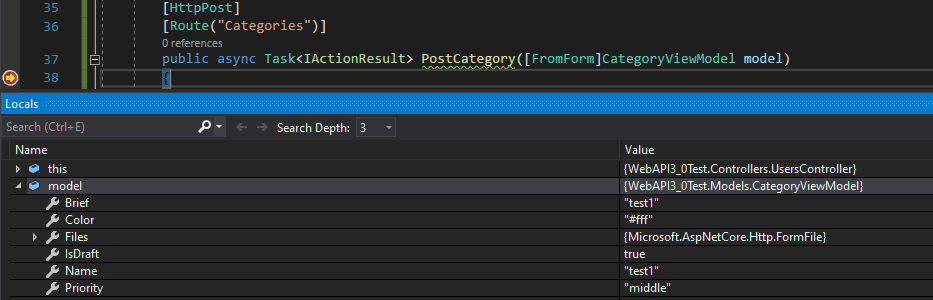
页面原文内容由Stack Overflow提供。腾讯云小微IT领域专用引擎提供翻译支持
原文链接:
https://stackoverflow.com/questions/59477979
复制相关文章
相似问题
腾讯云开发者

Copyright © 2013 - 2026 Tencent Cloud. All Rights Reserved. 腾讯云 版权所有
深圳市腾讯计算机系统有限公司 ICP备案/许可证号:粤B2-20090059  粤公网安备44030502008569号
腾讯云计算(北京)有限责任公司 京ICP证150476号 | 京ICP备11018762号