
表列与表头均匀显示。
表列与表头均匀显示。
提问于 2019-12-13 00:28:49
我的表标题与表的行显示不均匀。
就像这张照片上:
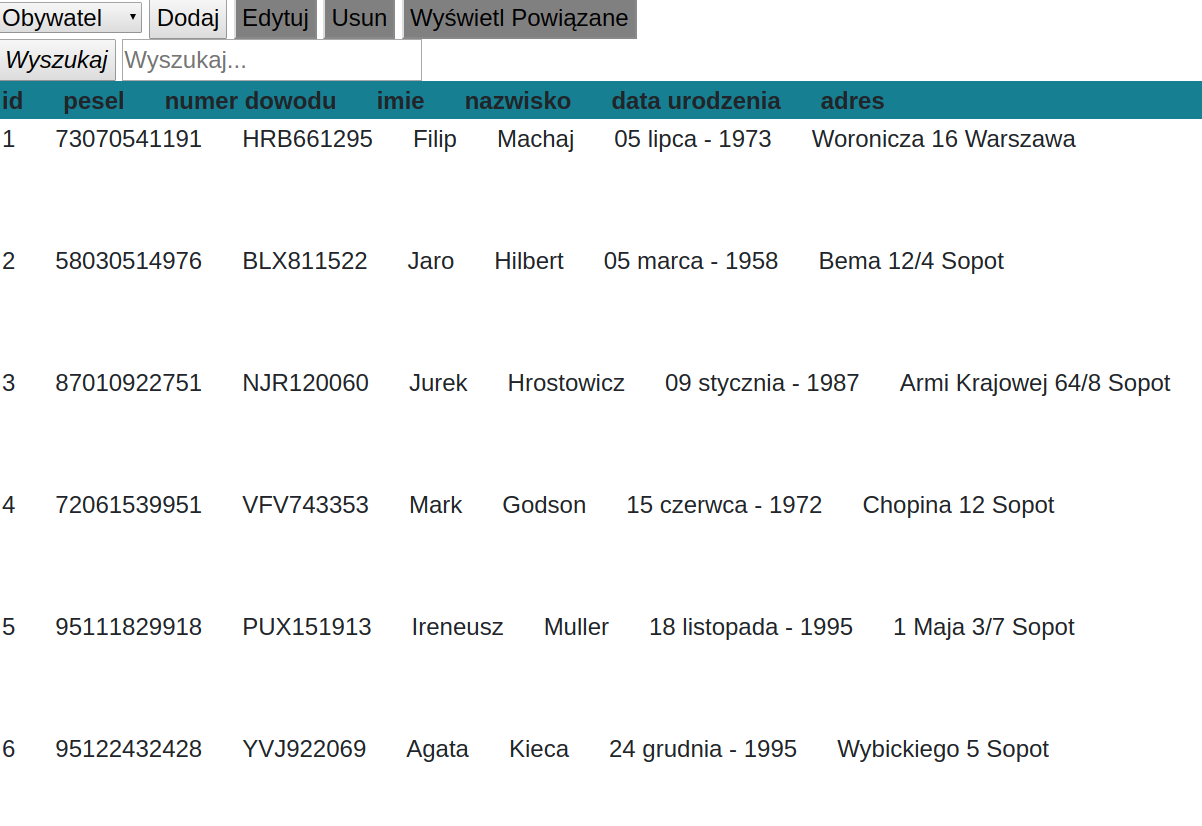
对不起,图片上的名字是我的母语(波兰语),但我希望你能理解。
如何使标题和行与表的其余部分均匀显示?
下面我发布了我的HTML和我的CSS为这个表:
CSS:
.hid{
    display: none;
    overflow:hidden;
    visibility: hidden;
}
.kol{
    width: 100%;
    display: inline;
    padding: 20px;
    text-align: justify;

    border-style: solid;
    border: deepskyblue;
}
.nagl{

    position: -webkit-sticky;
    position: sticky;
    top: 0;
    background-color: #167F92;


}
.row{
   /* display: table-row;*/
    display:table;
    table-layout: fixed;
    width:100%;
}
td:empty { display: none; }
以及表头的HTML:
<div class="nagl" id="nago">
<table class="row">
    <tr >

        <th  class=' kol'>id</th>
        <th  class=' kol '>pesel</th>
        <th  class=' kol'>numer dowodu</th>
        <th  class=' kol'>imie</th>
        <th class=' kol'>nazwisko</th>
        <th  class=' kol'>data urodzenia</th>
        <th  class=' kol'>adres</th>


    </tr>
</table>
至于桌子本身:
  <table>
   <tr class='row'>
       <th  class=' hid '><input   type='radio' name='rad' value='nie_wybrany' onclick='wyb_rekord() '></th>
       <td   class='  kol'>{{id}}</td>
       <td  class='  kol'>{{pesel}}</td>
       <td   class='  kol'>{{nr_dowodu}}</td>
       <td   class='  kol'>{{imie}}</td>
       <td  class='  kol'>{{nazwisko}}</td>
       <td  class='   kol'>{{formatDate data_urodzenia  'short'}}</td>
       <td   class='  kol'>{{adres}} </td>


   </tr>
 </table>
我正在使用javascript和工具栏动态填充表
回答 2
Stack Overflow用户
回答已采纳
发布于 2020-01-11 04:31:30
我已经更改了css类:
 .nagl{


    background-color: #167F92;
    top: 100px;
    position: fixed;
    padding: 20px;

   }
我将这个块添加到我的css中:
th, td{
width: 12vw;
text-align: center;}
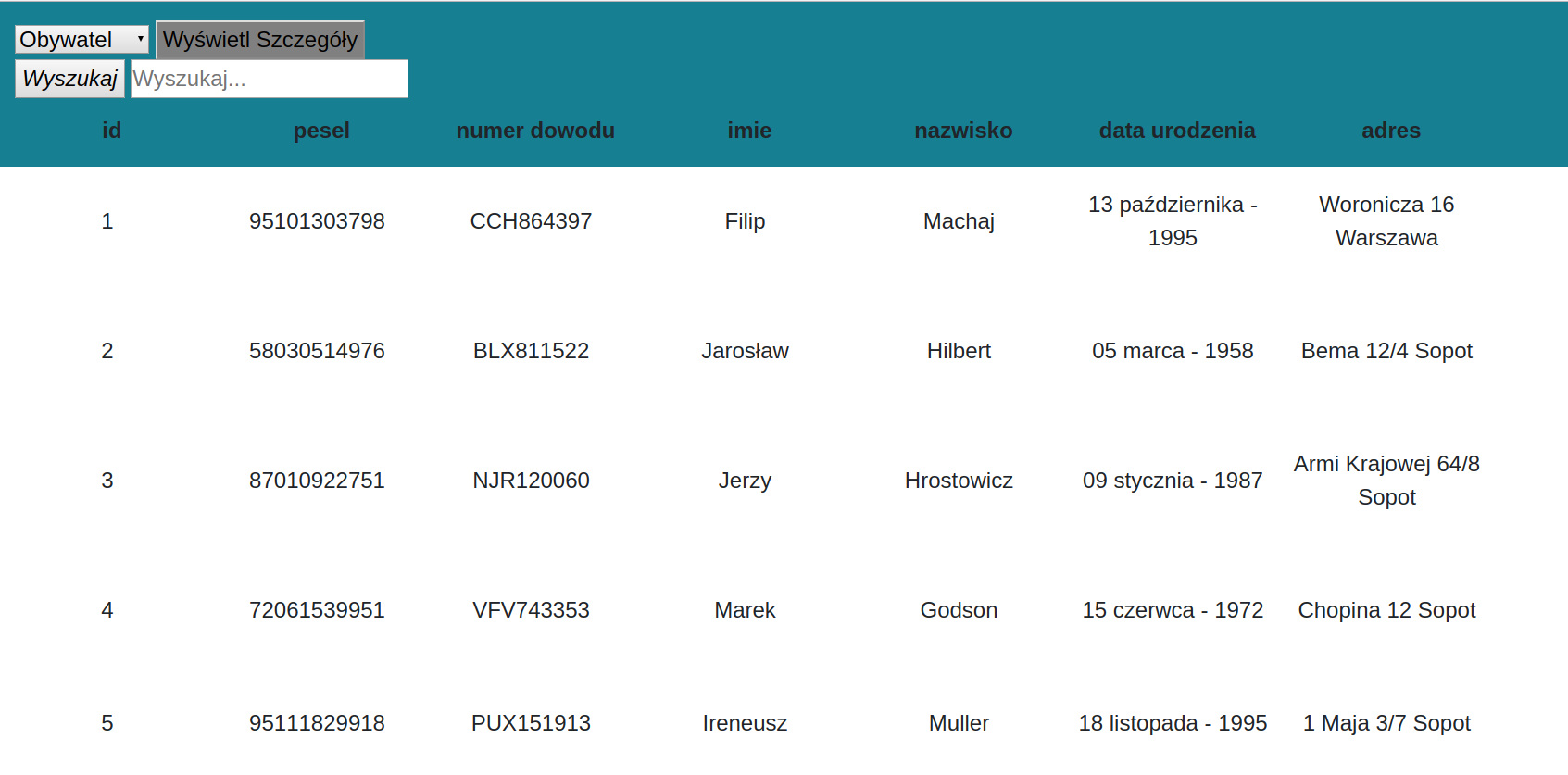
其影响如下:
Stack Overflow用户
发布于 2019-12-13 00:36:25
为什么我们需要为标题和表的实际数据部分有两个单独的表。我们可以很容易地通过使用内置的标记来实现这一点。
<table>
  <thead>
    <tr>
      <th>Header1</th>
      <th>Header2</th>
      <th>Header3</th>
      <th>Header4</th>
    </tr>
  </thead>
  <tbody>
    <tr>
      <td>Data1</td>
      <td>Data2</td>
      <td>Data3</td>
      <td>Data4</td>
    </tr>
    <tr>
      <td>Data11</td>
      <td>Data22</td>
      <td>Data33</td>
      <td>Data44</td>
    </tr>
    <tr>
      <td>Data111</td>
      <td>Data222</td>
      <td>Data333</td>
      <td>Data444</td>
    </tr>
  </tbody>
</table>
页面原文内容由Stack Overflow提供。腾讯云小微IT领域专用引擎提供翻译支持
原文链接:
https://stackoverflow.com/questions/59314592
复制相关文章
相似问题
腾讯云开发者

Copyright © 2013 - 2026 Tencent Cloud. All Rights Reserved. 腾讯云 版权所有
深圳市腾讯计算机系统有限公司 ICP备案/许可证号:粤B2-20090059  粤公网安备44030502008569号
腾讯云计算(北京)有限责任公司 京ICP证150476号 | 京ICP备11018762号