
Selenium -发送键输入密码在阴影根(打开)和多个iframes挪威BankId
Selenium -发送键输入密码在阴影根(打开)和多个iframes挪威BankId
提问于 2019-12-07 23:08:14
我想使用挪威这里和挪威BankId的测试数据进行自动测试。但我无法使用Selenium获取输入字段。
我想做的是:
- 转到https://www.banknorwegian.no/
- 点击“洛格客栈”
- 点击"BankID p mobil“
- 点击"BankID“在”innlogging的替换器“下
- 输入"02105892090“(从上面链接中测试用户)并单击"Logg”。
- 在"Engangskode“中再次输入"02105892090”,然后单击submit按钮。
HTML:
<iframe frameborder="0" width="100%" height="100%" src="<URL>" title="BankID">
    <div>Lots of divs...</div>
    <input data-bind=" attr: { maxlength: maxlength, type: type, id: id, 'data-type': dataType, disabled: disabled, 'aria-disabled': disabled, 'pattern': pattern, 'inputmode': 'numeric', 'max': $data.max, 'min': $data.min, 'step': $data.step, 'tabindex': $data.tabIndex, 'aria-invalid': isInvalid, 'aria-label': label }, value: val, valueUpdate: valueUpdate, css: { error: $data.err, hasFocus: hasFocus, hideCaret: $data.hideCaret, hasValue: hasValue }, event: { focus: onFocus, blur: onBlur }" autocomplete="off" autocapitalize="off" autocorrect="off" formnovalidate="" required="" maxlength="255" type="password" id="qxaTy_DZXMJPMnP_rZae_2" tabindex="2000" aria-invalid="true" pattern="[0-9]*" class="">`
</iframe>我可以到达(6.)但是,我无法获得"Engangskode“下的<input>和type="password"。它是在一个iframe,这使它更难。这就是我尝试过的:
public void EnterSsn(string ssn)
{
    var driver = WebDriverFacade.GetDriver;
    driver.SwitchTo().DefaultContent();

    driver.SwitchTo().Frame(0);

    Assert.IsTrue(driver.FindElement(By.CssSelector("input[type='password']")).ControlDisplayed());

    driver.FindElement(By.CssSelector("input[type='password']")).SendKeysWrapper(ssn, "SSN");
}
但我得到了错误信息:
OpenQA.Selenium.NoSuchElementException : no such element: Unable to locate element: {"method":"css selector","selector":"input[type='password']"}有人知道怎么做吗?
编辑:
在大家的帮助下,这是最终奏效的代码:
public void EnterSsn(string ssn)
{
    var driver = WebDriverFacade.GetDriver;
    driver.SwitchTo().DefaultContent();

    new WebDriverWait(driver, TimeSpan.FromSeconds(20)).Until(ExpectedConditions.FrameToBeAvailableAndSwitchToIt(By.CssSelector("iframe#ifmSingicat")));
    new WebDriverWait(driver, TimeSpan.FromSeconds(20)).Until(ExpectedConditions.FrameToBeAvailableAndSwitchToIt(By.CssSelector("#bankid-container iframe")));
    new WebDriverWait(driver, TimeSpan.FromSeconds(20)).Until(ExpectedConditions.ElementToBeClickable((IWebElement)((IJavaScriptExecutor)driver).ExecuteScript("return document.querySelector(\".full_width_height\").shadowRoot.querySelector(\"input[type=\'password\']\")"))).SendKeys(ssn);
}回答 3
Stack Overflow用户
回答已采纳
发布于 2019-12-09 13:22:24
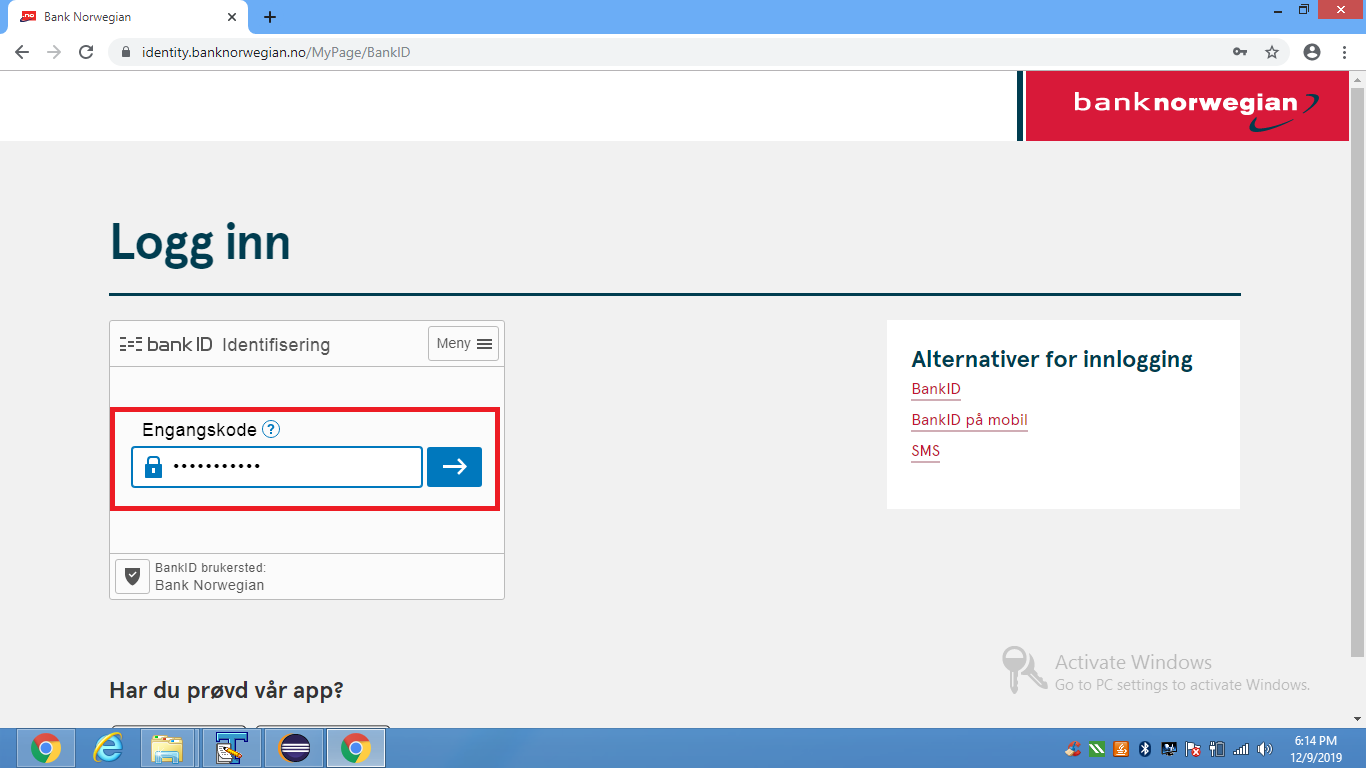
与text Engangskode相关联的字段位于中,在父<iframe>中的子<iframe>中。因此,要将字符序列发送到所需字段,需要:
- 导出父帧可用的WebDriverWait并切换到它。
- 诱导子帧可用的WebDriverWait并切换到它。
- 为所需的WebDriverWait诱导
ElementToBeClickable(),它与#shadow-root (open)一起使用。

- 您可以使用以下解决方案: 新TimeSpan.FromSeconds(20)).Until(ExpectedConditions.FrameToBeAvailableAndSwitchToIt(By.CssSelector("iframe#ifmSingicat")));WebDriverWait(驱动程序,新WebDriverWait驱动程序,TimeSpan.FromSeconds(20)).Until(ExpectedConditions.FrameToBeAvailableAndSwitchToIt(By.CssSelector("iframetitle='BankID'")));新WebDriverWait(驱动程序,WebDriverWait)
- 浏览器快照:
Stack Overflow用户
发布于 2019-12-08 13:29:17
这里有两个iframes (嵌套iframes),因此您需要切换两次。首先用id=ifmSingicat切换到iframe,然后切换到交换iframe的第一个iframe。
//Main document
driver.SwitchTo().DefaultContent();

//Find the first frame, and use switch to frame
IWebElement containerFrame = driver.FindElement(By.Id("ifmSingicat"));
driver.SwitchTo().Frame(containerFrame);

//You are now in iframe "containerFrame", now find the nested iframe
IWebElement contentFrame = driver.FindElement(By.CssSelector("#bankid-container iframe"));
driver.SwitchTo().Frame(contentFrame);

//Now find the elements you want in the nested frame
IWebElement foo = driver.FindElement(By.CssSelector("input[type='password']"));
注意:我不是C#开发人员,希望上面的语法是正确的。
Stack Overflow用户
发布于 2019-12-09 06:08:18
如果您切换到纠正iframe,那么它只是您需要添加一些等待。它将为iframe元素加载提供一些时间。
页面原文内容由Stack Overflow提供。腾讯云小微IT领域专用引擎提供翻译支持
原文链接:
https://stackoverflow.com/questions/59231027
复制相关文章
相似问题
腾讯云开发者

Copyright © 2013 - 2026 Tencent Cloud. All Rights Reserved. 腾讯云 版权所有
深圳市腾讯计算机系统有限公司 ICP备案/许可证号:粤B2-20090059  粤公网安备44030502008569号
腾讯云计算(北京)有限责任公司 京ICP证150476号 | 京ICP备11018762号