
type_keys将文本发送到错误的文本框
type_keys将文本发送到错误的文本框
提问于 2019-12-05 08:45:21
我正在尝试使用pywinauto将文本输入到“开始行”文本框中。
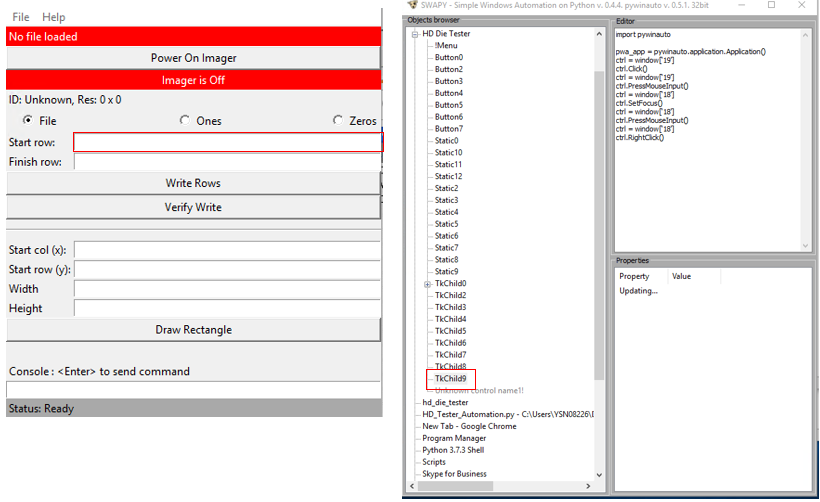
我使用的是折页代码:
import pywinauto
from pywinauto.application import Application

app = Application().connect(title='HD Die Tester')

app['HD Die Tester'].TkChild9.type_keys("hello")
但是,文本出现在"Start Col (x)“文本框中。这是我上一次点击的那个。
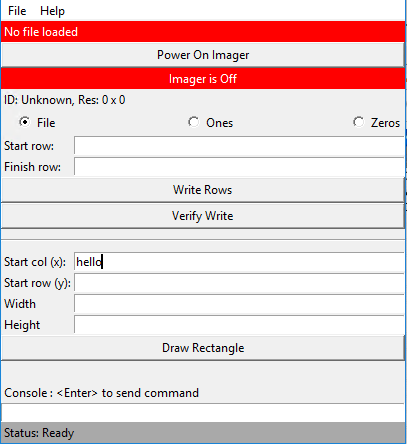
也就是说,如果我想要文本出现在TkChild9文本字段中,我必须手动单击它,以便文本出现在那里。我试着做一个自动点击,但这是行不通的。
这是我感兴趣的用户的类树:
app['HD Die Tester'].PrintControlIdentifiers()

Control Identifiers:

TkTopLevel - 'HD Die Tester'    (L337, T254, R757, B735)
['HD Die TesterTkTopLevel', 'HD Die Tester', 'TkTopLevel']
child_window(title="HD Die Tester", class_name="TkTopLevel")
   |
   | TkChild - ''    (L345, T305, R749, B727)
   | ['TkChild', 'HD Die TesterTkChild', 'TkChild0', 'TkChild1', 'HD Die TesterTkChild0', 'HD Die TesterTkChild1']
   | child_window(class_name="TkChild")
   |    |
   |    | Static - ''    (L345, T706, R749, B727)
   |    | ['Static', 'HD Die TesterStatic', 'Static0', 'Static1', 'HD Die TesterStatic0', 'HD Die TesterStatic1']
   |    | child_window(class_name="Static")
   |    |
   |    | Static - ''    (L544, T645, R550, B666)
   |    | ['Static2', 'HD Die TesterStatic2']
   |    | child_window(class_name="Static")
   |    |
   |    | Button - ''    (L345, T619, R749, B645)
   |    | ['Button', 'HD Die TesterButton', 'Button0', 'Button1', 'HD Die TesterButton0', 'HD Die TesterButton1']
   |    | child_window(class_name="Button")
   |    |
   |    | TkChild - ''    (L345, T687, R749, B706)
   |    | ['TkChild2', 'HD Die TesterTkChild2']
   |    | child_window(class_name="TkChild")
   |    |
   |    | Static - ''    (L345, T666, R546, B687)
   |    | ['Static3', 'HD Die TesterStatic3']
   |    | child_window(class_name="Static")
   |    |
   |    | TkChild - ''    (L418, T599, R749, B618)
   |    | ['TkChild3', 'HD Die TesterTkChild3']
   |    | child_window(class_name="TkChild")
   |    |
   |    | TkChild - ''    (L418, T578, R749, B597)
   |    | ['TkChild4', 'HD Die TesterTkChild4']
   |    | child_window(class_name="TkChild")
   |    |
   |    | TkChild - ''    (L418, T557, R749, B576)
   |    | ['TkChild5', 'HD Die TesterTkChild5']
   |    | child_window(class_name="TkChild")
   |    |
   |    | TkChild - ''    (L418, T536, R749, B555)
   |    | ['TkChild6', 'HD Die TesterTkChild6']
   |    | child_window(class_name="TkChild")
   |    |
   |    | Static - ''    (L345, T598, R387, B619)
   |    | ['Static4', 'HD Die TesterStatic4']
   |    | child_window(class_name="Static")
   |    |
   |    | Static - ''    (L345, T577, R383, B598)
   |    | ['Static5', 'HD Die TesterStatic5']
   |    | child_window(class_name="Static")
   |    |
   |    | Static - ''    (L345, T556, R418, B577)
   |    | ['Static6', 'HD Die TesterStatic6']
   |    | child_window(class_name="Static")
   |    |
   |    | Static - ''    (L345, T535, R413, B556)
   |    | ['Static7', 'HD Die TesterStatic7']
   |    | child_window(class_name="Static")
   |    |
   |    | TkChild - ''    (L345, T523, R749, B525)
   |    | ['TkChild7', 'HD Die TesterTkChild7']
   |    | child_window(class_name="TkChild")
   |    |
   |    | Button - ''    (L345, T487, R749, B513)
   |    | ['Button2', 'HD Die TesterButton2']
   |    | child_window(class_name="Button")
   |    |
   |    | Button - ''    (L345, T461, R749, B487)
   |    | ['Button3', 'HD Die TesterButton3']
   |    | child_window(class_name="Button")
   |    |
   |    | TkChild - ''    (L418, T441, R749, B460)
   |    | ['TkChild8', 'HD Die TesterTkChild8']
   |    | child_window(class_name="TkChild")
   |    |
   |    | TkChild - ''    (L418, T420, R749, B439)
   |    | ['TkChild9', 'HD Die TesterTkChild9']
   |    | child_window(class_name="TkChild")
   |    |
   |    | Static - ''    (L345, T440, R408, B461)
   |    | ['Static8', 'HD Die TesterStatic8']
   |    | child_window(class_name="Static")
   |    |
   |    | Static - ''    (L345, T419, R401, B440)
   |    | ['Static9', 'HD Die TesterStatic9']
   |    | child_window(class_name="Static")
   |    |
   |    | Button - ''    (L692, T394, R749, B419)
   |    | ['Button4', 'HD Die TesterButton4']
   |    | child_window(class_name="Button")
   |    |
   |    | Button - ''    (L527, T394, R582, B419)
   |    | ['Button5', 'HD Die TesterButton5']
   |    | child_window(class_name="Button")
   |    |
   |    | Button - ''    (L358, T394, R404, B419)
   |    | ['Button6', 'HD Die TesterButton6']
   |    | child_window(class_name="Button")
   |    |
   |    | Static - ''    (L345, T305, R749, B326)
   |    | ['Static10', 'HD Die TesterStatic10']
   |    | child_window(class_name="Static")
   |    |
   |    | Static - ''    (L345, T373, R749, B394)
   |    | ['Static11', 'HD Die TesterStatic11']
   |    | child_window(class_name="Static")
   |    |
   |    | Static - ''    (L345, T352, R749, B373)
   |    | ['Static12', 'HD Die TesterStatic12']
   |    | child_window(class_name="Static")
   |    |
   |    | Button - ''    (L345, T326, R749, B352)
   |    | ['Button7', 'HD Die TesterButton7']
   |    | child_window(class_name="Button")
   |    |
   |    | TkChild - ''    (L345, T305, R346, B306)
   |    | ['TkChild10', 'HD Die TesterTkChild10']
   |    | child_window(class_name="TkChild")
   |
   | Static - ''    (L345, T706, R749, B727)
   | ['Static', 'HD Die TesterStatic', 'Static0', 'Static1', 'HD Die TesterStatic0', 'HD Die TesterStatic1']
   | child_window(class_name="Static")
   |
   | Static - ''    (L544, T645, R550, B666)
   | ['Static2', 'HD Die TesterStatic2']
   | child_window(class_name="Static")
   |
   | Button - ''    (L345, T619, R749, B645)
   | ['Button', 'HD Die TesterButton', 'Button0', 'Button1', 'HD Die TesterButton0', 'HD Die TesterButton1']
   | child_window(class_name="Button")
   |
   | TkChild - ''    (L345, T687, R749, B706)
   | ['TkChild2', 'HD Die TesterTkChild2']
   | child_window(class_name="TkChild")
   |
   | Static - ''    (L345, T666, R546, B687)
   | ['Static3', 'HD Die TesterStatic3']
   | child_window(class_name="Static")
   |
   | TkChild - ''    (L418, T599, R749, B618)
   | ['TkChild3', 'HD Die TesterTkChild3']
   | child_window(class_name="TkChild")
   |
   | TkChild - ''    (L418, T578, R749, B597)
   | ['TkChild4', 'HD Die TesterTkChild4']
   | child_window(class_name="TkChild")
   |
   | TkChild - ''    (L418, T557, R749, B576)
   | ['TkChild5', 'HD Die TesterTkChild5']
   | child_window(class_name="TkChild")
   |
   | TkChild - ''    (L418, T536, R749, B555)
   | ['TkChild6', 'HD Die TesterTkChild6']
   | child_window(class_name="TkChild")
   |
   | Static - ''    (L345, T598, R387, B619)
   | ['Static4', 'HD Die TesterStatic4']
   | child_window(class_name="Static")
   |
   | Static - ''    (L345, T577, R383, B598)
   | ['Static5', 'HD Die TesterStatic5']
   | child_window(class_name="Static")
   |
   | Static - ''    (L345, T556, R418, B577)
   | ['Static6', 'HD Die TesterStatic6']
   | child_window(class_name="Static")
   |
   | Static - ''    (L345, T535, R413, B556)
   | ['Static7', 'HD Die TesterStatic7']
   | child_window(class_name="Static")
   |
   | TkChild - ''    (L345, T523, R749, B525)
   | ['TkChild7', 'HD Die TesterTkChild7']
   | child_window(class_name="TkChild")
   |
   | Button - ''    (L345, T487, R749, B513)
   | ['Button2', 'HD Die TesterButton2']
   | child_window(class_name="Button")
   |
   | Button - ''    (L345, T461, R749, B487)
   | ['Button3', 'HD Die TesterButton3']
   | child_window(class_name="Button")
   |
   | TkChild - ''    (L418, T441, R749, B460)
   | ['TkChild8', 'HD Die TesterTkChild8']
   | child_window(class_name="TkChild")
   |
   | TkChild - ''    (L418, T420, R749, B439)
   | ['TkChild9', 'HD Die TesterTkChild9']
   | child_window(class_name="TkChild")
   |
   | Static - ''    (L345, T440, R408, B461)
   | ['Static8', 'HD Die TesterStatic8']
   | child_window(class_name="Static")
   |
   | Static - ''    (L345, T419, R401, B440)
   | ['Static9', 'HD Die TesterStatic9']
   | child_window(class_name="Static")
   |
   | Button - ''    (L692, T394, R749, B419)
   | ['Button4', 'HD Die TesterButton4']
   | child_window(class_name="Button")
   |
   | Button - ''    (L527, T394, R582, B419)
   | ['Button5', 'HD Die TesterButton5']
   | child_window(class_name="Button")
   |
   | Button - ''    (L358, T394, R404, B419)
   | ['Button6', 'HD Die TesterButton6']
   | child_window(class_name="Button")
   |
   | Static - ''    (L345, T305, R749, B326)
   | ['Static10', 'HD Die TesterStatic10']
   | child_window(class_name="Static")
   |
   | Static - ''    (L345, T373, R749, B394)
   | ['Static11', 'HD Die TesterStatic11']
   | child_window(class_name="Static")
   |
   | Static - ''    (L345, T352, R749, B373)
   | ['Static12', 'HD Die TesterStatic12']
   | child_window(class_name="Static")
   |
   | Button - ''    (L345, T326, R749, B352)
   | ['Button7', 'HD Die TesterButton7']
   | child_window(class_name="Button")
   |
   | TkChild - ''    (L345, T305, R346, B306)
   | ['TkChild10', 'HD Die TesterTkChild10']
   | child_window(class_name="TkChild")
请指点。
以下是我的调试工作:
1.编程查找文本框区域:
import pywinauto
from pywinauto.application import Application
app = Application().connect(title='HD Die Tester')
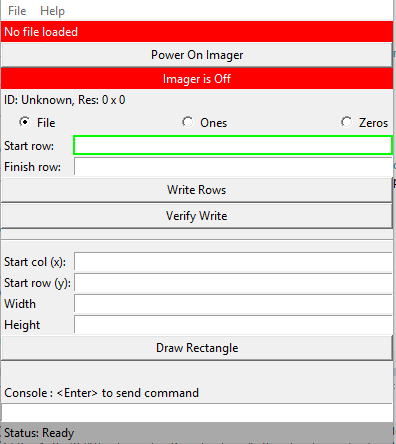
app['HD Die Tester']['TkChild9'].draw_outline(colour='green', thickness=2)
这就是我所看到的。
2.使用set_text将字符输入到文本框
app['HD Die Tester']['TkChild9'].set_text("hello")
发生错误消息
Traceback (most recent call last):
  File "<pyshell#8>", line 1, in <module>
    app['HD Die Tester']['TkChild9'].set_text("hello")
  File "C:\Program Files (x86)\Microsoft Visual Studio\Shared\Python37_64\lib\site-packages\pywinauto\application.py", line 182, in __call__
    format(self.criteria[-1]['best_match']))
AttributeError: Neither GUI element (wrapper) nor wrapper method 'set_text' were found (typo?)
3.使用set_keyboard_focus
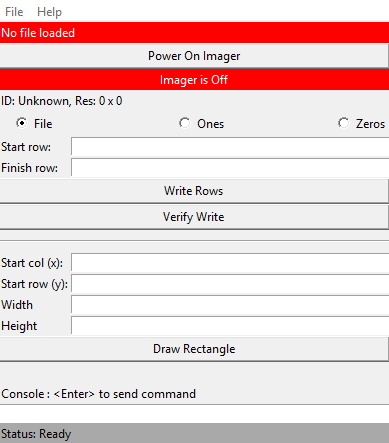
app['HD Die Tester']['TkChild9'].set_keyboard_focus().type_keys("hello", set_foreground=False)
这是输出:
<hwndwrapper.HwndWrapper - '', TkChild, 2427666>
hello
什么都没出现在桂冠上
回答 1
Stack Overflow用户
发布于 2019-12-11 10:43:58
.click_input()方法将有助于在键入之前正确设置输入焦点。而且,.wrapper_object()显然返回HwndWrapper而不是EditWrapper,因此它意味着元素不会被检测为编辑框。它可以显式转换为EditWrapper对象。为此目的使用此导入:
from pywinauto.controls.win32_controls import EditWrapper

edit = EditWrapper(app['HD Die Tester']['TkChild9'].wrapper_object())
edit.set_edit_text("hello") # or try type_keys(...)页面原文内容由Stack Overflow提供。腾讯云小微IT领域专用引擎提供翻译支持
原文链接:
https://stackoverflow.com/questions/59191254
复制相关文章
相似问题
腾讯云开发者

Copyright © 2013 - 2026 Tencent Cloud. All Rights Reserved. 腾讯云 版权所有
深圳市腾讯计算机系统有限公司 ICP备案/许可证号:粤B2-20090059  粤公网安备44030502008569号
腾讯云计算(北京)有限责任公司 京ICP证150476号 | 京ICP备11018762号