
guizero Raspberry Pi:按钮->命令序列问题
guizero Raspberry Pi:按钮->命令序列问题
提问于 2019-11-24 13:54:39
要求:按下guizero上的一个按钮,首先设置一个文本值,然后执行一个函数(这里是一个简单的time.sleep();最初是一个子进程);在执行该函数之后,应该显示一个结果文本;
#!/usr/bin/python3
# -*- coding: utf-8 -*-

from guizero import App, PushButton, Text
import subprocess
import time

# Action you would like to perform
def counter0():
    global s0
    text0.value = int(text0.value) + 1  # works
    text1.value = s0                    # works

def counter1():
    global s0
    text1.value = s0       # display a status value - but does not (!)
    time.sleep(1)          # originally a subprocess is called here; works
    text1.value = "ready"  # only diplays this after a delay

s0="start something after pressing butt1"

app = App("Hello world", layout="grid")

text0 = Text(app, text="1", align="left", grid=[0,1])
text1 = Text(app, text=s0, align="left",grid=[0,8] )
butt1 = PushButton(app, text="Button", command=counter1, align="left", grid=[0,2])
text0.repeat(10000, counter0)  # Schedule call to counter() every 1000ms

app.display()
很可能我不明白吉泽罗背后的想法。对如何管理这些需求有什么想法吗?
回答 1
Stack Overflow用户
回答已采纳
发布于 2019-11-24 14:47:13
如果我正确理解你的问题,你的具体问题是:
text1.value = s0 # display a status value - but does not (!)这不起作用,因为guizero框架同步执行函数:在函数返回之前,不执行其他代码(包括更新显示的代码)。
如果你想:
在使用subprocess
- Run运行命令之前
- 显示消息--在命令完成
之后
然后,您将需要重写您的逻辑,这样您的应用程序就不会等待“抗衡1”完成。异步运行代码的一个选项是在一个单独的线程中运行它。例如:
from guizero import App, PushButton, Text
import threading
import time


# Action you would like to perform
def counter0():
    global s0
    text0.value = int(text0.value) + 1  # works
    text1.value = s0                    # works


def run_command():
    time.sleep(1)          # originally a subprocess is called here; works
    text1.value = "ready"  # only diplays this after a delay


def counter1():
    global s0
    text1.value = "Running command..."
    threading.Thread(target=run_command).start()


s0 = "start something after pressing butt1"

app = App("Hello world", layout="grid")

text0 = Text(app, text="1", align="left", grid=[0, 1])
text1 = Text(app, text=s0, align="left", grid=[0, 8])
butt1 = PushButton(app, text="Button", command=counter1,
                   align="left", grid=[0, 2])
text0.repeat(10000, counter0)

app.display()
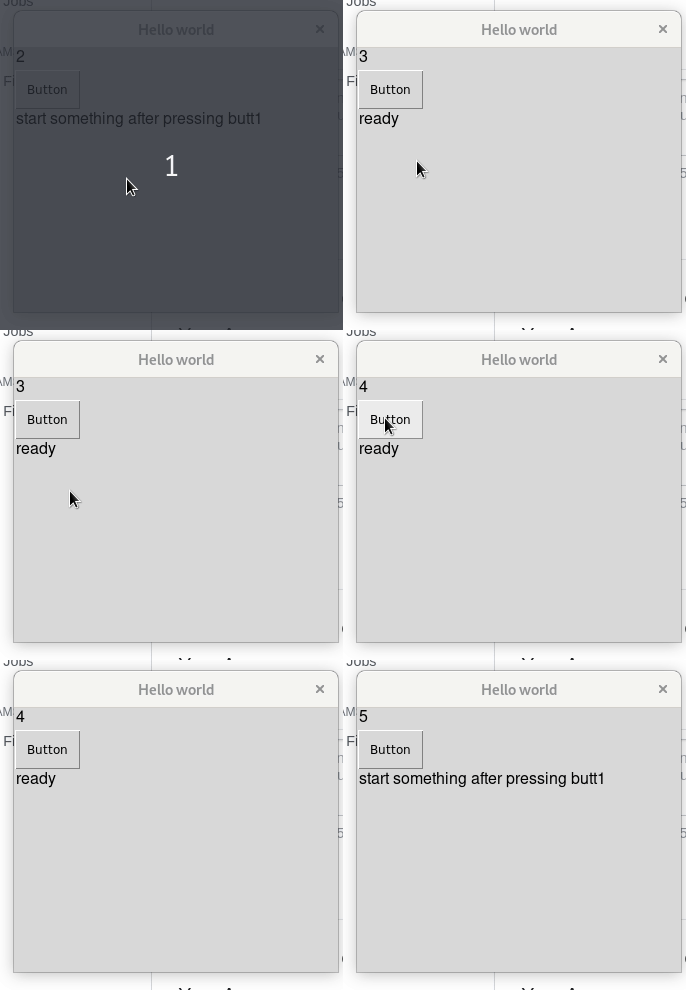
运行上述代码将为您提供以下行为:
页面原文内容由Stack Overflow提供。腾讯云小微IT领域专用引擎提供翻译支持
原文链接:
https://stackoverflow.com/questions/59018383
复制相关文章
相似问题
腾讯云开发者

Copyright © 2013 - 2026 Tencent Cloud. All Rights Reserved. 腾讯云 版权所有
深圳市腾讯计算机系统有限公司 ICP备案/许可证号:粤B2-20090059  粤公网安备44030502008569号
腾讯云计算(北京)有限责任公司 京ICP证150476号 | 京ICP备11018762号