
使用AzureDevOps + Powershell的Newman
使用AzureDevOps + Powershell的Newman
提问于 2019-11-22 15:23:14
大家早上好
我正在尝试与AzureDevops发布管道集成邮递员测试。我有两个步骤:
- 第一步是安装newman
- 第二步是使用newman
运行集合脚本
第二步看起来是:
try
{
    $testFiles = Get-ChildItem *.postman_collection.json -Recurse
$environmentFile = Get-ChildItem *staging.postman_environment.json -Recurse

Write-Host $testFiles.Count files to test

foreach ($f in $testFiles)
{
   $environment  = $environmentFile[0].FullName

   Write-Host running file $f.FullName
   Write-Host usting environment $environment


   $collection = $f.FullName
   $resultFile = "Results\" + $f.BaseName + ".xml"

   Write-Host running $collection
   Write-Host will create $resultFile


   $(newman run $collection -e $environment -r junit --reporter-junit-export $resultFile)
}

}
catch
{
    Write-Host "Exception occured"
    Write-Host $_
}
以上步骤不像预期的那样工作。在发布日志中,我可以看到这两条消息如下:
   Write-Host running $collection
   Write-Host will create $resultFile
不过,这行
$(newman run $collection -e $environment -r junit --reporter-junit-export $resultFile) 不会被处决。
我在本地机器上也做了同样的操作,命令也在工作。然而,不好的是,try catch块没有工作,只有我可以看到其结果是:
2019-11-22T15:11:23.8332717Z ##[error]PowerShell exited with code '1'.
2019-11-22T15:11:23.8341270Z ##[debug]Processed: ##vso[task.logissue type=error]PowerShell exited with code '1'.
2019-11-22T15:11:23.8390876Z ##[debug]Processed: ##vso[task.complete result=Failed]Error detected
2019-11-22T15:11:23.8414283Z ##[debug]Leaving D:\a\_tasks\PowerShell_e213ff0f-5d5c-4791-802d-52ea3e7be1f1\2.151.2\powershell.ps1.
有没有人知道如何获得真正的错误,或者有在AzureDevOps中使用newman测试的经验?
回答 1
Stack Overflow用户
回答已采纳
发布于 2019-11-25 11:47:35
在VSTS中运行上述脚本时,请删除$()行中的newman run:
newman run $collection -e $environment -r junit --reporter-junit-export $resultFile 然后脚本可以非常成功地运行。
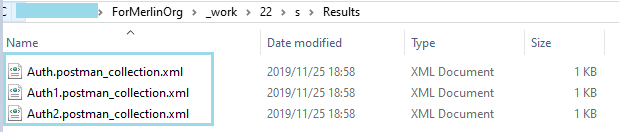
我想您已经知道,对于powershell命令行,即使newman run命令已成功运行,也不会在powershell命令行界面中显示结果。因此,日志中不会直接显示任何消息来让您知道它是否成功。要在VSTS中确认这一点,可以在使用私有代理时检查代理缓存:
页面原文内容由Stack Overflow提供。腾讯云小微IT领域专用引擎提供翻译支持
原文链接:
https://stackoverflow.com/questions/58997210
复制相关文章
相似问题
腾讯云开发者

Copyright © 2013 - 2026 Tencent Cloud. All Rights Reserved. 腾讯云 版权所有
深圳市腾讯计算机系统有限公司 ICP备案/许可证号:粤B2-20090059  粤公网安备44030502008569号
腾讯云计算(北京)有限责任公司 京ICP证150476号 | 京ICP备11018762号