
动态添加反应形元素使其在角度上自动失效。
动态添加反应形元素使其在角度上自动失效。
提问于 2019-11-21 04:43:21
我正在处理一个动态表单,其中的行是根据用户需求生成的。但问题是,一旦用户生成新行,它就会自动失效,甚至不会触及它。如何避免这种行为。这是我的表格

当我点击add按钮时,它就变成这样了
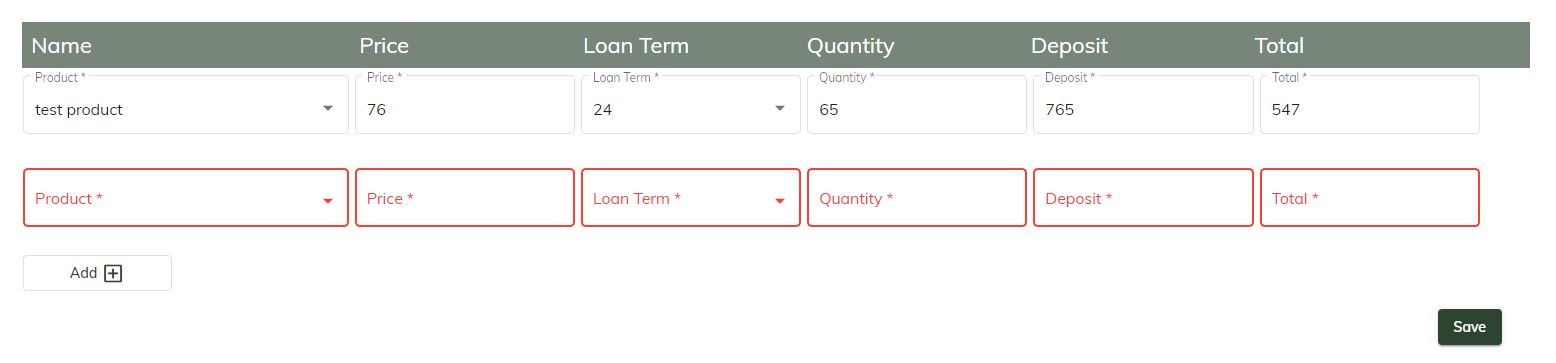
这是我的html文件
<form [formGroup]="loanProductForm">
    <table>
        <thead>
            <tr class='tableHeader'>
                <div fxLayout="row" fxLayoutAlign="start center" fxFlex="1 0 auto">
                    <td fxFlex="22" class="pr-4">Name</td>
                    <td fxFlex="15" class="pr-4">Price</td>
                    <td fxFlex="15" class="pr-4">Loan Term</td>
                    <td fxFlex="15" class="pr-4">Quantity</td>
                    <td fxFlex="15" class="pr-4">Deposit</td>
                    <td fxFlex="15" class="pr-4">Total</td>
                </div>
            </tr>
        </thead>
        <tbody>
            <tr formArrayName="products" *ngFor="let product of loanProductForm.get('products').controls; let i = index">
                <div [formGroupName]="i" fxLayout="row" fxLayoutAlign="start center" fxFlex="1 0 auto">
                    <td fxFlex="22">
                        <mat-form-field appearance="outline" fxFlex="100" class="pr-4">
                            <mat-label>Product </mat-label>
                            <mat-select formControlName="productId" [id]="'productId' + i" required>
                                <mat-option *ngFor="let product of productList" [value]="product.productId">
                                    {{product.name}}
                                </mat-option>
                            </mat-select>
                            <div *ngIf="product.get('productId').errors?.required &&
                                                    product.get('productId').touched">
                                ProductId is required
                            </div>
                        </mat-form-field>
                    </td>
                    <td fxFlex="15">
                        <mat-form-field appearance="outline" fxFlex="100" class="pr-4">
                            <mat-label>Price </mat-label>
                            <input type='number' matInput formControlName="price" [id]="'price' + i" name="" placeholder="Price" required>
                        </mat-form-field>
                    </td>
                    <td fxFlex="15">
                        <mat-form-field appearance="outline" fxFlex="100" class="pr-4">
                            <mat-label>Loan Term </mat-label>
                            <mat-select formControlName="loanTermId" [id]="'loanTermId' + i" required>
                                <mat-option *ngFor="let loanTerm of loanTermList" [value]="loanTerm.loanTermId">
                                    {{loanTerm.numberOfMonths}}
                                </mat-option>
                            </mat-select>
                        </mat-form-field>
                    </td>
                    <td fxFlex="15">
                        <mat-form-field appearance="outline" fxFlex="100" class="pr-4">
                            <mat-label>Quantity </mat-label>
                            <input type='number' formControlName="quantity" [id]="'quantity' + i" matInput name="" id="" placeholder="Quantity" required>

                        </mat-form-field>
                    </td>
                    <td fxFlex="15">
                        <mat-form-field appearance="outline" fxFlex="100" class="pr-4">
                            <mat-label>Deposit </mat-label>
                            <input type='number' formControlName="deposit" [id]="'deposit' + i" matInput name="" id="" placeholder="Deposit" required>
                        </mat-form-field>
                    </td>
                    <td fxFlex="15">
                        <mat-form-field appearance="outline" fxFlex="100" class="pr-4">
                            <mat-label>Total </mat-label>
                            <input type='number' formControlName="total" [id]="'total' + i" matInput name="" id="" placeholder="Total" required>
                        </mat-form-field>
                    </td>

                </div>
            </tr>
            <tr>
                <td fxFlex="10">
                    <div fxLayout="row" fxLayoutAlign="start center" fxFlex="1 0 auto">
                        <button mat-stroked-button class='addBtn btn-style-2' fxFlex='100' (click)='addProductButtonClick()'>Add
                            <mat-icon matSuffix>add_box</mat-icon>
                        </button>
                    </div>
                </td>
            </tr>
        </tbody>
    </table>
</form>
<button mat-raised-button fxFlex="15" class="btn-style-1" style="align-self: flex-end;margin-right: 30px;margin-top: 15px;" (click)="addNewLoan()">Save</button>
</form>下面是我的ts文件中的相关代码片段
this.loanProductForm = this._formBuilder.group({
      products: this._formBuilder.array([
        this.addProductFormGroup()
      ])
    });

addProductFormGroup(): FormGroup {
    return this._formBuilder.group({
      productId: ['', Validators.required],
      price: ['', Validators.required],
      loanTermId: ['', Validators.required],
      quantity: ['', Validators.required],
      deposit: ['', {Validators.required,updateOn: 'blur'}],
      total: ['', Validators.required],
    });
  }
  addProductButtonClick(): void {
    (<FormArray>this.loanProductForm.get('products')).push(this.addProductFormGroup());
    console.log('Loan Products: ', this.loanProductForm.value)
}尽管我在html中使用*ngIf,但它仍然使新元素无效。
提前感谢
回答 3
Stack Overflow用户
回答已采纳
发布于 2019-11-21 13:23:07
我们需要记住的是,如果我们不指定角形式中的按钮为button类型,那么角将假定按钮是submit类型。这就是你的代码中所做的,你的表单实际上是提交的。当表单被提交时,作为默认的角材料表单将所有的东西涂红到无效的字段中。
所以只要加上
type="button"到您的Add按钮:
<button type="button" .... (click)='addProductButtonClick()'>
  Add
</button>Stack Overflow用户
发布于 2019-11-21 07:29:37
您可以尝试编辑addProductButtonClick()函数如下:
addProductButtonClick(): void {
    (<FormArray>this.loanProductForm.get('products')).push(newGroup);
    const indexOfLastProduct = this.loanProductForm['controls']['products'].length - 1;
    this.loanProductForm['controls']['products']['controls'][indexOfLastProduct].markAsUntouched();

    console.log('Loan Products: ', this.loanProductForm.value)
}Stack Overflow用户
发布于 2019-11-21 05:48:51
您可以在*ng-if中尝试product.controls['productId'].invalid。
页面原文内容由Stack Overflow提供。腾讯云小微IT领域专用引擎提供翻译支持
原文链接:
https://stackoverflow.com/questions/58967444
复制相关文章
相似问题
腾讯云开发者

Copyright © 2013 - 2026 Tencent Cloud. All Rights Reserved. 腾讯云 版权所有
深圳市腾讯计算机系统有限公司 ICP备案/许可证号:粤B2-20090059  粤公网安备44030502008569号
腾讯云计算(北京)有限责任公司 京ICP证150476号 | 京ICP备11018762号