
iOS Github操作(构建、测试和部署)
iOS Github操作(构建、测试和部署)
提问于 2019-11-15 19:53:45
我试图使用github创建一个简单的工作流,因此当我将示例推到我的主分支时,它会在macOS-latest中构建代码并在OS 12.4, iPhone 11 Pro Max上进行测试。由于它是很新的,教程不完整,谁能借我一把吗?
这就是我现在拥有的:
name: StyleOn_Workflow

on: [push]

jobs:
  build:

    runs-on: macOS-latest
    strategy:
      matrix:
        destination: ['platform=iOS Simulator,OS=12.4,name=iPhone 11 Pro Max']

    steps:
    - uses: actions/checkout@master
    - name: Build
      run: swift build -v

  test:
      name: Test
      runs-on: macOS-latest
      strategy:
          matrix:
            destination: ['platform=iOS Simulator,OS=12.4,name=iPhone 11 Pro Max']
      steps:
        - name: Checkout
          uses: actions/checkout@master
        - name: Run tests
          run: swift test -v
另外,由于我没有将应用程序部署到应用程序商店,我如何才能完成部署阶段?或者把它合并到主分支?我需要三个阶段,构建,测试和部署
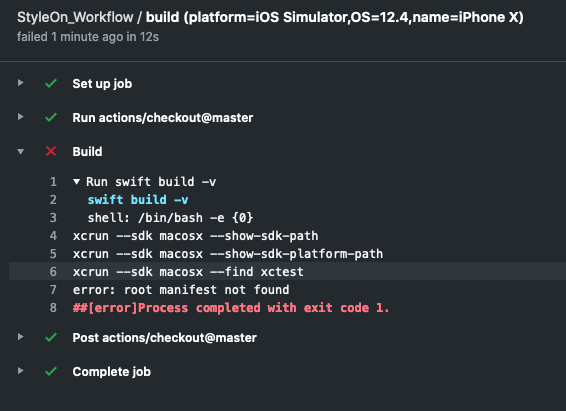
这是我正在犯的错误:
回答 1
Stack Overflow用户
回答已采纳
发布于 2019-11-22 09:10:08
基于您的问题,我认为您应该使用xcodebuild命令行工具,而不是swift build和swift test。
正如我所看到的,您应该使用这样的命令来构建:
set -o pipefail && xcodebuild clean -scheme $SCHEME -destination $DESTINATION -derivedDataPath $DERIVED_DATA_PATH build-for-testing并将其用于测试:
set -o pipefail && xcodebuild test-without-building -xctestrun $(find . -type f -name "*.xctestrun") -destination "platform=iOS Simulator,name=$DEVICE" -derivedDataPath $DERIVED_DATA_PATH -enableCodeCoverage YES请注意,在作业之间,您应该上传和下载.xctestrun文件。
您可以找到一个详细的示例这里。
页面原文内容由Stack Overflow提供。腾讯云小微IT领域专用引擎提供翻译支持
原文链接:
https://stackoverflow.com/questions/58883811
复制相关文章
相似问题
腾讯云开发者

Copyright © 2013 - 2026 Tencent Cloud. All Rights Reserved. 腾讯云 版权所有
深圳市腾讯计算机系统有限公司 ICP备案/许可证号:粤B2-20090059  粤公网安备44030502008569号
腾讯云计算(北京)有限责任公司 京ICP证150476号 | 京ICP备11018762号