
显示模拟的闪亮应用程序:如何巧妙地重写
我有一个简单的原型闪亮的应用程序,显示布朗运动在一维。目前,我使用基本图形,以获得我正在寻找的最低功能。当我将其扩展到我感兴趣的实际任务时,模拟中的每一个步骤都将在计算上更加密集(在这个原型中,它遵循x <- x + rnorm(1)的思路)。
因此,我想知道是否能巧妙地帮助渲染效率,如果是,如何做到这一点。从我的最小搜索来看,这类累积动画似乎需要将所有的时间序列都放在手边,并通过框架进行复制:https://plot.ly/r/cumulative-animations/。当模拟的每一步都很昂贵时,这就意味着用户等待应用程序渲染的时间很长。相反,我希望在每次模拟迭代之后“实时”地呈现累积结果,正如下面使用基本图形实现的那样。任何关于如何巧妙地将其转换成这样的想法都是非常有帮助的!作为最后一个挑战,我想保持“去”,“停止”,“重置”按钮的侧边栏,而不是使用平缓的动画按钮。
谢谢!(感谢@danyaalmohamed为我提供了一个让MWE启动的例子)
library(shiny)

ui<-fluidPage(
    titlePanel('1D Brownian Motion'),
    sidebarLayout(
        # panel with all inputs
        sidebarPanel(
            # param set-up
            numericInput('mean', 'mean', 0, step = 1),
            numericInput('sd', 'sd', 1, step = 0.5, min = 0.0001),

            # buttons to start, stop, reset
            fluidRow(
                column(3, actionButton('go', 'Go')),
                column(3, actionButton('stop', 'Stop')),
                column(3, actionButton('reset',label='Reset'))
            )
        ),

        # plot panel
        mainPanel(
            plotOutput('bmtrack', height = '250px'),
            plotOutput('bmmax', height = '250px')
        )
    )
)

server<-function(input,output){
    waits <- reactiveValues() # reactive to store all reactive variables
    waits$x <- 0
    waits$xmax <- 0
    waits$tt <- 0

    # function to move simulation forward
    forward <- function() {
        waits$x <- c(waits$x,
                            tail(waits$x, 1) + rnorm(1, input$mean, input$sd))
        waits$xmax <- c(waits$xmax, max(waits$x))
        waits$tt <- c(waits$tt, max(waits$tt) + 1)
    }

    # setup
    session <- reactiveValues()
    session$timer <- reactiveTimer(Inf)

    # when go button is pressed
    observeEvent(input$go,{
        session$timer<-reactiveTimer(30)
        observeEvent(session$timer(),{
            forward()
        })
    })


    # when stop button is pressed
    observeEvent(input$stop,{
        session$timer<-reactiveTimer(Inf)
    })


    # when reset button is pressed
    observeEvent(input$reset,{
        waits$x <- 0
        waits$xmax <- 0
        waits$tt <- 0
    })

    output$bmtrack<-renderPlot({
        ylim <- c(-1, 1)
        if(ylim[1] > min(waits$x)) ylim[1] <- min(waits$x)
        if(ylim[2] < max(waits$x)) ylim[2] <- max(waits$x)

        par(mar = c(3, 3, 2, 0) + 0.5, cex = 1.4, mgp = c(1.75, 0.5, 0), tcl = -0.25)
        plot(waits$tt, waits$x,
             type = 'l', lwd = 2,
             ylab = 'X', xlab = '', main = 'BM track',
             xlim = c(0, ifelse(max(waits$tt) < 50, 50, max(waits$tt))),
             ylim = ylim)
    })

    output$bmmax<-renderPlot({
        ylim <- c(-1, 1)
        if(ylim[1] > min(waits$xmax)) ylim[1] <- min(waits$xmax)
        if(ylim[2] < max(waits$xmax)) ylim[2] <- max(waits$xmax)

        par(mar = c(3, 3, 2, 0) + 0.5, cex = 1.4, mgp = c(1.75, 0.5, 0), tcl = -0.25)
        plot(waits$tt, waits$xmax,
             type = 'l', lwd = 2,
             ylab = 'max of X', xlab = 'Time', main = 'BM max',
             xlim = c(0, ifelse(max(waits$tt) < 50, 50, max(waits$tt))),
             ylim = ylim)
    })

}

runApp(shinyApp(ui, server), launch.browser = TRUE)回答 1
Stack Overflow用户
发布于 2019-11-12 10:06:01
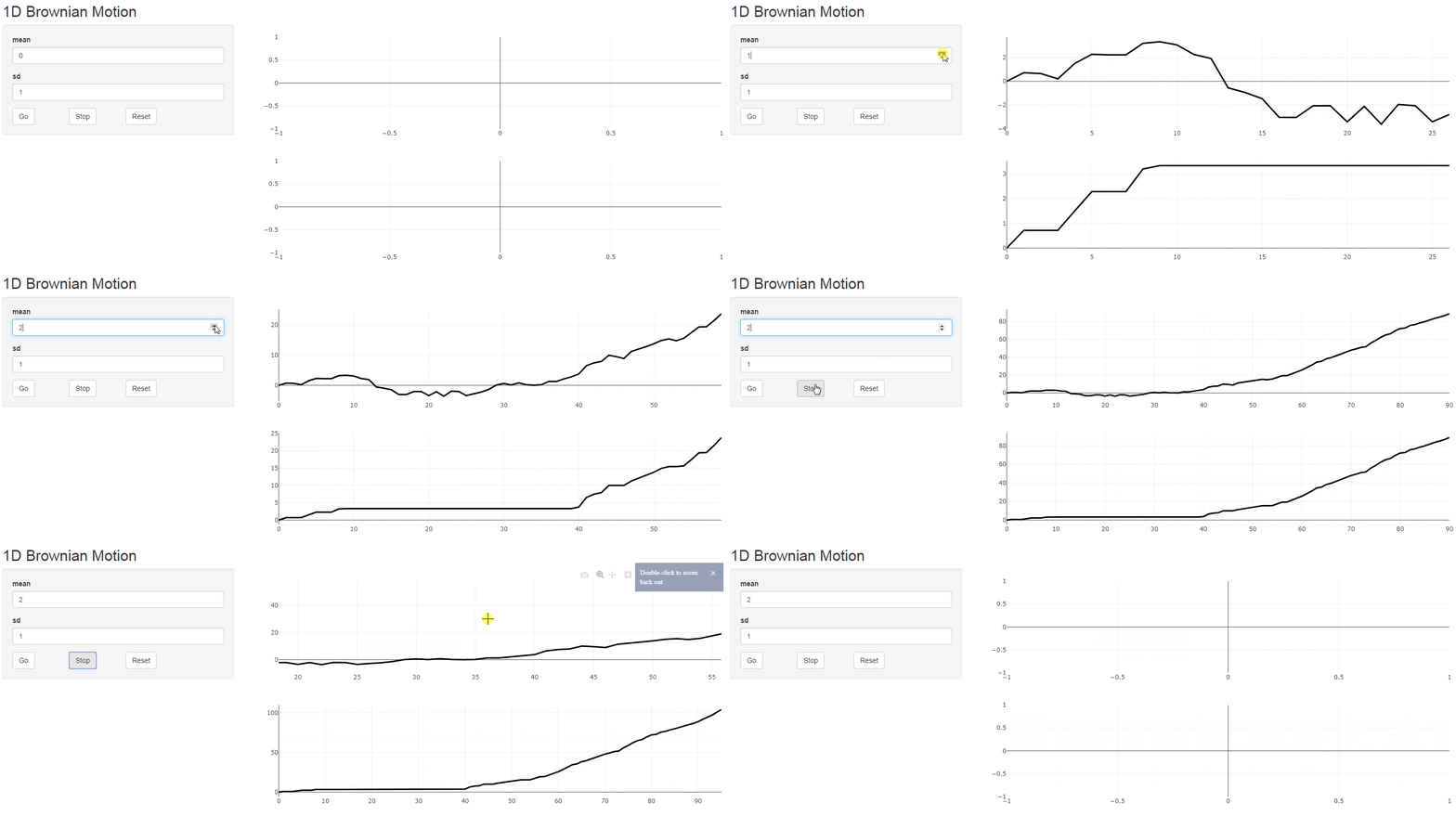
为了有效地更改一个巧妙的对象,您应该看看plotlyProxy,它避免了重新呈现整个情节。这里有一些流示例。
这是我认为你想要的-顺便说一下。您应该避免调用您的reactiveValues“会话”,因为session是server函数(plotlyProxy所需的)的一个可选参数。
library(shiny)
library(plotly)

ui <- fluidPage(titlePanel('1D Brownian Motion'),
                sidebarLayout(
                  # panel with all inputs
                  sidebarPanel(
                    # param set-up
                    numericInput('mean', 'mean', 0, step = 1),
                    numericInput('sd', 'sd', 1, step = 0.5, min = 0.0001),

                    # buttons to start, stop, reset
                    fluidRow(
                      column(3, actionButton('go', 'Go')),
                      column(3, actionButton('stop', 'Stop')),
                      column(3, actionButton('reset', label = 'Reset'))
                    )
                  ),

                  # plot panel
                  mainPanel(
                    plotlyOutput('bmtrack', height = '250px'),
                    plotlyOutput('bmmax', height = '250px')
                  )
                ))

server <- function(input, output, session) {
  # reactive to store all reactive variables
  waits <- reactiveValues(x = 0, xmax = 0, tt = 0, timer = reactiveTimer(Inf))

  # function to move simulation forward
  forward <- function() {
    waits$x <- waits$x + rnorm(1, input$mean, input$sd)
    waits$xmax <- max(waits$xmax, waits$x)
    waits$tt <- waits$tt + 1
  }

  # when go button is pressed
  observeEvent(input$go, {
    waits$timer <- reactiveTimer(100)
    observeEvent(waits$timer(), {
      forward()
    })
  })

  # when stop button is pressed
  observeEvent(input$stop, {
    waits$timer <- reactiveTimer(Inf)
  })

  # when reset button is pressed
  observeEvent(input$reset,{
      waits$x <- 0
      waits$xmax <- 0
      waits$tt <- 0
  })

  # generate initial "empty" plot
  initial_plot <- plot_ly(
    x = 0,
    y = 0,
    type = 'scatter',
    mode = 'lines',
    line = list(color = '#000000',
                width = 3)
  )

  # render initial plot and assign to both outputs
  output$bmmax <- output$bmtrack <- renderPlotly({
    input$reset # rerender when reset is pressed
    initial_plot
  })

  # create plotlyProxy objects for both plotly outputs
  bmtrack_proxy <- plotlyProxy("bmtrack", session)
  bmmax_proxy <- plotlyProxy("bmmax", session)

  # manipulate plots via plotlyProxy objects (without rerendering)
  observe({
      plotlyProxyInvoke(bmtrack_proxy, "extendTraces", list(x = list(list(waits$tt)), y = list(list(waits$x))), list(0))
  })

  observe({
      plotlyProxyInvoke(bmmax_proxy, "extendTraces", list(x = list(list(waits$tt)), y = list(list(waits$xmax))), list(0))
  })

}

shinyApp(ui, server)
https://stackoverflow.com/questions/58810460
复制相似问题
腾讯云开发者

Copyright © 2013 - 2026 Tencent Cloud. All Rights Reserved. 腾讯云 版权所有
深圳市腾讯计算机系统有限公司 ICP备案/许可证号:粤B2-20090059  粤公网安备44030502008569号
腾讯云计算(北京)有限责任公司 京ICP证150476号 | 京ICP备11018762号