
如何在底部放置元素而不与其他内容混合
如何在底部放置元素而不与其他内容混合
提问于 2019-11-10 09:28:36
我有一些弹出窗口,其中有一个表,我正在从JavaScript中添加行。在弹出窗口底部有两个按钮,我想:
- 两个按钮留在弹出窗口的底部。
- 如果我通过JavaScript向表中添加了更多的行,我希望这些行不会与按钮混淆。
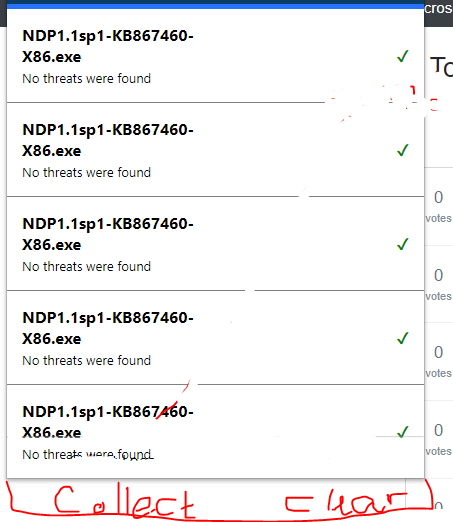
当我添加行时,它看起来如下:
但我想要的是:
在这里,HTML:
<body>
    <div id="popup_header">
        <div id="popup_logo_div"></div>
        <button id="cog-button" type="button">
            <a id="index_link"> <i class="fa fa-cog  fa-lg fa-fw" style="font-size:27px;"></i></a>
        </button>
    </div>

    <div>
        <table style="width:100%" id="scan-history-table" border=1 frame=void rules=rows>
        </table>
    </div>

    <div class="bottom_banner">
        <hr>
        <table width="100%" id="table-footer">
            <tr>
                <td class="tds"><a id="collect_logs" class="locale_message">Collect Logs</a></td>
                <td class="tds"><a id="clear_compleated_btn" class="locale_message K12">Clear</a></td>
            </tr>
        </table>
    </div>

    <script type="text/javascript" src="js/jquery-3.4.1.min.js"></script>
</body>
css:
body {
    margin: 0;
    padding: 0;
    width: 417px;
    font-size: 16px;
    height: 505px;
}

#popup_header {
    height: 70px;
    background-color: #0a3d63;
    color: white;
    border-bottom: 5px solid #2672fb;
}

td:not(.tds),
th {
    padding: 15px 15px;
}

#cog-button {
    float: right;
    background: none;
    color: white;
    border: none;
    cursor: pointer;
    float: right;
    margin: 12px;
    margin-top: 20px;
}

#popup_logo_div {
    width: 210px;
    float: left;
    /*    margin: 20px 0px 0px 10px;*/
    margin: 15px 0px 0px 5px;
}

img {
    height: 35px;
}

hr {
    /*    background-size: 5px 1px;*/
    opacity: 0.4;
}

a {
    /*    font-size: 16px;*/
    cursor: pointer;
}

a:hover {
    color: #a0ce38;
}

.bottom_banner {
    position: absolute;
    /*    position: fixed;*/
    bottom: 0px;
    width: 100%;
/*    background-color: red;*/
    /*    margin-top: 70px;*/
    /*     font-size: 12px;*/
}

.locale_message {
    /*    text-align: center;*/

}

.locale_message {
    /*    text-align: center;*/

}

.tds {
    text-align: center;
    height: 20px;
}

/*
.right-border {
    border-right: 1px solid black;
    height: 40px;
    padding: -10px;
    margin-top: 20px;
}
*/

td {
    width: 50%;
}

i {
    margin-top: 7px;
}

ul {
    list-style-type: none;
    padding: 10;
}

#table-footer {
    margin-bottom: 5px;
}回答 1
Stack Overflow用户
回答已采纳
发布于 2019-11-10 09:40:27
$(function() {
  var trLen = $('#scan-history-table').find('tr').length;
  if (trLen === 0) {
    $('.bottom_banner').css('position', 'fixed');
  }
})body {
margin: 0;
padding: 0;
width: 417px;
font-size: 16px;
height: 505px;
}
#popup_header {
height: 70px;
background-color: #0a3d63;
color: white;
border-bottom: 5px solid #2672fb;
}
td:not(.tds),
th {
padding: 15px 15px;
}
#cog-button {
float: right;
background: none;
color: white;
border: none;
cursor: pointer;
float: right;
margin: 12px;
margin-top: 20px;
}
#popup_logo_div {
width: 210px;
float: left;
/* margin: 20px 0px 0px 10px;*/
margin: 15px 0px 0px 5px;
}
img {
height: 35px;
}
hr {
/* background-size: 5px 1px;*/
opacity: 0.4;
}
a {
/* font-size: 16px;*/
cursor: pointer;
}
a:hover {
color: #a0ce38;
}
.bottom_banner {
position: absolute;
/* position: fixed;*/
bottom: 0px;
width: 100%;
/* background-color: red;*/
/* margin-top: 70px;*/
/* font-size: 12px;*/
}
.locale_message {
/* text-align: center;*/
}
.locale_message {
/* text-align: center;*/
}
.tds {
text-align: center;
height: 20px;
}
/*
.right-border {
border-right: 1px solid black;
height: 40px;
padding: -10px;
margin-top: 20px;
}
*/
td {
width: 50%;
}
i {
margin-top: 7px;
}
ul {
list-style-type: none;
padding: 10;
}
#table-footer {
margin-bottom: 5px;
}
#collect_logs:hover {
background-color: red;
}<script src="https://cdnjs.cloudflare.com/ajax/libs/jquery/3.3.1/jquery.min.js"></script>
<div style="position: relative;padding-bottom: 50px;">
<table style="width:100%;" id="scan-history-table" border="1" frame="void" rules="rows">
<tbody>
<tr>
<td>content</td>
</tr>
<tr>
<td>content</td>
</tr>
<tr>
<td>content</td>
</tr>
<tr>
<td>content</td>
</tr>
<tr>
<td>content</td>
</tr>
<tr>
<td>content</td>
</tr>
<tr>
<td>content</td>
</tr>
<tr>
<td>content</td>
</tr>
</tbody>
</table>
<div class="bottom_banner">
<hr>
<table width="100%" id="table-footer">
<tbody>
<tr>
<td class="tds"><a id="collect_logs" class="locale_message">Collect Logs</a></td>
<td class="tds"><a id="clear_compleated_btn" class="locale_message K12">Clear</a></td>
</tr>
</tbody>
</table>
</div>
</div>
将bottom_banner移动到表的父容器,然后向父容器添加以下样式:position:relative;padding-bottom:50px;。因为你的底座是绝对的。
页面原文内容由Stack Overflow提供。腾讯云小微IT领域专用引擎提供翻译支持
原文链接:
https://stackoverflow.com/questions/58787306
复制相关文章
相似问题
腾讯云开发者

Copyright © 2013 - 2026 Tencent Cloud. All Rights Reserved. 腾讯云 版权所有
深圳市腾讯计算机系统有限公司 ICP备案/许可证号:粤B2-20090059  粤公网安备44030502008569号
腾讯云计算(北京)有限责任公司 京ICP证150476号 | 京ICP备11018762号