
马赛克灯显示CAReplicatorLayer动画
马赛克灯显示CAReplicatorLayer动画
提问于 2019-10-28 11:32:30
我试图用CAReplicatorLayer对象:https://downloops.com/stock-footage/mosaic-light-show-blue-illuminated-pixel-grid-looping-background/实现背景视图的马赛克灯光显示效果
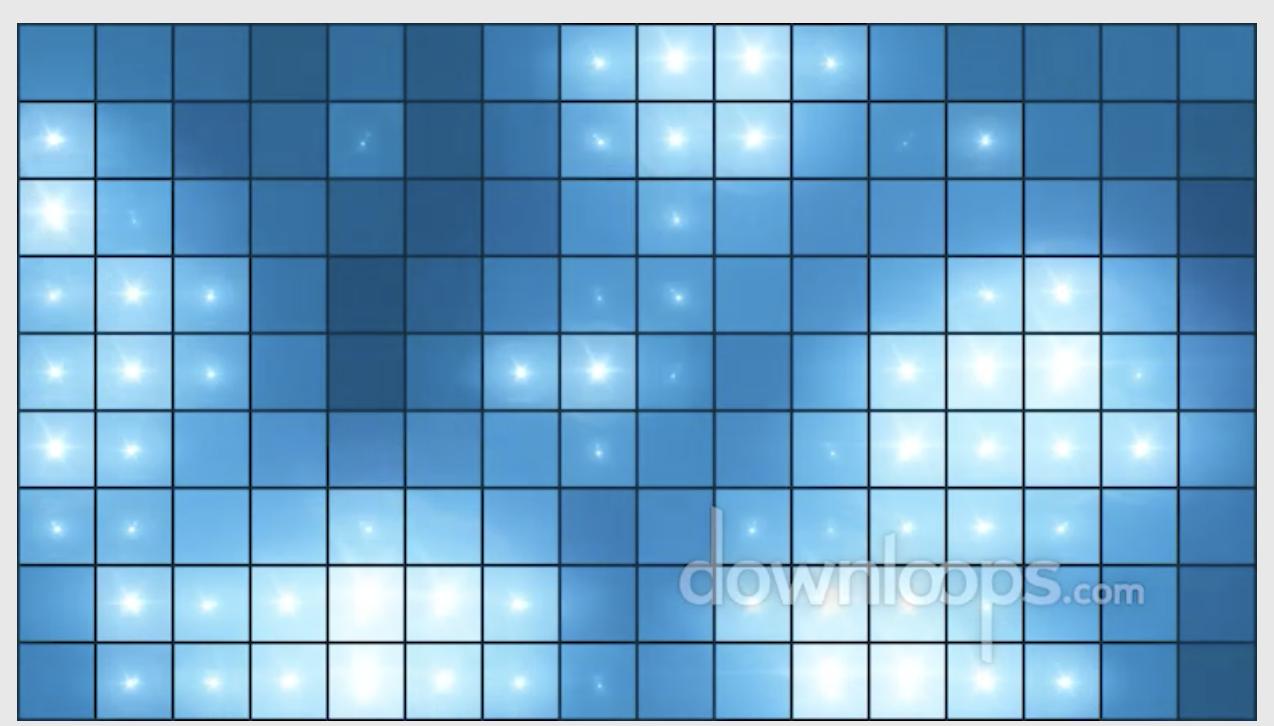
每个瓷砖/CALayer是一个水平和垂直复制的单一图像。我做过的那部分。
在我看来,这项任务至少分为四个部分:
- 选择一个随机的瓷砖
- ,为所选的瓷砖
- 选择一个随机的颜色偏移范围,如果随机颜色偏移超过特定的阈值,则在指定的时间内应用该颜色偏移量(
- ),然后在颜色偏移动画中应用发光效果。
但我不确定这是不是正确的算法。
我的当前代码摘自本教程:https://www.swiftbysundell.com/articles/ca-gems-using-replicator-layers-in-swift/
动画不是我的强大套件&我实际上不知道如何在所有的瓷砖上应用连续/重复的动画。以下是我的当前代码:
    @IBOutlet var animationView: UIView!

    func cleanUpAnimationView() {
        self.animationView.layer.removeAllAnimations()
        self.animationView.layer.sublayers?.removeAll()
    }

    /// Start a background animation with a replicated pattern image in tiled formation.
    func setupAnimationView(withPatternImage patternImage: UIImage, animate: Bool = true) {
        // Tutorial: https://www.swiftbysundell.com/articles/ca-gems-using-replicator-layers-in-swift/

        let imageSize = patternImage.size.halve

        self.cleanUpAnimationView()

        // Animate pattern image
        let replicatorLayer = CAReplicatorLayer()
        replicatorLayer.frame.size = self.animationView.frame.size
        replicatorLayer.masksToBounds = true
        self.animationView.layer.addSublayer(replicatorLayer)

        // Give the replicator layer a sublayer to replicate
        let imageLayer = CALayer()
        imageLayer.contents = patternImage.cgImage
        imageLayer.frame.size = imageSize
        replicatorLayer.addSublayer(imageLayer)

        // Tell the replicator layer how many copies (or instances) of the image needs to be rendered. But we won't see more than one since they are, per default, all rendered/stacked on top of each other.
        let instanceCount = self.animationView.frame.width / imageSize.width
        replicatorLayer.instanceCount = Int(ceil(instanceCount))
        // Instance offsets & transforms is needed to move them
        // 'CATransform3D' transform will be used on each instance: shifts them to the right & reduces the red & green color component of each instance's tint color.

        // Shift each instance by the width of the image
        replicatorLayer.instanceTransform = CATransform3DMakeTranslation(imageSize.width, 0, 0)

        // Reduce the red & green color component of each instance, effectively making each copy more & more blue while horizontally repeating the gradient pattern
        let colorOffset = -1 / Float(replicatorLayer.instanceCount)
        replicatorLayer.instanceRedOffset = colorOffset
        replicatorLayer.instanceGreenOffset = colorOffset
        //replicatorLayer.instanceBlueOffset = colorOffset
        //replicatorLayer.instanceColor = UIColor.random.cgColor

        // Extend the original pattern to also repeat vertically using another tint color gradient
        let verticalReplicatorLayer = CAReplicatorLayer()
        verticalReplicatorLayer.frame.size = self.animationView.frame.size
        verticalReplicatorLayer.masksToBounds = true
        verticalReplicatorLayer.instanceBlueOffset = colorOffset
        self.animationView.layer.addSublayer(verticalReplicatorLayer)

        let verticalInstanceCount = self.animationView.frame.height / imageSize.height
        verticalReplicatorLayer.instanceCount = Int(ceil(verticalInstanceCount))

        verticalReplicatorLayer.instanceTransform = CATransform3DMakeTranslation(0, imageSize.height, 0)
        verticalReplicatorLayer.addSublayer(replicatorLayer)

        guard animate else { return }

        // Set both the horizontal & vertical replicators to add a slight delay to all animations applied to the layer they're replicating
        let delay = TimeInterval(0.1)
        replicatorLayer.instanceDelay = delay
        verticalReplicatorLayer.instanceDelay = delay

        // This will make the image layer change color
        let animColor = CABasicAnimation(keyPath: "instanceRedOffset")
        animColor.duration = animationDuration
        animColor.fromValue = verticalReplicatorLayer.instanceRedOffset
        animColor.toValue = -1 / Float(Int.random(replicatorLayer.instanceCount-1))
        animColor.autoreverses = true
        animColor.repeatCount = .infinity
        replicatorLayer.add(animColor, forKey: "colorshift")

        let animColor1 = CABasicAnimation(keyPath: "instanceGreenOffset")
        animColor1.duration = animationDuration
        animColor1.fromValue = verticalReplicatorLayer.instanceGreenOffset
        animColor1.toValue = -1 / Float(Int.random(replicatorLayer.instanceCount-1))
        animColor1.autoreverses = true
        animColor1.repeatCount = .infinity
        replicatorLayer.add(animColor1, forKey: "colorshift1")

        let animColor2 = CABasicAnimation(keyPath: "instanceBlueOffset")
        animColor2.duration = animationDuration
        animColor2.fromValue = verticalReplicatorLayer.instanceBlueOffset
        animColor2.toValue = -1 / Float(Int.random(replicatorLayer.instanceCount-1))
        animColor2.autoreverses = true
        animColor2.repeatCount = .infinity
        replicatorLayer.add(animColor2, forKey: "colorshift2")
}回答 1
Stack Overflow用户
发布于 2020-01-03 16:25:20
let imageSize = patternImage.size.halve 和
animColor.toValue = -1 / Float(Int.random(replicatorLayer.instanceCount-1))两者都产生了错误。
我删除了halve并注释掉了animColor行和代码运行和动画。在使用您的代码之前,我无法获得任何复制器层来显示或动画(甚至不是最基本的苹果或教程代码)。非常感谢!
页面原文内容由Stack Overflow提供。腾讯云小微IT领域专用引擎提供翻译支持
原文链接:
https://stackoverflow.com/questions/58590187
复制相关文章
相似问题
腾讯云开发者

Copyright © 2013 - 2026 Tencent Cloud. All Rights Reserved. 腾讯云 版权所有
深圳市腾讯计算机系统有限公司 ICP备案/许可证号:粤B2-20090059  粤公网安备44030502008569号
腾讯云计算(北京)有限责任公司 京ICP证150476号 | 京ICP备11018762号