
关注SwiftUI中的下一个TextField/SecureField
关注SwiftUI中的下一个TextField/SecureField
提问于 2019-10-16 22:25:26
我在SwiftUI中构建了一个登录屏幕。当用户输入完他们的电子邮件时,我想关注密码SecureField。我该怎么做?
struct LoginView: View {
    @State var username: String = ""
    @State var password: String = ""

    var body: some View {
        ScrollView {
            VStack {
                TextField("Email", text: $username)
                    .padding()
                    .frame(width: 300)
                    .background(Color(UIColor.systemGray5))
                    .cornerRadius(5.0)
                    .padding(.bottom, 20)
                    .keyboardType(.emailAddress)

                SecureField("Password", text: $password)
                    .padding()
                    .frame(width: 300)
                    .background(Color(UIColor.systemGray5))
                    .cornerRadius(5.0)
                    .padding(.bottom, 20)

                Button(action: {

                }, label: {
                    Text("Login")
                        .padding()
                        .frame(width: 300)
                        .background((username.isEmpty || password.isEmpty) ? Color.gray : Color(UIColor.cricHQOrangeColor()))
                        .foregroundColor(.white)
                        .cornerRadius(5.0)
                        .padding(.bottom, 20)
}).disabled(username.isEmpty || password.isEmpty)回答 5
Stack Overflow用户
回答已采纳
发布于 2019-10-16 22:55:34
当使用UIKit时,可以通过设置响应链来实现这一点。这在SwiftUI中是不可用的,所以在有一个更复杂的焦点和响应系统之前,您可以使用onEditingChanged更改的TextField
然后,您将需要根据存储的状态变量管理每个字段的状态。它最终可能是比你想做的更多的工作。
幸运的是,您可以通过使用UIKit返回到SwiftUI中的UIViewRepresentable。
下面是使用UIKit响应程序系统管理文本字段焦点的一些代码:
import SwiftUI

struct KeyboardTypeView: View {
    @State var firstName = ""
    @State var lastName = ""
    @State var focused: [Bool] = [true, false]

    var body: some View {
        Form {
            Section(header: Text("Your Info")) {
                TextFieldTyped(keyboardType: .default, returnVal: .next, tag: 0, text: self.$firstName, isfocusAble: self.$focused)
                TextFieldTyped(keyboardType: .default, returnVal: .done, tag: 1, text: self.$lastName, isfocusAble: self.$focused)
                Text("Full Name :" + self.firstName + " " + self.lastName)
            }
        }
}
}


struct TextFieldTyped: UIViewRepresentable {
    let keyboardType: UIKeyboardType
    let returnVal: UIReturnKeyType
    let tag: Int
    @Binding var text: String
    @Binding var isfocusAble: [Bool]

    func makeUIView(context: Context) -> UITextField {
        let textField = UITextField(frame: .zero)
        textField.keyboardType = self.keyboardType
        textField.returnKeyType = self.returnVal
        textField.tag = self.tag
        textField.delegate = context.coordinator
        textField.autocorrectionType = .no

        return textField
    }

    func updateUIView(_ uiView: UITextField, context: Context) {
        if isfocusAble[tag] {
            uiView.becomeFirstResponder()
        } else {
            uiView.resignFirstResponder()
        }
    }

    func makeCoordinator() -> Coordinator {
        Coordinator(self)
    }

    class Coordinator: NSObject, UITextFieldDelegate {
        var parent: TextFieldTyped

        init(_ textField: TextFieldTyped) {
            self.parent = textField
        }

        func updatefocus(textfield: UITextField) {
            textfield.becomeFirstResponder()
        }

func textFieldShouldReturn(_ textField: UITextField) -> Bool {

            if parent.tag == 0 {
                parent.isfocusAble = [false, true]
                parent.text = textField.text ?? ""
            } else if parent.tag == 1 {
                parent.isfocusAble = [false, false]
                parent.text = textField.text ?? ""
         }
        return true
        }

    }
}您可以参考这个问题来获得有关这个特定方法的更多信息。
希望这能有所帮助!
Stack Overflow用户
发布于 2021-06-16 22:35:15
iOS 15+
在iOS 15中,我们现在可以使用@FocusState来控制应该聚焦的字段。
下面是一个示例,说明如何在键盘上方添加按钮以聚焦上一个/下一个字段:
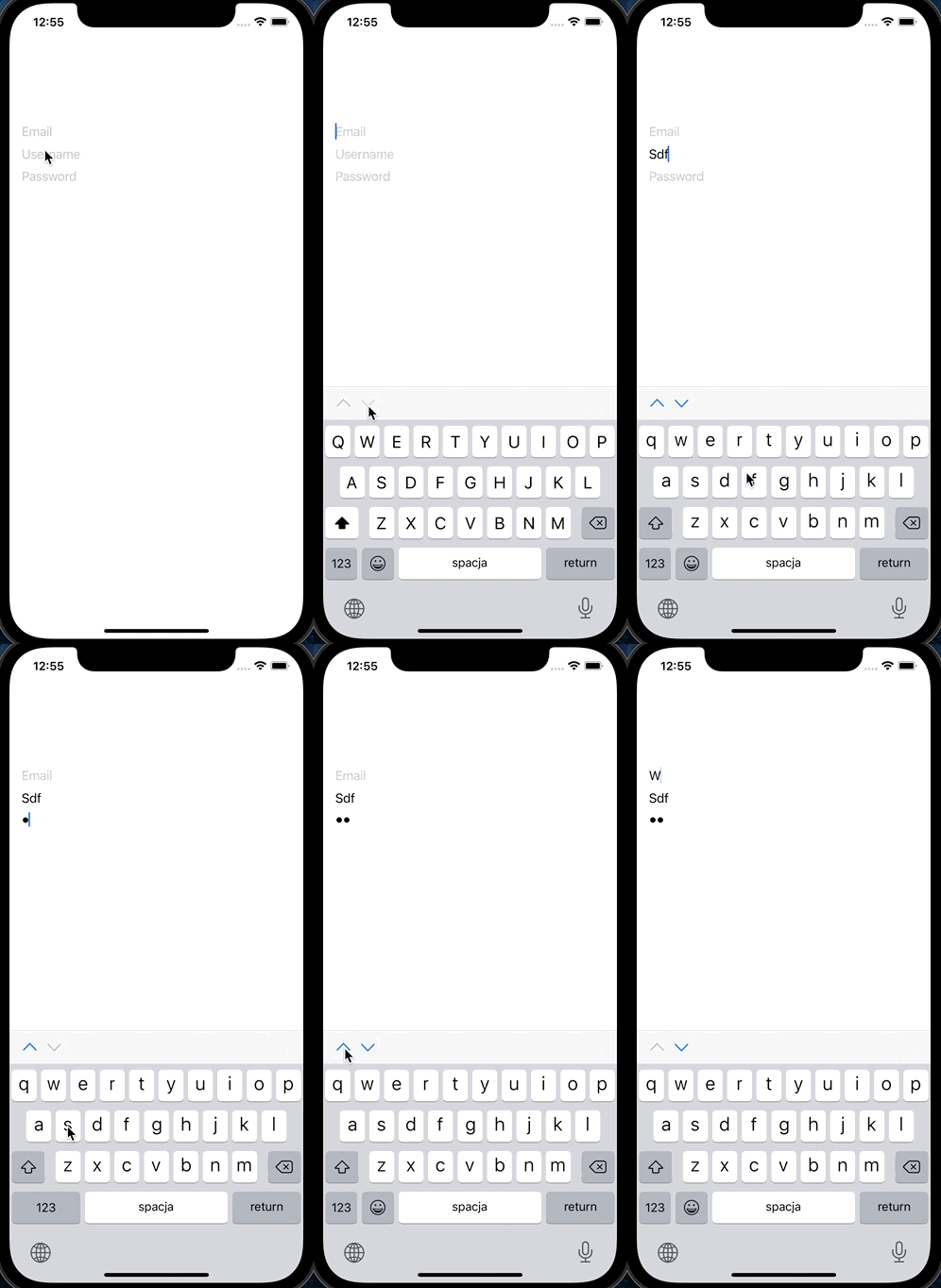
struct ContentView: View {
    @State private var email: String = ""
    @State private var username: String = ""
    @State private var password: String = ""

    @FocusState private var focusedField: Field?

    var body: some View {
        NavigationView {
            VStack {
                TextField("Email", text: $email)
                    .focused($focusedField, equals: .email)
                TextField("Username", text: $username)
                    .focused($focusedField, equals: .username)
                SecureField("Password", text: $password)
                    .focused($focusedField, equals: .password)
            }
            .toolbar {
                ToolbarItem(placement: .keyboard) {
                    Button(action: focusPreviousField) {
                        Image(systemName: "chevron.up")
                    }
                    .disabled(!canFocusPreviousField()) // remove this to loop through fields
                }
                ToolbarItem(placement: .keyboard) {
                    Button(action: focusNextField) {
                        Image(systemName: "chevron.down")
                    }
                    .disabled(!canFocusNextField()) // remove this to loop through fields
                }
            }
        }
    }
}extension ContentView {
private enum Field: Int, CaseIterable {
case email, username, password
}
private func focusPreviousField() {
focusedField = focusedField.map {
Field(rawValue: $0.rawValue - 1) ?? .password
}
}
private func focusNextField() {
focusedField = focusedField.map {
Field(rawValue: $0.rawValue + 1) ?? .email
}
}
private func canFocusPreviousField() -> Bool {
guard let currentFocusedField = focusedField else {
return false
}
return currentFocusedField.rawValue > 0
}
private func canFocusNextField() -> Bool {
guard let currentFocusedField = focusedField else {
return false
}
return currentFocusedField.rawValue < Field.allCases.count - 1
}
}Stack Overflow用户
发布于 2019-10-22 20:44:38
我改进了吉恩·Z·拉根和拉齐布·莫利克的答案。修复崩溃,这允许任意数量的文本字段,支持密码,并将其放入自己的类中。
struct UITextFieldView: UIViewRepresentable {
    let contentType: UITextContentType
    let returnVal: UIReturnKeyType
    let placeholder: String
    let tag: Int
    @Binding var text: String
    @Binding var isfocusAble: [Bool]

    func makeUIView(context: Context) -> UITextField {
        let textField = UITextField(frame: .zero)
        textField.textContentType = contentType
        textField.returnKeyType = returnVal
        textField.tag = tag
        textField.delegate = context.coordinator
        textField.placeholder = placeholder
        textField.clearButtonMode = UITextField.ViewMode.whileEditing

        if textField.textContentType == .password || textField.textContentType == .newPassword {
            textField.isSecureTextEntry = true
        }

        return textField
    }

    func updateUIView(_ uiView: UITextField, context: Context) {
        uiView.text = text

        if uiView.window != nil {
            if isfocusAble[tag] {
                if !uiView.isFirstResponder {
                    uiView.becomeFirstResponder()
                }
            } else {
                uiView.resignFirstResponder()
            }
        }
    }

    func makeCoordinator() -> Coordinator {
        Coordinator(self)
    }

    class Coordinator: NSObject, UITextFieldDelegate {
        var parent: UITextFieldView

        init(_ textField: UITextFieldView) {
            self.parent = textField
        }

        func textFieldDidChangeSelection(_ textField: UITextField) {
            // Without async this will modify the state during view update.
            DispatchQueue.main.async {
                self.parent.text = textField.text ?? ""
            }
        }

        func textFieldShouldBeginEditing(_ textField: UITextField) -> Bool {
            setFocus(tag: parent.tag)
            return true
        }

        func setFocus(tag: Int) {
            let reset = tag >= parent.isfocusAble.count || tag < 0

            if reset || !parent.isfocusAble[tag] {
                var newFocus = [Bool](repeatElement(false, count: parent.isfocusAble.count))
                if !reset {
                    newFocus[tag] = true
                }
                // Without async this will modify the state during view update.
                DispatchQueue.main.async {
                    self.parent.isfocusAble = newFocus
                }
            }
        }

        func textFieldShouldReturn(_ textField: UITextField) -> Bool {
            setFocus(tag: parent.tag + 1)
            return true
        }
    }
}

struct UITextFieldView_Previews: PreviewProvider {
    static var previews: some View {
        UITextFieldView(contentType: .emailAddress,
                       returnVal: .next,
                       placeholder: "Email",
                       tag: 0,
                       text: .constant(""),
                       isfocusAble: .constant([false]))
    }
}页面原文内容由Stack Overflow提供。腾讯云小微IT领域专用引擎提供翻译支持
原文链接:
https://stackoverflow.com/questions/58422440
复制相关文章
相似问题
腾讯云开发者

Copyright © 2013 - 2026 Tencent Cloud. All Rights Reserved. 腾讯云 版权所有
深圳市腾讯计算机系统有限公司 ICP备案/许可证号:粤B2-20090059  粤公网安备44030502008569号
腾讯云计算(北京)有限责任公司 京ICP证150476号 | 京ICP备11018762号