
如何在html5视频播放器的视频进度显示栏中添加标记?
如何在html5视频播放器的视频进度显示栏中添加标记?
提问于 2019-10-13 19:56:43
我有一个简单的自定义HTML 5视频播放器,我想添加标记到我的视频播放器,进度指示栏之类的东西。
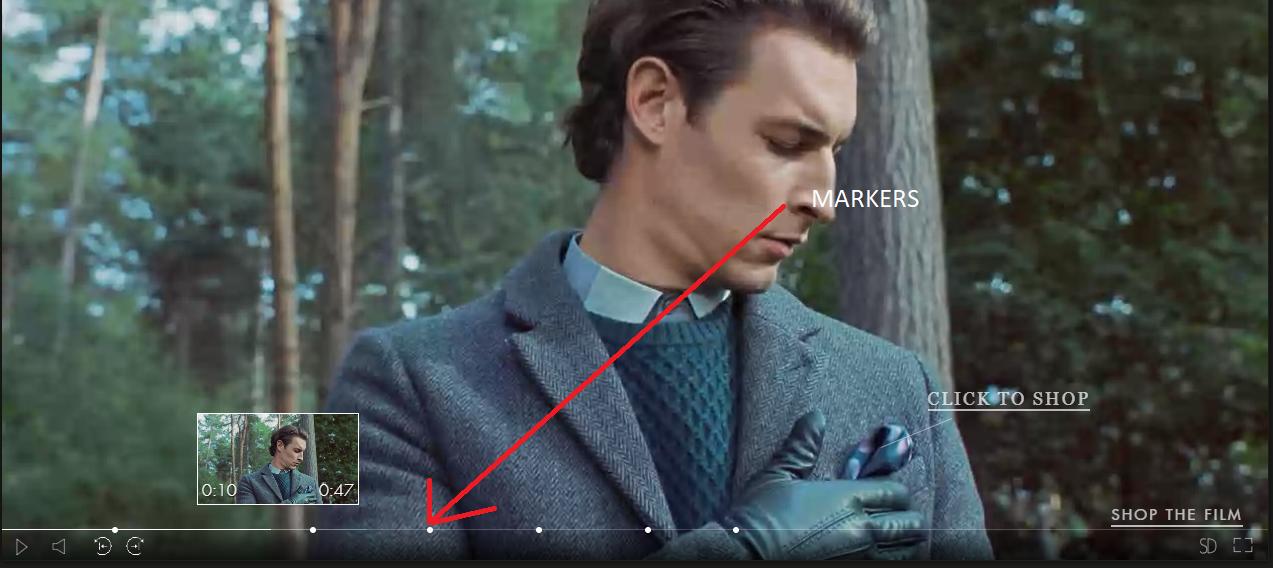
到目前为止,这里是我的解决方案,只有一个标记在0.6s。
HTML
<div canplay id="video-block">
    <div id="video-container">
        <video id="videoplayer" ref="video"  autoplay webkit-playsinline playsinline>
            <source src="videos/vmerce.mp4" type="video/mp4">
        </video>

    </div>
    <div id="video-controls" style="position: relative; display: block">
        <div id="seek-bar-container">
            <div id="seek-bar">
                <div id="current-time">

                </div>
            </div>
        </div>
        <div id="pause-play-button">
            <img id="play" src="images/play.png">
            <img id="pause" src="images/pause.png" style="display:none">
        </div>
    </div>
</div>
下面是添加标记的js
$(document).ready(function(){

    //get videoplayer tag element
        var videoplayerID =document.getElementById("videoplayer");
        var ranges = [{
            from: 0,
            to: 6
        },
        {
            from: 6,
            to: 9
        },
        {
            from: 9,
            to: 25
        },
        {
            from: 25,
            to: 38
        },
    ];

    console.log(ranges[0].to);

        videoplayerID.addEventListener("timeupdate", function () {
            if ($(this)[0].duration) {
                $(this).parent().parent().find("#current-time").css("width", ($(this)[0].currentTime * 100 / $(this)[0].duration) + "%");
            }

            if (this.currentTime >= ranges[0].to) {

                var bb =$('<div class="bubles"></div>')

                $("#current-time").append(bb);

            }
        });


})
现在,当我运行我的应用程序,我得到以下信息。
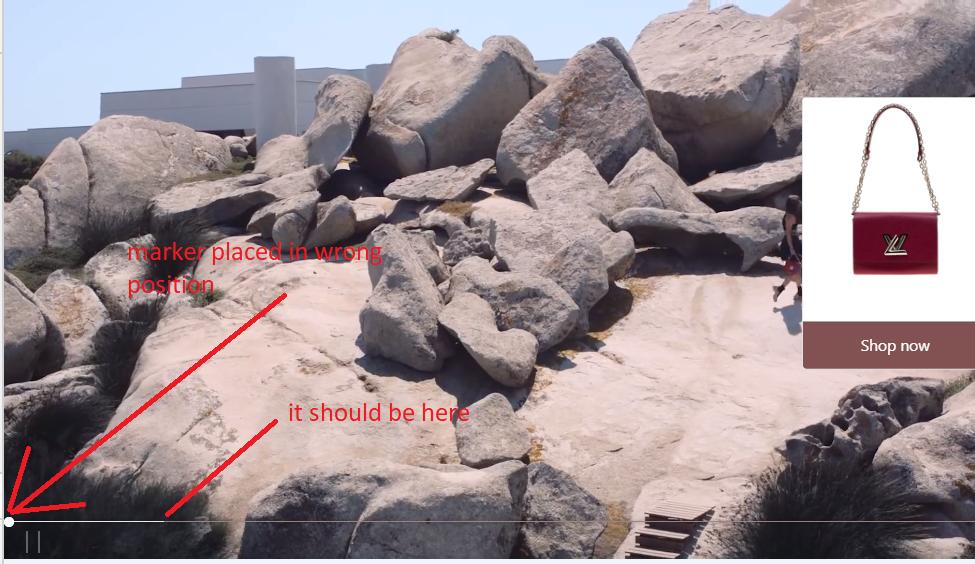
我需要做什么才能得到我想要的?
回答 2
Stack Overflow用户
回答已采纳
发布于 2019-10-14 08:58:42
您正在正确的轨道上计算width栏的#current-time。在timeupdate侦听器之外,对每个range或marker执行相同的操作。
循环遍历标记的每个position并计算left属性的偏移量,就像您对width属性所做的那样。这将给出每个标记在时间线上的位置。
然后在循环中创建每个标记,给它left属性值并将它们添加到#seekbar中。
// Video and seekbar
const video = document.getElementById('videoplayer');
const seekBar = document.getElementById('seekbar');

// Positions of markers in seconds.
const positions = [3, 6.5, 7];

// Set the markers when we CAN know the duration of the video.
video.addEventListener('loadedmetadata', () => {

  // Add each marker to the #seekbar element.
  positions.forEach(function(position) {

    // Is position within range of the duration?
    if (position <= video.duration) {

      // Calculate position in percentage..
      const left = (position / video.duration) * 100 + '%';

      // ..create marker and give it the left value..
      const marker = document.createElement('div');
      marker.classList.add('bubles');
      marker.style.left = left;

      // ..and add the marker to the #seekbar.
      seekBar.appendChild(marker);
    }
  });
});这将使时间线上的每个标记都有一个百分比值。循环之后,继续侦听timeupdate事件。
如果您想合并范围(如您的示例中的那样),则需要进行一些修改。但这将帮助你开始你想要去的地方。
Stack Overflow用户
发布于 2019-10-14 07:19:02
看看前面这个类似问题的答案,我想你会找到解决办法的。由冯彭斯回答。
页面原文内容由Stack Overflow提供。腾讯云小微IT领域专用引擎提供翻译支持
原文链接:
https://stackoverflow.com/questions/58367319
复制相关文章
相似问题
腾讯云开发者

Copyright © 2013 - 2026 Tencent Cloud. All Rights Reserved. 腾讯云 版权所有
深圳市腾讯计算机系统有限公司 ICP备案/许可证号:粤B2-20090059  粤公网安备44030502008569号
腾讯云计算(北京)有限责任公司 京ICP证150476号 | 京ICP备11018762号