
不能正确地将Dash1.4.0部署到CentOS Apache服务器,网页处于上传状态,为什么?
不能正确地将Dash1.4.0部署到CentOS Apache服务器,网页处于上传状态,为什么?
提问于 2019-10-11 14:40:28
我用Dash 1.4.0和Flask 1.0.2创建了下面的小应用程序,请在下面找到它。我能够将它部署到Centos Apache服务器上,它开始了,但我得到的唯一东西是加载页面,在浏览器控制台中,我看到一些组件不存在,请参阅printscreen (我在图片中删除了服务器的ip ),我应该做些什么来解决这个问题?它在我的电脑上工作,没有任何问题。
Chrome浏览器中的控制台:
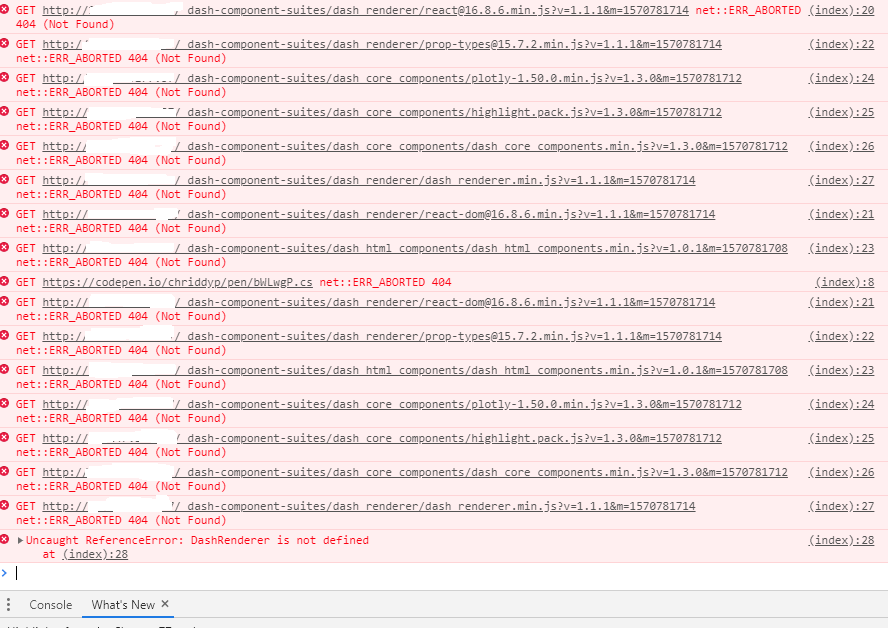
WebApp代码:
from libs.initsetup import InitSetup
import libs.dbops as dbops
import os
import dash
import dash_core_components as dcc
import dash_html_components as html
from flask_caching import Cache
from flask import Flask

on_server = True

if not on_server:
    WORKDIR = ""
else:
    WORKDIR = "/var/www/mosregwebsite_dash_plot"


external_stylesheets = ['https://codepen.io/chriddyp/pen/bWLwgP.css']
server = Flask(__name__)

dash_app = dash.Dash(__name__,  server=server)

dash_app.scripts.config.serve_locally = True
dash_app.css.config.serve_locally = True

cache = Cache(dash_app.server, config={
    'CACHE_TYPE': 'filesystem',
    'CACHE_DIR': WORKDIR + os.path.join(os.getcwd(), 'cache-directory')
})

TIMEOUT = 1800  # plots are updated every 30 minutes


@cache.memoize(timeout=TIMEOUT)
def return_layout():
    clients = InitSetup.read_initfile_json(WORKDIR + os.path.join(os.getcwd(), "jsons", "clients.json"))
    HOST, DBUSER, DBPASSWORD, AUTH_PLUGIN, *rest = InitSetup.read_mysql_init_config_file(WORKDIR +
        os.path.join(os.getcwd(), "mosregwebsite_dash_plot.config.txt"))

    conn, curs = dbops.create_mysql_connection(HOST, DBUSER, DBPASSWORD, AUTH_PLUGIN)

    graphs = []
    for k, v in clients.items():
        x, y = dbops.select_data_for_pictures(curs, k)
        graphs.append({'x': x, 'y': y, 'type': 'lineplot', 'name': v})

    return html.Div(children=[
        dcc.Graph(
            style={
                'textAlign': 'center',
                'height': '900px',
            },
            id='example-graph',
            figure={
                'data': graphs,
                'layout': {
                }

            }
        )
    ])


    dash_app.layout = return_layout

    if __name__ == '__main__':
        os.mkdir("numbeo")
        if not on_server:
            dash_app.run_server(host='127.0.0.107', port=8999, debug=False)
        else:
            HOST, PORT = InitSetup.read_website_settings_from_config_file(
                WORKDIR + os.path.join(os.getcwd(),
    "mosregwebsite_dash_plot.config.txt"))
        dash_app.run_server(host=HOST, port=int(PORT), debug=False)


    #########    WSGI FILE:   ##################

    import sys
    import os
    activate_this = '/var/www/mosregwebsite_dash_plot/env/bin/activate_this.py'
    with open(activate_this) as file_:
        exec(file_.read(), dict(__file__=activate_this))
    sys.path.insert(0, '/var/www/mosregwebsite_dash_plot/')


    from mosregwebsite_dash_plot import server as application

    #######    SETUP.PY    ##############


    from setuptools import setup


    setup(
        name='mosreg_webscrap_website',
        version='1.0.0',
        packages=[''],
        url='',
        license='',
        author='kozyrev.av',
        author_email='kozirev8@gmail.com',
        description='This is website which display processed information from
    mosreg website',
       install_requires=[
            'dash==1.4.0',
            'Flask-Caching==1.7.2',
            'mysql-connector==2.2.9',
            'mysql-connector-python==8.0.16',
            'flask==1.0.2'
        ]
)回答 1
Stack Overflow用户
发布于 2019-10-14 06:11:11
https://dash.plot.ly/react-for-python-developers检查所有安装是否正确。
要安装Node.js,请转到Node.js网站下载最新版本。我们建议安装LTS版本。
Node.js将自动在您的计算机上安装
通过运行:节点-v验证节点是否已安装
通过运行: npm -v验证npm是否已安装
页面原文内容由Stack Overflow提供。腾讯云小微IT领域专用引擎提供翻译支持
原文链接:
https://stackoverflow.com/questions/58343593
复制相关文章
相似问题
腾讯云开发者

Copyright © 2013 - 2026 Tencent Cloud. All Rights Reserved. 腾讯云 版权所有
深圳市腾讯计算机系统有限公司 ICP备案/许可证号:粤B2-20090059  粤公网安备44030502008569号
腾讯云计算(北京)有限责任公司 京ICP证150476号 | 京ICP备11018762号