
iOS:如果有Pop-up,如何使状态栏变暗
iOS:如果有Pop-up,如何使状态栏变暗
提问于 2019-09-26 16:31:41
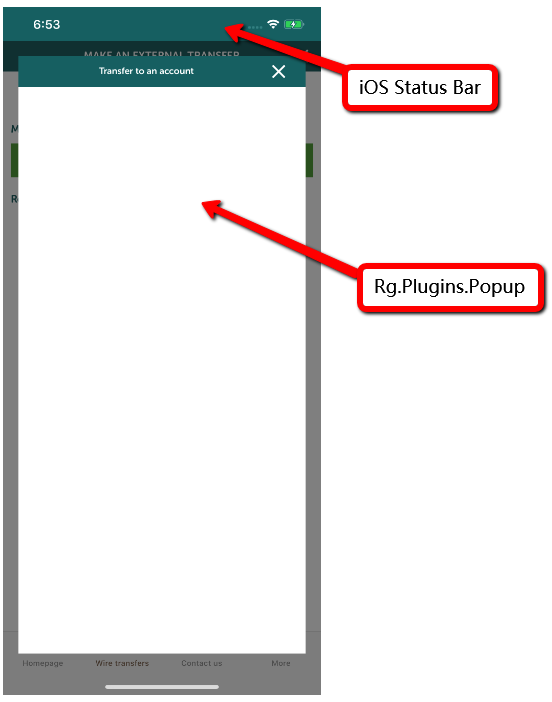
我的工作是改变iOS状态栏的颜色和它的文本颜色。结果看起来很好,除非屏幕上弹出。如下图所示,状态栏在屏幕上弹出时不会变暗,它似乎在屏幕上突出。
由于我真的不熟悉iPhone,它通常是这样工作的吗?或者,如果出现弹出,还有没有解决昏暗状态栏的方法?
注意事项:我使用iPhone X和iOS 12.1
流行代码:
<?xml version="1.0" encoding="utf-8" ?>

<pages:BasePopupPage
    xmlns="http://xamarin.com/schemas/2014/forms"
    xmlns:x="http://schemas.microsoft.com/winfx/2009/xaml"
    x:Class="WhiteLabel.Mobile.App.Pages.Popup.TransferPopUp"
    xmlns:pages="clr-namespace:WhiteLabel.Mobile.App.Pages.Popup"
    xmlns:popups="clr-namespace:Rg.Plugins.Popup.Pages;assembly=Rg.Plugins.Popup"
    xmlns:animations="clr-namespace:Rg.Plugins.Popup.Animations;assembly=Rg.Plugins.Popup"
    xmlns:Resources="clr-namespace:WhiteLabel.Mobile.App.Resources">

    <!--Animations use example-->
    <popups:PopupPage.Animation>
        <animations:ScaleAnimation
          PositionIn="Center"
          PositionOut="Center"
          ScaleIn="1.2"
          ScaleOut="0.8"
          DurationIn="400"
          DurationOut="300"
          EasingIn="SinOut"
          EasingOut="SinIn"
          HasBackgroundAnimation="True"/>
    </popups:PopupPage.Animation>

    <!-- Content -->
    <StackLayout
           VerticalOptions="Center"
           HorizontalOptions="FillAndExpand"
           Padding="20, 20, 20, 20">
           <StackLayout BackgroundColor="White">
             <Grid >
                <Grid.ColumnDefinitions>
                    <ColumnDefinition/>
                    <ColumnDefinition Width="60"/>
                </Grid.ColumnDefinitions>
                <Grid.RowDefinitions>
                    <RowDefinition Height="40"/>
                </Grid.RowDefinitions>
              </Grid>

              <StackLayout >
                <Label
                     Text="DELETE_POPUP_INFO"
                     HorizontalTextAlignment="Center"
                     VerticalTextAlignment="Center"/>


                <Grid BackgroundColor="White" Padding="20, 20, 20, 20">
                    <Grid.ColumnDefinitions>
                        <ColumnDefinition Width="50*"/>
                        <ColumnDefinition Width="50*"/>
                    </Grid.ColumnDefinitions>
                    <Grid.RowDefinitions>
                        <RowDefinition Height="40"/>
                    </Grid.RowDefinitions>

                    <!-- Cancel button-->
                    <Button x:Name="CancelButton"
                            Command="{Binding TappedCloseCommand}"
                            Grid.Row="0"
                            Grid.Column="0"
                            Text="CANCEL"
                            BorderWidth="1"
                            BorderRadius="0">
                        <Button.BorderRadius>
                            <!-- fixes a bug on android where border doesn't work without a radius. -->
                            <OnPlatform x:TypeArguments="x:Int32">
                                <OnPlatform.Android>1</OnPlatform.Android>
                            </OnPlatform>
                        </Button.BorderRadius>
                    </Button>

                    <!-- Delete button-->
                    <Button x:Name="DeleteButton"
                            Command="{Binding TappedDeleteCommand}"
                            Grid.Row="0"
                            Grid.Column="1"
                            Text="DELETE"
                            WidthRequest="500"
                            BorderRadius="0">
                    </Button>
                </Grid>
            </StackLayout>
        </StackLayout>
    </StackLayout>

</pages:BasePopupPage>
回答 1
Stack Overflow用户
发布于 2019-10-01 02:41:31
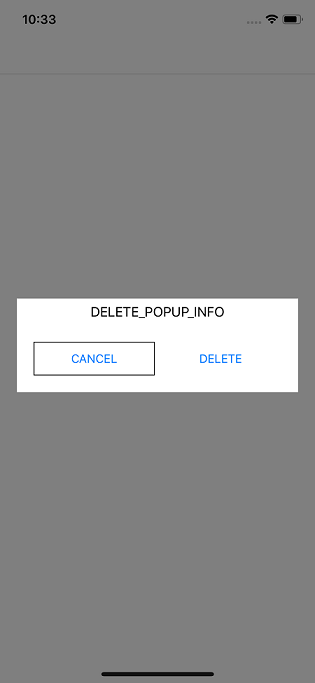
我使用您的代码并创建一个弹出页面。它如预期的那样工作。我将向您展示我使用的代码,您可以查看它。
下面是我用来显示弹出窗口的按钮事件:
private void Button_Clicked(object sender, EventArgs e)
{
    PopupNavigation.Instance.PushAsync(new Page1());
}
我也没有在弹出页面中添加额外的代码:
public partial class Page1 : PopupPage
{
    public Page1()
    {
        InitializeComponent();
    }
}Xaml中的代码与您和我在1.1.5.188版本中使用的代码相同。
如果你想要的话,我可以和你分享样品。
这是截图:
页面原文内容由Stack Overflow提供。腾讯云小微IT领域专用引擎提供翻译支持
原文链接:
https://stackoverflow.com/questions/58121168
复制相关文章
相似问题
腾讯云开发者

Copyright © 2013 - 2026 Tencent Cloud. All Rights Reserved. 腾讯云 版权所有
深圳市腾讯计算机系统有限公司 ICP备案/许可证号:粤B2-20090059  粤公网安备44030502008569号
腾讯云计算(北京)有限责任公司 京ICP证150476号 | 京ICP备11018762号