
bottomSheetDialogFragment全屏
我试图实现的是类似Instagram在应用程序中的web浏览器,当你点击广告时使用:
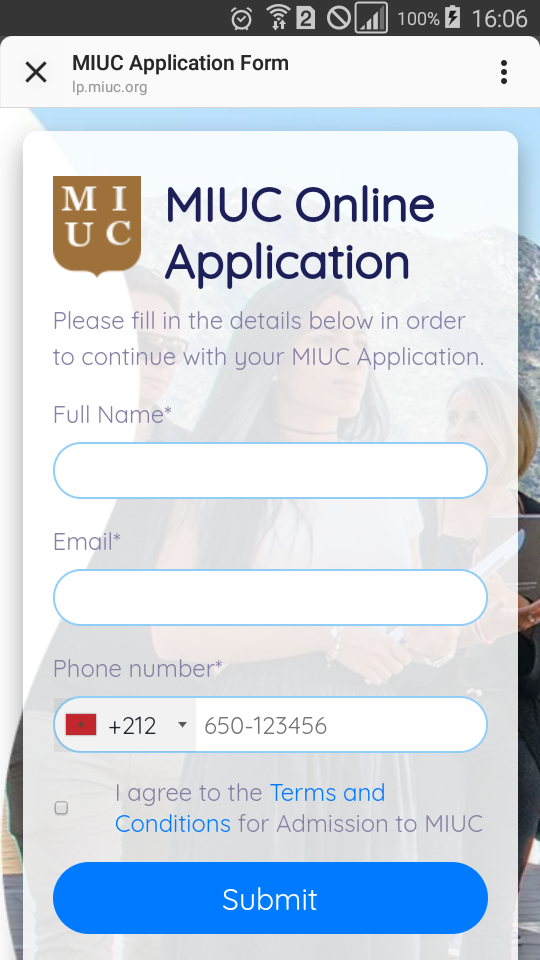
我所做的是,我使用了一个WebView bottomSheetDialogFragment,并覆盖了onCreateDialog以获得如下所示的全屏:
@Override
public Dialog onCreateDialog(Bundle savedInstanceState) {
    BottomSheetDialog bottomSheetDialog=(BottomSheetDialog)super.onCreateDialog(savedInstanceState);
    bottomSheetDialog.setOnShowListener(dialog -> {
        BottomSheetDialog dialogc = (BottomSheetDialog) dialog;
        FrameLayout bottomSheet =  dialogc .findViewById(android.support.design.R.id.design_bottom_sheet);
        BottomSheetBehavior.from(bottomSheet).setState(BottomSheetBehavior.STATE_EXPANDED);
        //BottomSheetBehavior.from(bottomSheet).setSkipCollapsed(true);
        //BottomSheetBehavior.from(bottomSheet).setHideable(true);
    });
    return bottomSheetDialog;
}
我得到的结果如下:
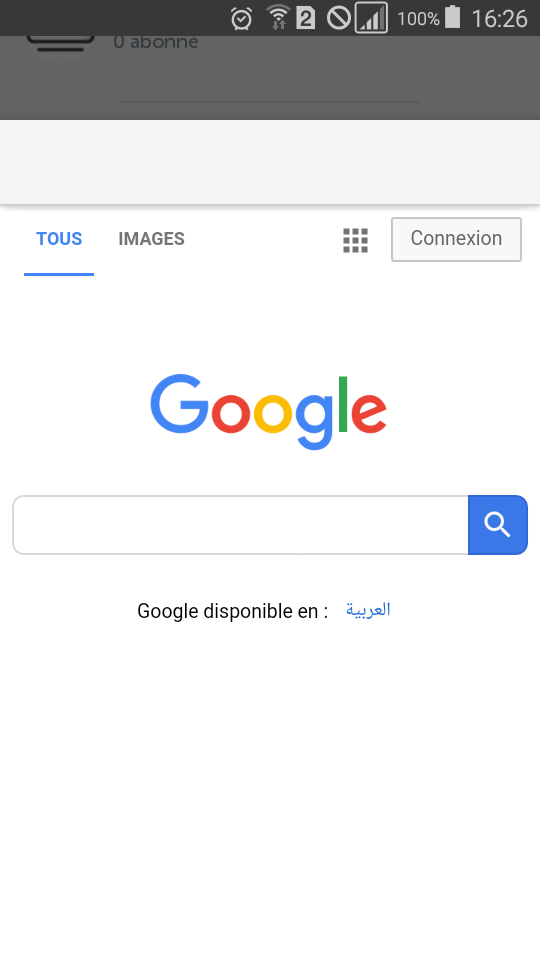
我的问题是,我怎样才能获得全屏效果,或者如何实现类似instagram浏览器的功能?
ps:我尝试了第一个铬自定义选项卡,但是我无法将它添加到对话框片段中。
谢谢。
回答 12
Stack Overflow用户
发布于 2019-09-23 17:14:09
在您的自定义BottomSheetDialogFragment中,您可以使用以下内容:
  @NonNull @Override public Dialog onCreateDialog(Bundle savedInstanceState) {
    Dialog dialog = super.onCreateDialog(savedInstanceState);
    dialog.setOnShowListener(new DialogInterface.OnShowListener() {
      @Override public void onShow(DialogInterface dialogInterface) {
        BottomSheetDialog bottomSheetDialog = (BottomSheetDialog) dialogInterface;
        setupFullHeight(bottomSheetDialog);
      }
    });
    return  dialog;
  }


  private void setupFullHeight(BottomSheetDialog bottomSheetDialog) {
    FrameLayout bottomSheet = (FrameLayout) bottomSheetDialog.findViewById(R.id.design_bottom_sheet);
    BottomSheetBehavior behavior = BottomSheetBehavior.from(bottomSheet);
    ViewGroup.LayoutParams layoutParams = bottomSheet.getLayoutParams();

    int windowHeight = getWindowHeight();
    if (layoutParams != null) {
      layoutParams.height = windowHeight;
    }
    bottomSheet.setLayoutParams(layoutParams);
    behavior.setState(BottomSheetBehavior.STATE_EXPANDED);
  }

  private int getWindowHeight() {
    // Calculate window height for fullscreen use
    DisplayMetrics displayMetrics = new DisplayMetrics();
    ((Activity) getContext()).getWindowManager().getDefaultDisplay().getMetrics(displayMetrics);
    return displayMetrics.heightPixels;
}Stack Overflow用户
发布于 2020-07-17 16:23:53
对于延迟的回答,很抱歉,但是在您的自定义BottomSheetDialogFragment中,您可以将match_parent设置为底部工作表视图的布局参数,如下所示:
override fun onCreateDialog(savedInstanceState: Bundle?): Dialog {
    val dialog = BottomSheetDialog(requireContext(), theme)
    dialog.setOnShowListener {

        val bottomSheetDialog = it as BottomSheetDialog
        val parentLayout =
            bottomSheetDialog.findViewById<View>(com.google.android.material.R.id.design_bottom_sheet)
        parentLayout?.let { it ->
            val behaviour = BottomSheetBehavior.from(it)
            setupFullHeight(it)
            behaviour.state = BottomSheetBehavior.STATE_EXPANDED
        }
    }
    return dialog
}

private fun setupFullHeight(bottomSheet: View) {
    val layoutParams = bottomSheet.layoutParams
    layoutParams.height = WindowManager.LayoutParams.MATCH_PARENT
    bottomSheet.layoutParams = layoutParams
}将高度设置为match_parent可以帮助您的对话框绘制在导航栏内嵌的上方
Stack Overflow用户
发布于 2020-05-07 19:44:45
建议的解决方案基于使用内部id,因为它不是故意公开的,它可能在没有警告的情况下更改。
我的解决方案将布局高度设置为FrameLayout,但以一种更抽象的方式设置,因此,如果它更改,则不会中断,即使ViewGroup类型发生了更改。
override fun onStart() {
    super.onStart()
    val sheetContainer = requireView().parent as? ViewGroup ?: return
    sheetContainer.layoutParams.height = ViewGroup.LayoutParams.MATCH_PARENT
}如果您查看BottomSheetDialog,即private View wrapInBottomSheet方法,您将看到发生这种情况以保证工作表的行为。一些额外的调试,允许我计算出片段View是来自每个人都正在通过id查找的FrameLayout的直接子程序。
这样,您就不需要依赖ID了,我使用的是onStart,因为它是在片段准备好进行交互时定义的,所以应该已经准备好了。
如果你从一开始就需要它的高度(很可能)
override fun onCreateDialog(savedInstanceState: Bundle?): Dialog {
    return BottomSheetDialog(requireContext(), theme).apply {
        behavior.state = BottomSheetBehavior.STATE_EXPANDED
        behavior.peekHeight = //your harcoded or dimen height
    }
}https://stackoverflow.com/questions/58065771
复制相似问题
腾讯云开发者

Copyright © 2013 - 2026 Tencent Cloud. All Rights Reserved. 腾讯云 版权所有
深圳市腾讯计算机系统有限公司 ICP备案/许可证号:粤B2-20090059  粤公网安备44030502008569号
腾讯云计算(北京)有限责任公司 京ICP证150476号 | 京ICP备11018762号