
carPlay的新委托
我正在为CarPlay开发导航应用程序,在iOS 12中,CPApplicationDelegate有两种检测CarPlay是否打开的方法:
func application(_ application: UIApplication, didConnectCarInterfaceController interfaceController: CPInterfaceController, to window: CPWindow)和
func application(_ application: UIApplication, didDisconnectCarInterfaceController interfaceController: CPInterfaceController, from window: CPWindow)在iOS 13中,这些方法被废弃,苹果给了新的委托: CPTemplateApplicationSceneDelegate
我尝试将这个新的委托CPTemplateApplicationSceneDelegate连接到我的服务,该服务为CarPlay提供所有操作,但只有我看到的功能才能帮助我:
func application(_ application: UIApplication, configurationForConnecting connectingSceneSession: UISceneSession, options: UIScene.ConnectionOptions) -> UISceneConfiguration因此,我的问题是如何检测CarPlay是否连接,以及如何为在新iOS 13 CarPlay的一个窗口中启动的CarPlay提供操作。
回答 1
Stack Overflow用户
发布于 2019-11-18 10:37:37
---------------------------EDIT------------------------
通常,目标的设置检查“支持多个窗口”。然后在(CPTemplateApplicationSceneSessionRoleApplication),中将配置添加到carPlay场景角色中,如下所示:
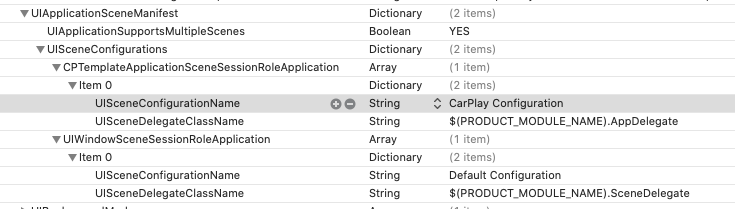
还有哇哦!您的代表将调用
func templateApplicationScene(_ templateApplicationScene: CPTemplateApplicationScene, didConnect interfaceController: CPInterfaceController, to window: CPWindow)您可以在其中配置CarPlay控制器。
---------------------------END -
我会尝试这样的方法:
func application(_ application: UIApplication,
                 configurationForConnecting connectingSceneSession: UISceneSession,
                 options: UIScene.ConnectionOptions) -> UISceneConfiguration {

    if connectingSceneSession.role == UISceneSession.Role.carTemplateApplication {
      if let carPlayScene = connectingSceneSession.scene as? CPTemplateApplicationScene {
        carPlayScene.delegate = self
      }
    }
然后,在您的委托方法中,您应该像在iOS12中那样设置您的接口
func templateApplicationScene(_ templateApplicationScene: CPTemplateApplicationScene, didConnect interfaceController: CPInterfaceController, to window: CPWindow)不知道它是否有效,因为我的CarPlay模拟器崩溃了.
https://stackoverflow.com/questions/57973897
复制相似问题
腾讯云开发者

Copyright © 2013 - 2026 Tencent Cloud. All Rights Reserved. 腾讯云 版权所有
深圳市腾讯计算机系统有限公司 ICP备案/许可证号:粤B2-20090059  粤公网安备44030502008569号
腾讯云计算(北京)有限责任公司 京ICP证150476号 | 京ICP备11018762号