
与模板参数包一起使用natvis
与模板参数包一起使用natvis
提问于 2019-09-18 18:44:12
我有一个大致像这样的数据结构
struct Column
{
    void* data;
};

template <class... T>
struct Table
{
    size_t count;
    std::vector<Column> columns; // columns.size() == sizeof...(T)
};
我试着用下面的方式来想象
+ Table
  + Column 0
      item 1
      item 2
      ...
  + Column 1
      item 1
      item 2
      ...
到目前为止,这就是我所拥有的:
<Type Name="Table<*>">
<Expand>
<Synthetic Name="Column 0">
<Expand>
<ArrayItems>
<Size>count</Size>
<ValuePointer>($T1*) columns[0].data</ValuePointer>
</ArrayItems>
</Expand>
</Synthetic>
<Synthetic Name="Column 1" Condition="columns.size() > 1">
<Expand>
<ArrayItems>
<Size>count</Size>
<ValuePointer>($T2*) columns[1].data</ValuePointer>
</ArrayItems>
</Expand>
</Synthetic>
</Expand>
</Type>很明显,这个比例真的很差。我的任务是复制粘贴每一列的代码,并添加一个Condition来启用或禁用它。最后,我将获得最大数量的受支持列,之后,可视化将停止显示列。
有什么办法能更聪明地展示这一点吗?如果我能够用像$T$i这样的表达式对模板参数进行索引,我可以想象几种方法来做到这一点。
我真正想做的是这样的事情:
<Type Name="Table<*>">
<Expand>
<ArrayItems>
<Size>columns.size()</Size>
<Value>
<Synthetic Name="Column %i">
<Expand>
<ArrayItems>
<Size>count</Size>
<ValuePointer>($T$i2*) columns[$i2].data</ValuePointer>
</ArrayItems>
</Expand>
</Synthetic>
</Value>
</ArrayItems>
</Expand>
</Type>回答 1
Stack Overflow用户
回答已采纳
发布于 2019-09-19 17:01:05
看来,唯一的选择是在代码中创建一个助手类型,该类型进行递归模板扩展,逐个剥离模板参数。您必须强制编译器实例化模板,使其可供natvis使用。
我刚开始的数据
struct ColumnStorage
{
    void* data;
};

struct TableStorage
{
    size_t rowCount;
    std::vector<ColumnStorage> columns;
};

template <class Table, class... TableColumns>
struct TableAccessor
{
    TableStorage* tableStorage;
};
这就是我需要补充的东西,以获得体面的自然
// The helper type that allows natvis to work. The first template parameter keeps track of the
// column index so we know where to index into TableStorage::columns. The second parameter isn't
// used here. The third parameter is the concrete types of each column.
template <int i, class Table, class... TableColumns>
struct NatvisColumnView;

template <class Table, class... TableColumns>
struct TableAccessor
{
    TableStorage* tableStorage;

    // Used by natvis to cast `this`
    using NatvisView = NatvisColumnView<0, Table, TableColumns...>;

    // Force the compiler to instantiate the template or it won't be available to natvis
    TableAccessor() { (NatvisView*) this; }
};

// End the template recursion. Inherit from TableAccessor so that tableStorage can be used
template <int i, class Table, class Column>
struct NatvisColumnView<i, Table, Column> : TableAccessor<Table, Column> {};

// Recursive template to peel off column types one-by-one
template <int i, class Table, class FirstColumn, class... RestColumns>
struct NatvisColumnView<i, Table, FirstColumn, RestColumns...> : NatvisColumnView<i + 1, Table, RestColumns...>
{
    using base = typename NatvisColumnView<i + 1, Table, RestColumns...>;
};<Type Name="TableAccessor<*,*>">
<DisplayString>Table</DisplayString>
<Expand>
<Item Name="Count">tableStorage->rowCount</Item>
<!-- Cast `this` to the view type and use the for visualization -->
<ExpandedItem>*(NatvisView*) this</ExpandedItem>
</Expand>
</Type>
<!-- Bottom out the recursive view -->
<Type Name="NatvisColumnView<*,*,*>">
<DisplayString>NatvisColumnView</DisplayString>
<Expand>
<Synthetic Name="Column">
<Expand>
<ArrayItems>
<Size>tableStorage->rowCount</Size>
<ValuePointer>($T3*) tableStorage->columns[$T1].data</ValuePointer>
</ArrayItems>
</Expand>
</Synthetic>
</Expand>
</Type>
<!-- Display the first column then recurse -->
<Type Name="NatvisColumnView<*,*,*,*>">
<DisplayString>NatvisColumnView</DisplayString>
<Expand>
<Synthetic Name="Column">
<Expand>
<ArrayItems>
<Size>tableStorage->rowCount</Size>
<!-- Show the correct column using the column index (first template parameter)
and the column type (third template parameter) -->
<ValuePointer>($T3*) tableStorage->columns[$T1].data</ValuePointer>
</ArrayItems>
</Expand>
</Synthetic>
<ExpandedItem>*(base*) this</ExpandedItem>
</Expand>
</Type>最后看起来是这样的:
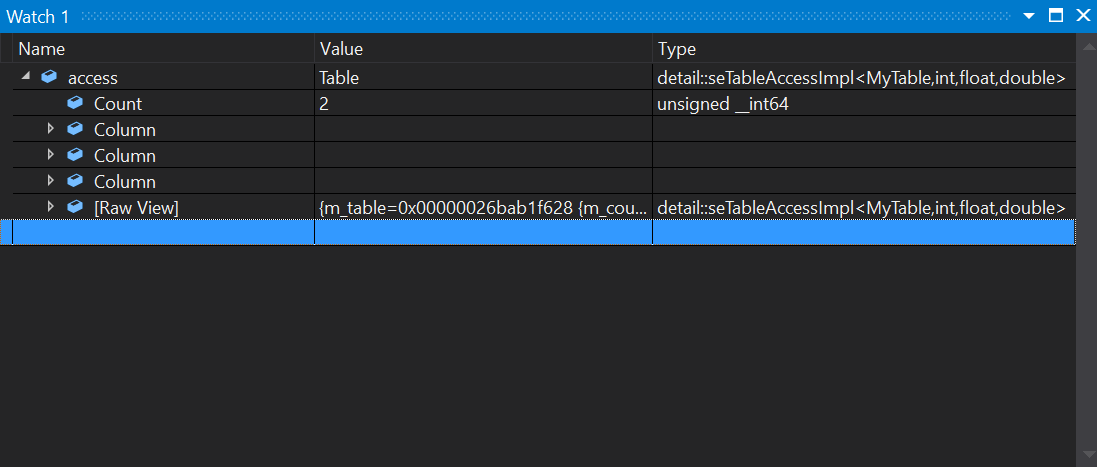
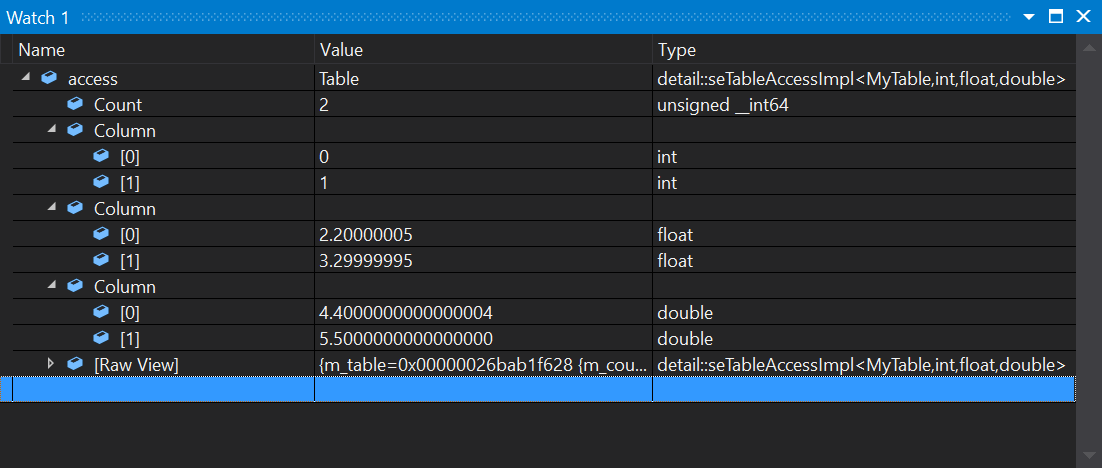
我尝试了各种其他方法,例如:
- 使用IndexListItems。如果不能索引模板参数
$T$i. - Using CustomListItems,就无法工作。同样,如果不能将模板parameters.
- Using索引为TableAccessor中的变量模板以获取类型和索引,则无法工作。显然,natvis不能访问可变模板。
将来,我会直接使用natvis DLL,而不是纠缠于严格限制的XML。
页面原文内容由Stack Overflow提供。腾讯云小微IT领域专用引擎提供翻译支持
原文链接:
https://stackoverflow.com/questions/57999070
复制相关文章
相似问题
腾讯云开发者

Copyright © 2013 - 2026 Tencent Cloud. All Rights Reserved. 腾讯云 版权所有
深圳市腾讯计算机系统有限公司 ICP备案/许可证号:粤B2-20090059  粤公网安备44030502008569号
腾讯云计算(北京)有限责任公司 京ICP证150476号 | 京ICP备11018762号