
如何在Magick.NET中创建8位BMP?
使用Magick.NET-Q8-任意。我想转换现有的TIFF图像为灰度8 bpp BMP图像。我试过这个:
byte[] input = <existing TIFF image>;
using (var image = new MagickImage(input))
{
    image.Grayscale();
    image.ColorType = ColorType.Palette;
    image.Depth = 8;
    image.Quantize(new QuantizeSettings() { Colors = 256,  DitherMethod = DitherMethod.No });

    byte[] result = image.ToByteArray(MagickFormat.Bmp);

    return result;
}
在FastStone查看器中,图像被报告为8位,但是在文件属性>详细信息中,图像报告为位深度: 32。我要在这里8点。我可以在Paint.NET中转换这个图像,当我选择“位深度:8位”时,新图像将正确地显示文件属性中的8位深度。
因此,Paint.NET创建了正确的8位位图.如何用Magick.NET做这件事?
回答 2
Stack Overflow用户
发布于 2019-09-23 21:49:07
Windows将所有压缩的 BMP文件显示为32位,与其实际位深度相反。
我不知道它是否是一个bug,但我更接近于称它为bug。
因为;在用代码创建了一个8bpp BMP文件之后,当我用二进制编辑器打开该文件时,在位图头结构中,我看到每个像素字段值(块28-29)必须是8。另外,下一个字节01 (偏移量30)意味着用游程编码压缩的数据是一种简单的无损数据压缩算法。
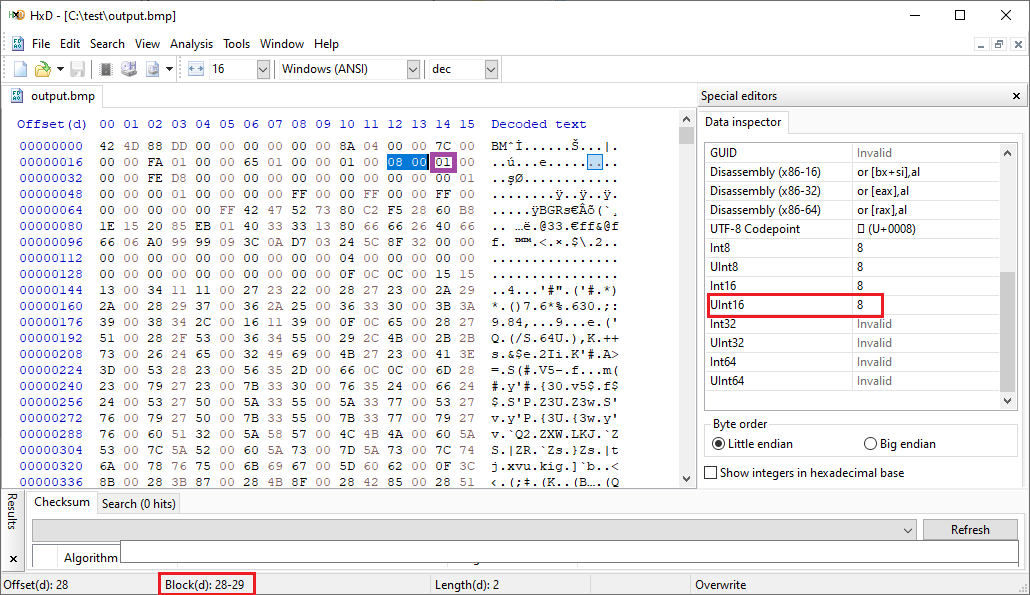
因此,我可以说,您用Magick.NET生成的图像没有问题,它当然是一个8bpp BMP图像文件,但是压缩了。
与Magick.NET的默认设置不同,Paint.NET似乎生成未压缩的BMP文件,这就是为什么由于Windows的怪异,您会看到不同的位深度。
要解决这个问题,您可以禁用压缩,这样属性对话框中显示的位深度值将是您所期望的值。
image.Settings.Compression = CompressionMethod.NoCompression;
byte[] result = image.ToByteArray(MagickFormat.Bmp);Stack Overflow用户
发布于 2019-09-23 00:13:55
看来那是不可能的。image.Depth = 8和image.BitDepth(8)都不起作用。可能是根目录在:
// ImageMagick.MagickImage.NativeMethods.X{ver.}
[DllImport("Magick.Native-Q8-x{ver.}.dll", CallingConvention = CallingConvention.Cdecl)]
public static extern void MagickImage_SetBitDepth(IntPtr Instance, UIntPtr channels, UIntPtr value);
或
// ImageMagick.MagickImage.NativeMethods.X{ver.}
[DllImport("Magick.Native-Q8-x{ver.}.dll", CallingConvention = CallingConvention.Cdecl)]
public static extern void MagickImage_WriteStream(IntPtr Instance, IntPtr settings, ReadWriteStreamDelegate writer, SeekStreamDelegate seeker, TellStreamDelegate teller, ReadWriteStreamDelegate reader, out IntPtr exception);看起来它不能创建8位.bmp,尽管.png没有问题。
var original = @"D:\tmp\0.tif";
var copy = @"D:\tmp\0.bmp";

using (var image = new MagickImage(original))
{
    image.Grayscale();
    image.ColorType = ColorType.Palette;
    image.Quantize(new QuantizeSettings() { Colors = 256, DitherMethod = DitherMethod.No });
    byte[] result = image.ToByteArray(MagickFormat.Png8);
    File.WriteAllBytes(copy, result);
}
Console.WriteLine("Press 'Enter'..."); // one have 8 bits .png here
Console.ReadLine();
using (var image = new MagickImage(copy))
{
    byte[] result = image.ToByteArray(MagickFormat.Bmp3);
    File.WriteAllBytes(copy, result);
} // but ends up with 32 bits .bmp again here
我还注意到
image.Quantize(new QuantizeSettings() { Colors = 16, DitherMethod = DitherMethod.No });产生4位结果。渐进式增长带来32位,但绝不是8位。
https://stackoverflow.com/questions/58026373
复制相似问题
腾讯云开发者

Copyright © 2013 - 2026 Tencent Cloud. All Rights Reserved. 腾讯云 版权所有
深圳市腾讯计算机系统有限公司 ICP备案/许可证号:粤B2-20090059  粤公网安备44030502008569号
腾讯云计算(北京)有限责任公司 京ICP证150476号 | 京ICP备11018762号