
更新到8.0后,JTAppleCalendar无法触发didSelectDate
我使用JTAppleCalendar将日历添加到应用程序的视图中。我所有的东西都正常工作,但是在我更新到8.0之后,我无法正确地连接控制器。
这是我所犯的错误
断言失败:未设置Datasource/委托时尝试访问日历。返回默认值:文件/Users/studio/Desktop/my_app/Pods/JTAppleCalendar/Sources/JTAppleCalendar/JTACVariables.swift,行109 2019-09-23 00:51:42.437357+0300 when 4044:97207断言失败:未设置Datasource/委托时尝试访问日历。返回默认值:文件/Users/studio/Desktop/my_app/Pods/JTAppleCalendar/Sources/JTAppleCalendar/JTACVariables.swift,行109
这是我的控制器
import UIKit
import JTAppleCalendar

class LandingPageViewController: UIViewController {

    let formatter = DateFormatter()

    var queryID: String = ""

    var targetDate: Date?
    var dateSelected: Date = Date()
    var timeSelected: Date = Date()

    @IBOutlet weak var calendarView: JTACMonthView!

    @IBOutlet weak var yearLabel: UILabel!

    @IBAction func calendarSaveButton(_ sender: Any) {
        if let finalDate = combineDateWithTime(date: dateSelected, time: timeSelected) {
            QueryModel().addTargetDate(id: queryID, targetDate: finalDate)
            dismiss(animated: true, completion: nil)
        }
    }

    func combineDateWithTime(date: Date, time: Date) -> Date? {
        let calendar = NSCalendar.current

        let dateComponents = calendar.dateComponents([.year, .month, .day], from: date)
        let timeComponents = calendar.dateComponents([.hour, .minute, .second], from: time)

        var mergedComponments = DateComponents()
        mergedComponments.year = dateComponents.year!
        mergedComponments.month = dateComponents.month!
        mergedComponments.day = dateComponents.day!
        mergedComponments.hour = timeComponents.hour!
        mergedComponments.minute = timeComponents.minute!
        mergedComponments.second = timeComponents.second!

        return calendar.date(from: mergedComponments)
    }

    override func viewDidLoad() {
        super.viewDidLoad()
        setupCalendarView()

        formatter.timeZone = Calendar.current.timeZone
        formatter.locale = Calendar.current.locale

        self.calendarView.scrollToDate(dateSelected, animateScroll: false)
        self.calendarView.selectDates([dateSelected])
    }

    @objc func handleDatePicker(sender: UIDatePicker) {
        timeSelected = sender.date;
    }

    func setupCalendarView(){
        calendarView.minimumLineSpacing = 0
        calendarView.minimumInteritemSpacing = 0

        calendarView.visibleDates { (visibleDates) in
            self.setupViewsFromCalendar(from: visibleDates)
        }
    }

    func setupViewsFromCalendar(from: DateSegmentInfo){
        let date = from.monthDates.first!.date

        formatter.dateFormat = "yyyy"
        yearLabel.text = formatter.string(from: date)

        formatter.dateFormat = "MMMM"
    }

    func handleCellSelection(myCustomCell: CalendarCell, cellState: CellState, date: Date) {
        myCustomCell.dateLabel.text = cellState.text

        if cellState.isSelected {
            dateSelected = date
            myCustomCell.selectedDay.isHidden = false
            myCustomCell.selectedDay.backgroundColor = UIColor.orange
        }else {
            myCustomCell.selectedDay.isHidden = true
        }
    }

    func handleCellTextColor(myCustomCell: CalendarCell, cellState: CellState, date: Date){
        if cellState.isSelected{
            myCustomCell.dateLabel.textColor = UIColor.white
        }else{
            if cellState.dateBelongsTo == .thisMonth {
                myCustomCell.dateLabel.textColor = UIColor.black
            }else{
                myCustomCell.dateLabel.textColor = UIColor.gray
            }
        }
    }

    func handleTodayCell(myCustomCell: CalendarCell, cellState: CellState, date: Date){
        formatter.dateFormat = "dd MM yyyy"

        let todayDateString = formatter.string(from: Date())
        let cellDateString = formatter.string(from: cellState.date);

        if todayDateString == cellDateString {
            // Checks to see if today is the current cell and apply different styling
            myCustomCell.selectedDay.isHidden = false
            myCustomCell.selectedDay.backgroundColor = UIColor.blue
            myCustomCell.dateLabel.textColor = UIColor.white
        }
    }
}

extension LandingPageViewController:JTACMonthViewDataSource {
    func calendar(_ calendar: JTACMonthView, willDisplay cell: JTACDayCell, forItemAt date: Date, cellState: CellState, indexPath: IndexPath) {
        let myCustomCell = cell as! CalendarCell
        handleCellSelection(myCustomCell: myCustomCell, cellState: cellState, date: date)
    }

    func configureCalendar(_ calendar: JTACMonthView) -> ConfigurationParameters {

        let startDate = Date()
        //print(startDate);

        let yearsToAdd = 10
        let endDate = Calendar.current.date(byAdding: .year, value: yearsToAdd, to: startDate)

        let params = ConfigurationParameters(
            startDate: startDate,
            endDate: endDate!,
            generateInDates: .forAllMonths,
            generateOutDates: .tillEndOfRow
        )

        return params
    }
}

extension LandingPageViewController: JTACMonthViewDelegate {
    func calendar(_ calendar: JTACMonthView, cellForItemAt date: Date, cellState: CellState, indexPath: IndexPath) -> JTACDayCell {
        let cell = calendar.dequeueReusableJTAppleCell(withReuseIdentifier: "CalendarCell", for: indexPath) as! CalendarCell

        handleCellSelection(myCustomCell: cell, cellState: cellState, date: date)
        handleCellTextColor(myCustomCell: cell, cellState: cellState, date: date)
        handleTodayCell(myCustomCell: cell, cellState: cellState, date: date)

        return cell
    }

    func calendar(_ calendar: JTACMonthView, didSelectDate date: Date, cell: JTACDayCell?, cellState: CellState) {
        guard let validCell = cell as? CalendarCell else { return }
        handleCellSelection(myCustomCell: validCell, cellState: cellState, date: date)
        handleCellTextColor(myCustomCell: validCell, cellState: cellState, date: date)
    }

    func calendar(_ calendar: JTACMonthView, didDeselectDate date: Date, cell: JTACDayCell?, cellState: CellState) {
        guard let validCell = cell as? CalendarCell else { return }
        handleCellSelection(myCustomCell: validCell, cellState: cellState, date: date)
        handleCellTextColor(myCustomCell: validCell, cellState: cellState, date: date)
        handleTodayCell(myCustomCell: validCell, cellState: cellState, date: date)
    }

    func calendar(_ calendar: JTACMonthView, shouldSelectDate date: Date, cell: JTACDayCell?, cellState: CellState) -> Bool {
        if (cellState.date.timeIntervalSince(Date()) > -86400) {
            return true
        }else {
            return false
        }
    }

    func calendar(_ calendar: JTACMonthView, didScrollToDateSegmentWith visibleDates: DateSegmentInfo) {
        setupViewsFromCalendar(from: visibleDates)
    }
}
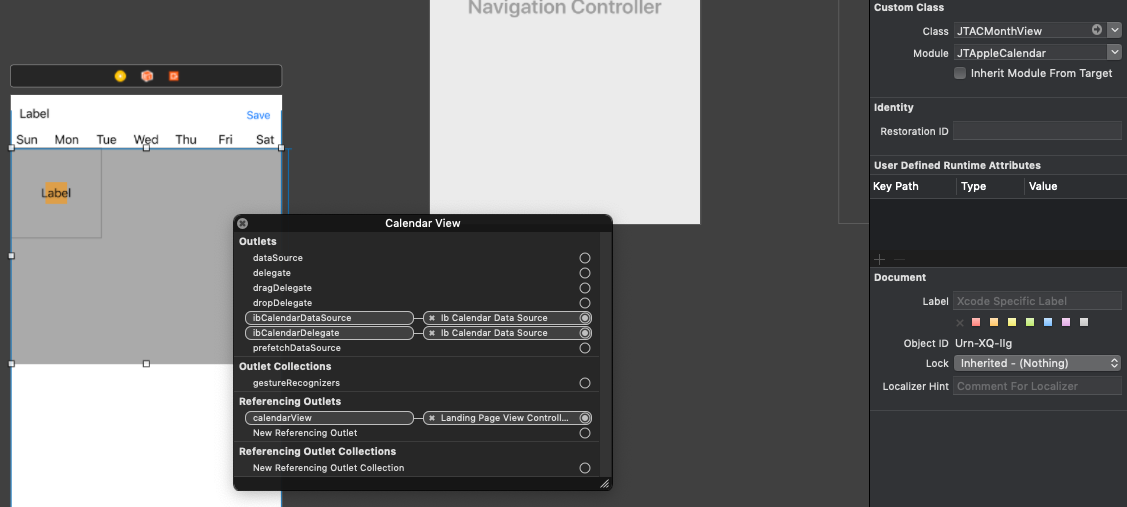
我刚把类名改成了新版本。
回答 1
Stack Overflow用户
发布于 2019-09-23 10:40:49
我想你错过了迁移指南。在那里,它告诉您重命名您的函数,并给出要重命名的函数列表。
如果您使用的是didSelect/didDeselect,则应该将其重命名为
func calendar(_ calendar: JTACMonthView, didSelectDate date: Date, cell: JTACDayCell?, cellState: CellState, indexPath: IndexPath)
func calendar(_ calendar: JTACMonthView, didDeselectDate date: Date, cell: JTACDayCell?, cellState: CellState, indexPath: IndexPath)
因为你没有给它们重新命名,所以它们没有被调用。在需要的地方,请重新命名其他的名字。
关于DataSource错误,当您从InterfaceBuilder中删除DataSource/Delegate并重新连接它们(可能是IB出错)时会发生什么?
https://stackoverflow.com/questions/58053743
复制相似问题
腾讯云开发者

Copyright © 2013 - 2026 Tencent Cloud. All Rights Reserved. 腾讯云 版权所有
深圳市腾讯计算机系统有限公司 ICP备案/许可证号:粤B2-20090059  粤公网安备44030502008569号
腾讯云计算(北京)有限责任公司 京ICP证150476号 | 京ICP备11018762号