
如何在自适应卡上使用CSS样式?
如何在自适应卡上使用CSS样式?
提问于 2019-09-25 19:41:42
我试图使用CSS在更细粒度的级别上对自适应卡进行样式化,但是默认CSS类的类似名称使得很难针对单个元素。
我试图用特定的参数来针对它,但它们在某种程度上仍然是交叉规则的。在自适应卡片构建过程中,我尝试过使用唯一的it或uniqueCSSSelectors,但是当它们到达前端时,它们似乎都被去掉了。
下面是一些我已经尝试过的例子。
li div .content .attachment .attachment div .ac-container:not(:first-child) .ac-columnSet:hover{
    background: #e6eaed;
    color: #323232;
}

li div .content .attachment .attachment div .ac-container:not(:first-child) .ac-columnSet:hover .ac-container .ac-textBlock p{
    color: #323232;
}```回答 1
Stack Overflow用户
回答已采纳
发布于 2019-10-14 21:20:03
首先,我想提到的是,这个功能已经是BotFramework-WebChat回购中正在处理的一个功能请求。我不知道ETA在这方面的情况,所以不要马上计划好。但是,一定要留心。
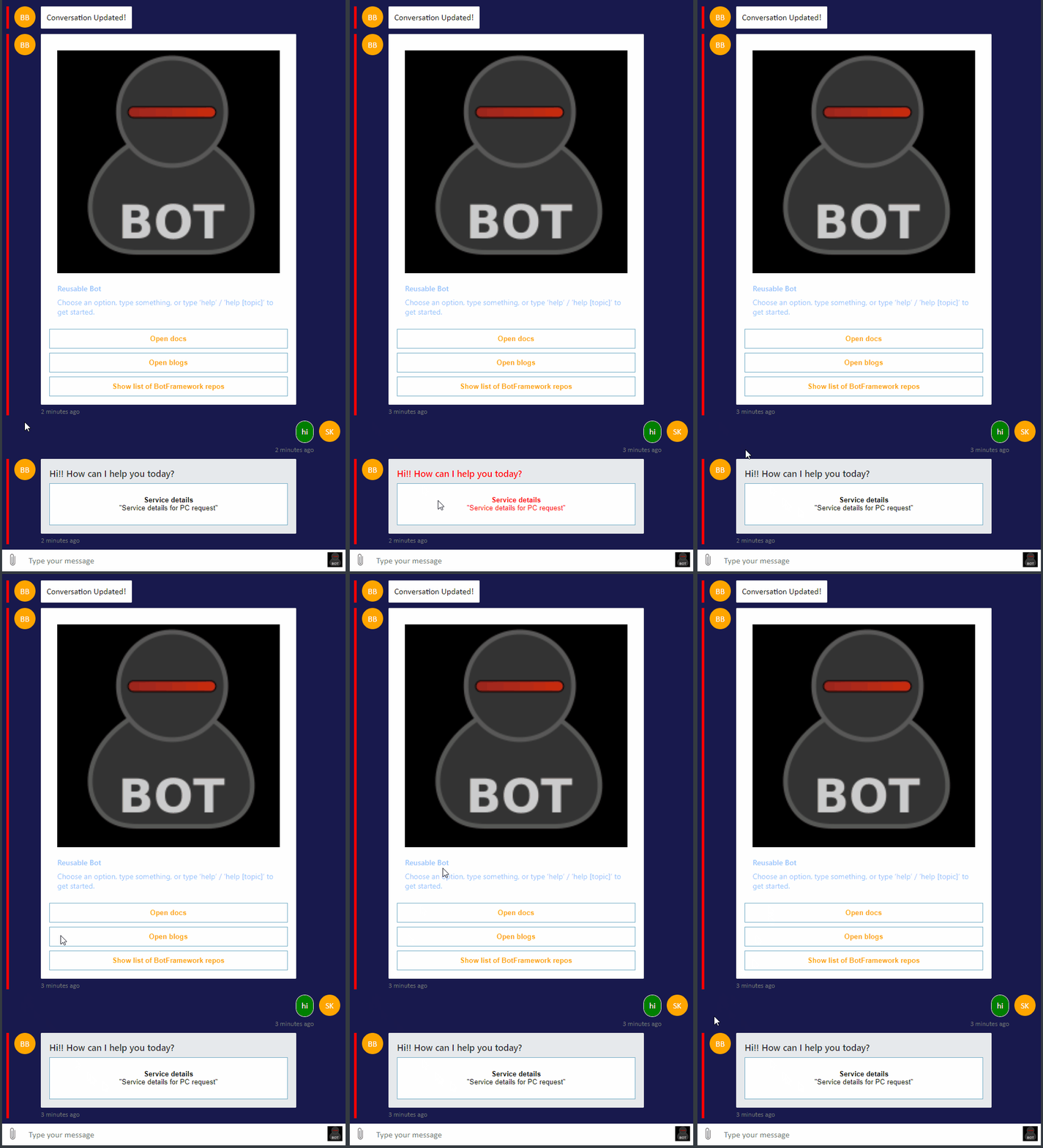
这是可行的一点黑客。简而言之,以下是你的步骤:
- 在您的自适应卡中创建一个“触发器”属性,并为其分配一个唯一值。
- 创建一个寻找触发器值的
activityMiddleware。接收到后,通过将id. - Add纯CSS附加到您的html中,根据步骤2中附加的
id来更新容纳传入自适应卡的元素。 - 将
activityMiddleware对象添加到直线。
。
希望得到帮助!
下面是示例代码:
mainDialog.js -从我的机器人发送的自适应卡
  async basicAdaptiveCard ( stepContext ) {
    const card = {
      "$schema": "http://adaptivecards.io/schemas/adaptive-card.json",
      "type": "AdaptiveCard",
      "version": "1.0",
      "trigger": "ServiceCardTrigger",
      "body": [
        {
          "type": "TextBlock",
          "text": "Hi!! How can I help you today?",
          "weight": "Bolder",
          "size": "Medium"
        }
      ],
      "actions": [
        {
          "type": "Action.Submit",
          "title": "Placeholder Message",
          "data": "close"
        }
      ]
    }

    const ac_card = CardFactory.adaptiveCard( card );
    await stepContext.context.sendActivity(
      {
        attachments: [ ac_card ]
      }
    );
    return { status: DialogTurnStatus.waiting };
  }
index.html -只显示基本位元。在这个过程中,我通过一个包含“服务详细信息”的值的按钮进行跟踪。它很简单,但适用于演示。必要时更新。
<style>
  #ServiceCard {
    background-color: #e6eaed;
    color: #323232;
  }

  #ServiceCard:hover p {
    color: red
  }
</style>

[...]

<script type="text/babel">
  [...]

  const activityMiddleware = () => next => card => {
    const { activity: { from, type, attachments } } = card;
    if (type === 'message' && from.role === 'bot') {
      if(attachments && attachments[0].content.trigger === 'ServiceCardTrigger') {
        let children = document.getElementsByClassName('ac-adaptiveCard');
        for (let i = 0, j = children.length; i <= j; i++) {
          if(i === j - 1) {
            let child = children[i];
            if(child.lastChild.innerHTML.includes('Service details')) {
              child.id = 'ServiceCard';
            }
          }
        };
      }
    }
    else {
      return next(card)
    }
  }

  [...]

  window.ReactDOM.render(
    <ReactWebChat
      activityMiddleware={ activityMiddleware }
      directLine={ directLine }
      username={'johndoe'}
    />,
    document.getElementById( 'webchat' )
  );

  [...]
</script>
页面原文内容由Stack Overflow提供。腾讯云小微IT领域专用引擎提供翻译支持
原文链接:
https://stackoverflow.com/questions/58105510
复制相关文章
相似问题
腾讯云开发者

Copyright © 2013 - 2026 Tencent Cloud. All Rights Reserved. 腾讯云 版权所有
深圳市腾讯计算机系统有限公司 ICP备案/许可证号:粤B2-20090059  粤公网安备44030502008569号
腾讯云计算(北京)有限责任公司 京ICP证150476号 | 京ICP备11018762号