
Python Gtk+3教程23应用程序没有显示什么是预期的?
Python Gtk+3教程23应用程序没有显示什么是预期的?
提问于 2019-09-28 16:30:05
我正在为桌面应用程序开发一个UI。我已经看到“菜单”被废弃了,因此决定第一次使用Gtk.Application类。
在下面的链接https://python-gtk-3-tutorial.readthedocs.io/en/latest/application.html#example中,它们提供了以下代码:
import sys
import gi
gi.require_version('Gtk', '3.0')
from gi.repository import GLib, Gio, Gtk
# This would typically be its own file
MENU_XML="""
<?xml version="1.0" encoding="UTF-8"?>
<interface>
<menu id="app-menu">
<section>
<attribute name="label" translatable="yes">Change label</attribute>
<item>
<attribute name="action">win.change_label</attribute>
<attribute name="target">String 1</attribute>
<attribute name="label" translatable="yes">String 1</attribute>
</item>
<item>
<attribute name="action">win.change_label</attribute>
<attribute name="target">String 2</attribute>
<attribute name="label" translatable="yes">String 2</attribute>
</item>
<item>
<attribute name="action">win.change_label</attribute>
<attribute name="target">String 3</attribute>
<attribute name="label" translatable="yes">String 3</attribute>
</item>
</section>
<section>
<item>
<attribute name="action">win.maximize</attribute>
<attribute name="label" translatable="yes">Maximize</attribute>
</item>
</section>
<section>
<item>
<attribute name="action">app.about</attribute>
<attribute name="label" translatable="yes">_About</attribute>
</item>
<item>
<attribute name="action">app.quit</attribute>
<attribute name="label" translatable="yes">_Quit</attribute>
<attribute name="accel"><Primary>q</attribute>
</item>
</section>
</menu>
</interface>
"""
class AppWindow(Gtk.ApplicationWindow):
def __init__(self, *args, **kwargs):
super().__init__(*args, **kwargs)
# This will be in the windows group and have the "win" prefix
max_action = Gio.SimpleAction.new_stateful("maximize", None,
GLib.Variant.new_boolean(False))
max_action.connect("change-state", self.on_maximize_toggle)
self.add_action(max_action)
# Keep it in sync with the actual state
self.connect("notify::is-maximized",
lambda obj, pspec: max_action.set_state(
GLib.Variant.new_boolean(obj.props.is_maximized)))
lbl_variant = GLib.Variant.new_string("String 1")
lbl_action = Gio.SimpleAction.new_stateful("change_label", lbl_variant.get_type(),
lbl_variant)
lbl_action.connect("change-state", self.on_change_label_state)
self.add_action(lbl_action)
self.label = Gtk.Label(label=lbl_variant.get_string(),
margin=30)
self.add(self.label)
self.label.show()
def on_change_label_state(self, action, value):
action.set_state(value)
self.label.set_text(value.get_string())
def on_maximize_toggle(self, action, value):
action.set_state(value)
if value.get_boolean():
self.maximize()
else:
self.unmaximize()
class Application(Gtk.Application):
def __init__(self, *args, **kwargs):
super().__init__(*args, application_id="org.example.myapp",
flags=Gio.ApplicationFlags.HANDLES_COMMAND_LINE,
**kwargs)
self.window = None
self.add_main_option("test", ord("t"), GLib.OptionFlags.NONE,
GLib.OptionArg.NONE, "Command line test", None)
def do_startup(self):
Gtk.Application.do_startup(self)
action = Gio.SimpleAction.new("about", None)
action.connect("activate", self.on_about)
self.add_action(action)
action = Gio.SimpleAction.new("quit", None)
action.connect("activate", self.on_quit)
self.add_action(action)
builder = Gtk.Builder.new_from_string(MENU_XML, -1)
self.set_app_menu(builder.get_object("app-menu"))
def do_activate(self):
# We only allow a single window and raise any existing ones
if not self.window:
# Windows are associated with the application
# when the last one is closed the application shuts down
self.window = AppWindow(application=self, title="Main Window")
self.window.present()
def do_command_line(self, command_line):
options = command_line.get_options_dict()
# convert GVariantDict -> GVariant -> dict
options = options.end().unpack()
if "test" in options:
# This is printed on the main instance
print("Test argument recieved: %s" % options["test"])
self.activate()
return 0
def on_about(self, action, param):
about_dialog = Gtk.AboutDialog(transient_for=self.window, modal=True)
about_dialog.present()
def on_quit(self, action, param):
self.quit()
if __name__ == "__main__":
app = Application()
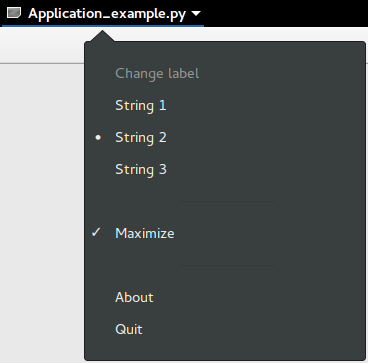
app.run(sys.argv)其中,它们将下列图像显示为所述输出:
然而,我正在运行它,并且正在显示这个窗口:
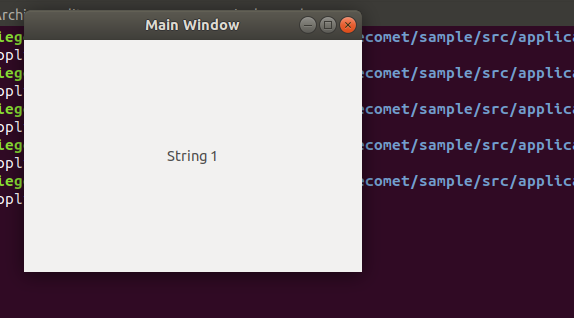
我只是在抨击"python3 application.py“,我想我想知道我是哑巴还是代码不再是什么样子了。
回答 1
Stack Overflow用户
回答已采纳
发布于 2019-09-29 01:40:38
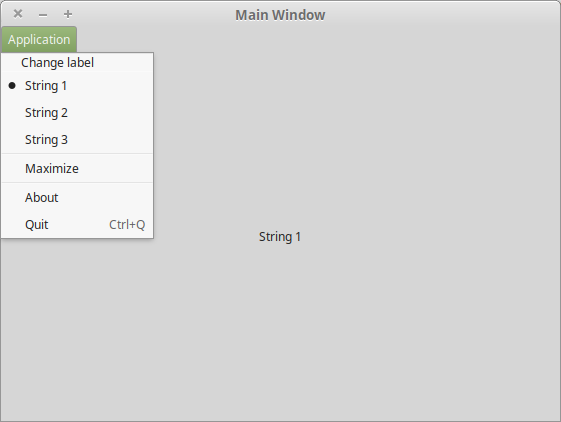
这肯定是发行版和/或窗口管理器的问题,因为在Linux 19中,我得到了这个窗口:
页面原文内容由Stack Overflow提供。腾讯云小微IT领域专用引擎提供翻译支持
原文链接:
https://stackoverflow.com/questions/58148269
复制相关文章
相似问题
腾讯云开发者

Copyright © 2013 - 2026 Tencent Cloud. All Rights Reserved. 腾讯云 版权所有
深圳市腾讯计算机系统有限公司 ICP备案/许可证号:粤B2-20090059  粤公网安备44030502008569号
腾讯云计算(北京)有限责任公司 京ICP证150476号 | 京ICP备11018762号