
加载资源失败:服务器在角-7和Laravel-5.8中的状态为422 (不可处理实体)。
我正在开发一个客户端门户应用程序,使用角-7作为前端和Laravel-5.8。我正在使用Larave空间进行用户管理。我有三张桌子:
拉勒维尔:
CREATE TABLE `client` (
`id` bigint(20) UNSIGNED NOT NULL AUTO_INCREMENT PRIMARY KEY,
`client_id` varchar(255) COLLATE utf8mb4_unicode_ci NOT NULL,
`client_name` varchar(255) COLLATE utf8mb4_unicode_ci NOT NULL
) ENGINE=InnoDB DEFAULT CHARSET=utf8mb4 COLLATE=utf8mb4_unicode_ci;


CREATE TABLE `users` (
`id` bigint(20) UNSIGNED NOT NULL AUTO_INCREMENT PRIMARY KEY,
`name` varchar(255) COLLATE utf8mb4_unicode_ci NOT NULL,
`email` varchar(255) COLLATE utf8mb4_unicode_ci NOT NULL,
`password` varchar(255) COLLATE utf8mb4_unicode_ci NOT NULL,
`client_id` varchar(255) COLLATE utf8mb4_unicode_ci DEFAULT NULL,
) ENGINE=InnoDB DEFAULT CHARSET=utf8mb4 COLLATE=utf8mb4_unicode_ci;
从上面的表中,我有两个类: User和Client。
- 每个用户都属于一个客户端,但不是更多。客户端的
- client_id也是主键。
UsersController
<?php
namespace App\Http\Controllers;
use Illuminate\Http\Request;
use Illuminate\Support\Facades\Auth;
use Carbon\Carbon;
use App\User;
use App\Client;
use Spatie\Permission\Models\Role;
use Spatie\Permission\Models\Permission;
use App\Notifications\SignupActivate;
use Avatar;
use Storage;
use App\Guardian;

class UsersController extends Controller
{

public function update(Request $request, $id)
{
    if(!Auth::user()->hasPermissionTo('Edit Users') && !Auth::user()->id==$id)
        return response()->json([ "message" => 'User do not have permission'], 401);
    $rules = [
        'name' => 'required|min:2',
        'client_id' => 'required'
    ];

    $this->validate($request, $rules);

    $user = User::findOrFail($id);


    if($request->role){
        foreach($user->roles as $role)
            $user->removeRole($role);
        foreach($request->role as $role)
            $user->assignRole($role);
    }

    $user->name = $request->name;
    $user->save();

    return response()->json(['data' => $user], 201);
}
}
ClientController.php
    public function clientAll(){
    return response()->json(Client::all());
}
api.php
Route::group([
'middleware' => 'auth:api'
], function () {
Route::get('users/profile', 'UsersController@profile');
Route::resource('users', 'UsersController', ['only' =>        ['index', 'show', 'store', 'update', 'destroy']]);
Route::post('users/pause', 'UsersController@pause');
});

Route::group([
'middleware' => 'auth:api'
], function () {
Route::get('client/clientall', 'ClientController@clientAll');
Route::resource('client', 'ClientController', ['only' =>    ['index', 'show', 'store', 'update', 'destroy']]);
});
在更新用户日期期间,我希望使用client_id/client_name填充下拉选择选项。这样我就可以用client_id更新user表了。
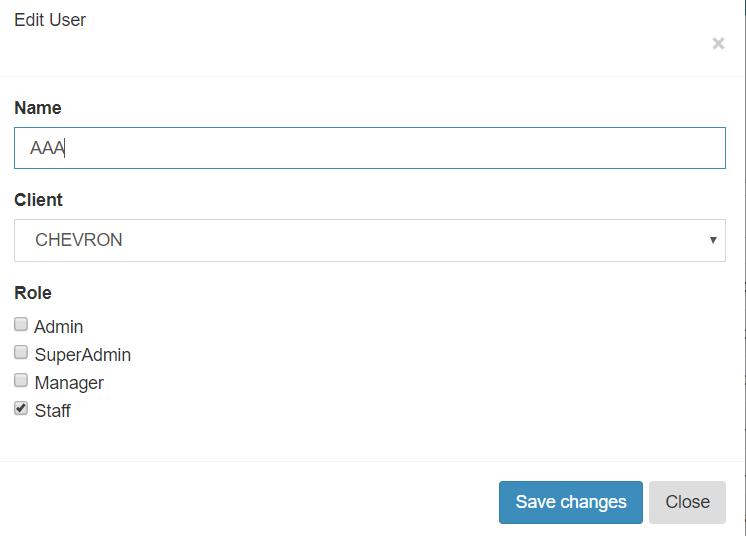
角度
user.component.ts
import { Component, OnInit } from '@angular/core';
import { HttpClient } from '@angular/common/http';
import { ApiService } from '../../../shared/services/api.service';
import { SnotifyService } from 'ng-snotify';
import { Router, ActivatedRoute } from '@angular/router';
import {NgbPaginationConfig} from '@ng-bootstrap/ng-bootstrap';

import { TokenService } from '../../../shared/services/token.service';
import { RolesCheckService } from 'src/app/shared/services/roles-check.service';

@Component({
  selector: 'app-users',
  templateUrl: './users.component.html',
  styleUrls: ['./users.component.scss']
})
export class UsersComponent implements OnInit {

users = null;     //Store Users Data
roles = null;     //Store all roles Data
clients = null;

public error = {
'role' : null,
'email' : null,
'client_id' : null,
'name' : null,
'password' : null
};
   //Form errors
 keyword = null;   //Current Search Keyword
 pagination = {    //Current Pagination data
'page' :  '1',
'max' : '10'
}
 role = null;
 User = 'User';

data = {          //User Update Data
 "id" : null,
 "name" : null,
 "client_id" : null,
 "role" : []
}

form = {         //New User add Data
  'name' : null,
  'email' : null,
  'client_id' : null,
  'password' : null,
  'password_confirmation' : null,
  'role' : []
 }

 headers = {     //Token for API Authorization
 'Authorization' : this.token.get(),
 'X-Requested-With' : 'XMLHttpRequest'
  }

  sortData = {        //Current Sort Data
   "col" : null,
   "order" : null
  }

 isSuperAdmin = false;

 constructor(private roleManage : RolesCheckService , private route : ActivatedRoute, private pg:   NgbPaginationConfig, private token : TokenService, private http : HttpClient, private router :    Router,private api : ApiService, private notify : SnotifyService) {
  pg.boundaryLinks = true;
  pg.rotate = true;
  }

 ngOnInit() {

 console.log('isSuperAdmin: ' + this.roleManage.isSuperAdmin);
 this.isSuperAdmin = this.roleManage.isSuperAdmin;
 this.route.queryParams.subscribe(params => {
   if(params['role']){
    this.role = params['role'];
    this.User = this.role;

  } else {
    this.User = 'User';
    this.role = '';
  }
})
this.notify.clear();
this.notify.info("Loading...", {timeout: 0});

if(this.keyword) {
  this.api.get('users?search=' + this.keyword + '&page=' + this.pagination.page + '&sort=' + this.sortData.col + '&order=' + this.sortData.order + '&role=' + this.role, this.headers).subscribe(
    data => this.datahandler(data),
    error => { this.notify.clear(); console.log(error); this.notify.error(error.error.message); }
  );
} else {
  this.api.get('users?page=' + this.pagination.page + '&sort=' + this.sortData.col + '&order=' + this.sortData.order + '&role=' + this.role, this.headers).subscribe(
    data => this.datahandler(data),
    error => { console.log(error); this.notify.error(error.error.message); }
  );
}
this.api.get('role', this.headers).subscribe(
  data => { console.log(data); this.roles=data; },
  error => { console.log(error); this.notify.clear(); this.notify.error(error.error.message); }
);
this.api.get('client/clientall', this.headers).subscribe(
  data => this.clients = data,
  error => { this.notify.error(error.error.message) }
 );
}


 datahandler(data){
  console.log(data.data);
  this.notify.clear();
  this.users = data.data;
  this.pagination.max = data.total;
}

//sort handler
sort(col){
 console.log(col);
 if(this.sortData.order=="asc" && this.sortData.col==col){
  this.sortData.order = "desc"
 } else if(this.sortData.order=="desc" && this.sortData.col==col){
  this.sortData.order = null;
  col = null;
 } else {
  this.sortData.order = "asc"
 }
 this.sortData.col = col;
 this.ngOnInit();
}

//Paginate Handling
 paginateClick(page){
  console.log(page);
  this.pagination.page = page;
  this.ngOnInit();
 }

 //Serach Handling
 search(){
 this.ngOnInit();
 }

//Pause or Active User Handling
 pause(id){
 this.notify.clear();
 console.log(id);
 var body = {
  "id" : id
 }
 return this.api.post('users/pause', body, this.headers).subscribe(
  data => {this.notify.info("Success", {timeout: 2000}); this.ngOnInit(); },
  error => this.notify.error(error.message, {timeout: 0})
  );
 }

//User edit Handling
edit(id){
 this.notify.clear();
 this.data.name = null;
 this.data.role = [];
 this.api.get('users/'+id, this.headers).subscribe(
   data => this.editDataHandler(data),
   error => this.notify.error("User Not Found", {timeout: 0})
 );
 this.data.id = id;
 var modal = document.getElementById('editModal');
 modal.style.display = "block";
}

editDataHandler(data){
 console.log(data);
this.data.name = data.name;
for(var i=0; i<data.roles.length; i++)
  this.data.role.push(data.roles[i].name);
}

 checkbox(event){
   if(event.srcElement.checked){
   this.data.role.push(event.srcElement.name);
  } else {
   var index =this.data.role.indexOf(event.srcElement.name);
   this.data.role.splice(index, index+1);
  }
  console.log(this.data.role);
 }

editsubmit(){
  this.notify.clear();
  this.notify.info("Wait...", {timeout: 0});
  this.api.put('users/'+this.data.id, this.data, this.headers).subscribe(
   data => {
    this.notify.clear();
    this.notify.info("User Updated Successfully", {timeout: 2000});
    this.ngOnInit();
    this.closeEditModal();
  },
  error => { this.notify.clear(); this.error = error.error.errors; }
 );
}

closeEditModal(){
 this.error = {
  'role' : null,
  'email' : null,
  'client_id' : null,
  'name' : null,
  'password' : null
 };
 var modal = document.getElementById('editModal');
 modal.style.display = "none";
}

//User delete Handling
delete(id){
 this.notify.clear();
 this.notify.warning('Are you sure you want to detele this User?', 'Delete User', {
  timeout: 0,
  showProgressBar: false,
  closeOnClick: true,
  pauseOnHover: true,
  buttons: [
    {text: 'Yes', action: () => {
      var headers = {
        'Authorization' : this.token.get()
      }
      return this.api.delete('users/'+id, headers).subscribe(
        data => {this.notify.info("Success", {timeout: 2000}); this.ngOnInit(); },
        error => this.notify.error(error.message, {timeout: 0})
      );
    }, bold: false},
    {text: 'No'}
  ]
 });
}

//New User add Handling
add(){
 this.notify.clear();

 this.form.name = null;
 this.form.email = null;
 this.form.password = null;
 this.form.password_confirmation = null;
 this.form.role = [];

 var modal = document.getElementById('addModal');
 modal.style.display = "block";
}


checkboxAdd(event){
  if(event.srcElement.checked){
    this.form.role.push(event.srcElement.name);
  } else {
    var index =this.form.role.indexOf(event.srcElement.name);
    this.form.role.splice(index, index+1);
  }
  console.log(this.form.role);
 }

  addModalSubmit(){
   this.notify.clear();
   this.notify.info("Wait...", {timeout: 0});
   this.api.post('users', this.form, this.headers).subscribe(
    data => {
     this.notify.clear();
     this.notify.info("User Added Successfully", {timeout: 2000});
    this.ngOnInit();
    this.closeAddModal();
   },
   error => { this.notify.clear(); this.error = error.error.errors; }
  );

 }

 closeAddModal(){
  this.error = {
   'role' : null,
   'email' : null,
   'client_id' : null,
   'name' : null,
   'password' : null
  };
 var modal = document.getElementById('addModal');
 modal.style.display = "none";
}
}
user.component.html
<!-- The Modal -->
<div id="addModal" class="modal" style="background-color: rgb(0,0,0); background-color: rgba(0,0,0,0.4);">
<div class="modal-dialog" role="document">
<div class="modal-content">
<div class="modal-header">
<button type="button" class="close" (click)='closeAddModal()'>
<span aria-hidden="true">×</span>
</button>
</div>
<div class="modal-body">
<div class="alert alert-danger" [hidden]="!error.role">
{{ error.role }}
</div>
<div class="alert alert-danger" [hidden]="!error.email">
{{ error.email }}
</div>
<div class="alert alert-danger" [hidden]="!error.name">
{{ error.name }}
</div>
<div class="alert alert-danger" [hidden]="!error.password">
{{ error.password }}
</div>
<form #editUserForm=ngForm>
<div class="form-group">
<label for="name">Name</label>
<input type="name" name="name" id="inputName" class="form-control" placeholder="Name" [(ngModel)]="form.name" required>
</div>
<div class="form-group">
<label for="name">Email</label>
<input type="email" name="email" id="inputEmail" class="form-control" placeholder="Email address" required [(ngModel)]="form.email">
</div>
<div class="form-group">
<label for="name">Role</label>
<div *ngFor="let role of roles">
<input type="checkbox" name="{{ role.name }}" value="{{ role.name }}" (change)="checkboxAdd($event)"> {{ role.name }}
</div>
</div>
<div class="form-group">
<label for="name">Password</label>
<input type="password" name="password" id="inputPassword" [(ngModel)]="form.password" class="form-control" placeholder="Password" required>
</div>
<div class="form-group">
<label for="name">Password Confirmation</label>
<input type="password" name="password_confirmation" id="inputPasswordConfirm" [(ngModel)]="form.password_confirmation" class="form-control" placeholder="Re enter Password" required>
</div>
</form>
</div>
<div class="modal-footer">
<button type="button" class="btn btn-primary" (click)='addModalSubmit()' [disabled]="!editUserForm.valid">Save changes</button>
<button type="button" class="btn btn-secondary" (click)='closeAddModal()'>Close</button>
</div>
</div>
</div>
当我单击submit按钮(保存更改)时,我得到了以下错误消息:
未能加载资源:服务器响应状态为422 (不可处理实体)
当我在网络上检查开发人员的工具时,我发现了以下错误消息:

我如何解决这个问题?
回答 1
Stack Overflow用户
发布于 2019-09-30 18:22:15
每当您要求Controller验证请求时,Laravel就会返回HTTP 422,但是验证失败。您可以在update函数的UserController中使用以下行的验证:
   $rules = [
        'name' => 'required|min:2',
        'client_id' => 'required'
    ];
$this->validate($request, $rules);所以其中一条规则肯定是不合格的。幸运的是,Laravel为您返回了一个充满错误的MessageBag。如果您的Accepts HTTP错误被设置为json,那么它将是一个很好的人类可读的响应。继续,打开用于测试和查看网络响应的浏览器的开发工具。你会看到这样的东西:
{
    "message": "The given data was invalid.",
    "errors": {
        "name": [
            "The name must be at least 2 characters long."
        ]
    }
}
这个消息袋的验证错误将指向您的问题。
编辑:由于我们已经将其缩小到不能发送client_id的角度,有两种方法可以解决您的问题:
- 为client_id添加一个表单字段,该字段耦合到在更新调用中发送的
data对象的client_id:
。
<div class="form-group">
    <label for="name">Client</label>
    <select [(ngModel)]="data.client_id">
        <option *ngFor="let client of clients" [value]="client.id">
            {{ client.name }}
        </option>
    </select>
</div>- 把它伪装成概念的证明,并从中找出答案;)
editsubmit(){

  this.data.client_id = 1;

  this.notify.clear();
  this.notify.info("Wait...", {timeout: 0});
  this.api.put('users/'+this.data.id, this.data, this.headers).subscribe(
   data => {
    this.notify.clear();
    this.notify.info("User Updated Successfully", {timeout: 2000});
    this.ngOnInit();
    this.closeEditModal();
  },
  error => { this.notify.clear(); this.error = error.error.errors; }
 );
}https://stackoverflow.com/questions/58172396
复制相似问题
腾讯云开发者

Copyright © 2013 - 2026 Tencent Cloud. All Rights Reserved. 腾讯云 版权所有
深圳市腾讯计算机系统有限公司 ICP备案/许可证号:粤B2-20090059  粤公网安备44030502008569号
腾讯云计算(北京)有限责任公司 京ICP证150476号 | 京ICP备11018762号