
如何在数组中的vue表中显示数据
如何在数组中的vue表中显示数据
提问于 2019-10-01 15:42:07
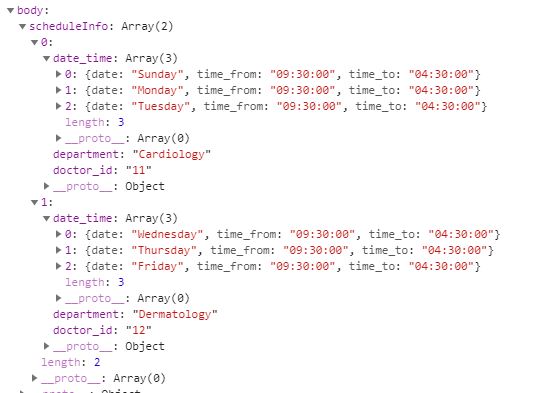
我试图在vue表中显示从serve接收到的数据,但是数据是复杂的。服务器返回数组。所以在vue桌子上展示它们有点困难。
,这是我收到的的回复
vue表的字段定义
`
    export const FieldsDef_doctor_schedule = [
    {
        name:'doctor_id',
        title: 'doctor ID',
        sortField: 'id',
        callback: 'scheduleId'
    },
    {
        name:'department',
        title: 'Department',
        sortField: 'department'
    },
    {
        name:'date',
        title:'Available Time',
        callback:'schedueleCall'
    },
    {
                 name: '__slot:actions',
                 title: 'Actions',
                 dataClass: 'center aligned'
         }
    ]
`
Vue表
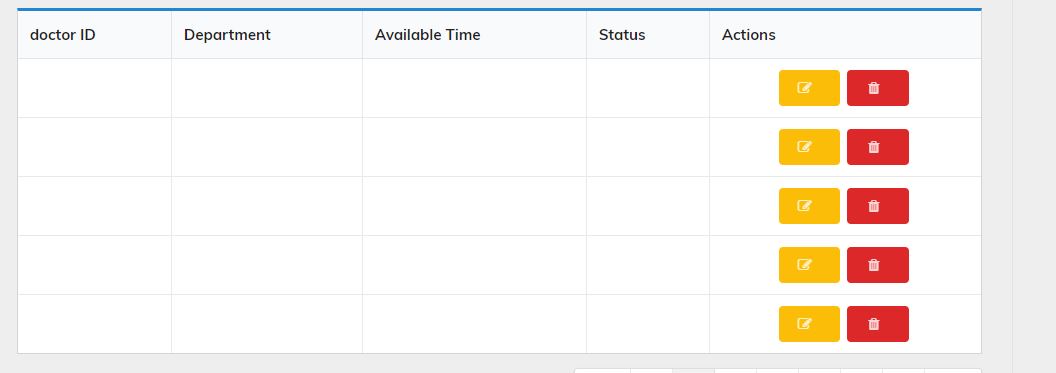
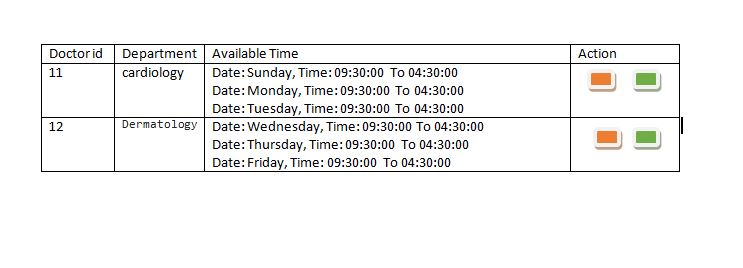
由于日期和时间信息对应于每个doctor_id和department。我希望vue表根据医生的id部门在一行中显示名为date_time的每个eache 3数组。
Demo
有人能帮忙吗?
模板代码
<template>
  <div id="schedule">
    <div class="page-wrapper">
      <div class="container" style="margin-top: 25px;margin-left: 50px;">
        <div class="row">
          <div class="col-md-7">
            <h4 class="page-title">Schedule</h4>
          </div>
          <div class="col-md-4 text-right m-b-20">
            <router-link class="ui button positive" to="/admin/doctors_schedule/addschedule">
              <i class="plus icon"></i>
              <strong>
                Add
                Schedule
              </strong>
            </router-link>
          </div>
        </div>
        <div class="row">
          <div class="col-md-11">
            <hr />
          </div>
        </div>
        <div class="row">
          <div class="col-md-11 border">
            <div class="ui container">
              <filter-bar></filter-bar>
              <vuetable
                ref="vuetable"
                api-url="https://vuetable.ratiw.net/api/users"
                :fields="fields"
                pagination-path
                :per-page="5"
                :multi-sort="true"
                :sort-order="sortOrder"
                :append-params="moreParams"
                @vuetable:pagination-data="onPaginationData"
              >
                <template slot="actions" slot-scope="props">
                  <div class="custom-actions">
                    <router-link to="/admin/doctors_schedule/editschedule" class="ui button yellow">
                      <i class="edit icon"></i>
                    </router-link>
                    <button
                      class="ui button red"
                      @click="onAction('delete-item', props.rowData,
      props.rowIndex)"
                    >
                      <i class="trash alternate icon"></i>
                    </button>
                  </div>
                </template>
              </vuetable>
              <div class="vuetable-pagination ui basic segment grid">
                <vuetable-pagination-info ref="paginationInfo"></vuetable-pagination-info>
                <vuetable-pagination
                  ref="pagination"
                  @vuetable-pagination:change-page="onChangePage"
                ></vuetable-pagination>
              </div>
            </div>
          </div>
        </div>
      </div>
    </div>
  </div>
</template>
  <script>
import Vue from "vue";
import VueEvents from "vue-events";
import Vuetable from "vuetable-2/src/components/Vuetable";
import VuetablePagination from "vuetable-2/src/components/VuetablePagination";
import VuetablePaginationInfo from "vuetable-2/src/components/VuetablePaginationInfo";
import FilterBar from "@/components/Pages/Admin/import_details/FilterBar";
import { FieldsDef_doctor_schedule } from "@/components/Pages/Admin/import_details/FieldsDef_doctor_schedule";
import { apiDomain } from "@/components/Pages/Authentication/config";

Vue.use(VueEvents);
Vue.component("filter-bar", FilterBar);

export default {
  components: {
    Vuetable,
    VuetablePagination,
    VuetablePaginationInfo
  },
  data() {
    return {
      fields: FieldsDef_doctor_schedule,
      sortOrder: [],
      moreParams: {},
      apiURL: ""
    };
  },
  mounted() {
    this.$events.$on("filter-set", eventData => this.onFilterSet(eventData));
    this.$events.$on("filter-reset", e => this.onFilterReset());
  },
  methods: {
    scheduleId(value) {
      return value;
      console.log(value);
    },
    onPaginationData(paginationData) {
      this.$refs.pagination.setPaginationData(paginationData);
      this.$refs.paginationInfo.setPaginationData(paginationData);
    },
    onChangePage(page) {
      this.$refs.vuetable.changePage(page);
    },
    onAction(action, data, index) {
      console.log("slot action: " + action, data.name, index);
    },
    onFilterSet(filterText) {
      this.moreParams.filter = filterText;
      Vue.nextTick(() => this.$refs.vuetable.refresh());
    },
    onFilterReset() {
      delete this.moreParams.filter;
      Vue.nextTick(() => this.$refs.vuetable.refresh());
    }
  },
  created() {
    this.apiURL = apiDomain + "api/getDoctorScheduleInfo";
    this.$http
      .get(this.apiURL)
      .then(response => {
        // console.log(response.body.scheduleInfo)
        console.log(response);
        response.body.scheduleInfo.forEach(function(val) {
          // console.log(val.date_time)
          val.date_time.forEach(function(val2) {
            console.log(
              "Date: " +
                val2.date +
                ", Time: " +
                val2.time_from +
                " To " +
                val2.time_to
            );
          });
        });
      })
      .catch(e => {
        console.log(e);
      });
  }
};
</script>回答 1
Stack Overflow用户
回答已采纳
发布于 2019-10-01 21:33:15
我注意到的东西很少..。
- 您缺少了
data-path属性,因为您的数据在sheduleInfo变量中
ie:data-path="sheduleInfo"
- ...but,,您还可以使用
transform属性来处理/转换数据。由于您希望遍历内容,这并不是(单独)解决多个条目问题。
- 向模板添加附加槽,并更新配置(更新日期字段改为使用
__slot:availableTimes)
。
  <template slot="availableTimes" slot-scope="props">
    <div v-for="(dt, i)props.rowData.date_time" :key="i">
      Date {{dt.date}} ...etc
    </div>
</template>页面原文内容由Stack Overflow提供。腾讯云小微IT领域专用引擎提供翻译支持
原文链接:
https://stackoverflow.com/questions/58188263
复制相关文章
相似问题
腾讯云开发者

Copyright © 2013 - 2026 Tencent Cloud. All Rights Reserved. 腾讯云 版权所有
深圳市腾讯计算机系统有限公司 ICP备案/许可证号:粤B2-20090059  粤公网安备44030502008569号
腾讯云计算(北京)有限责任公司 京ICP证150476号 | 京ICP备11018762号