
用s7读取C#中的西门子PLC S7netplus字符串
我很难用S7读取西门子PLC 1500的数据库数据。
情况:
- 我有一个正在运行的C#应用程序。
- I在PLC上连接得很好。
- 我可以读取布尔、UInt、UShot、Bytes
等数据。
但我不知道如何读取字符串数据(见下图)
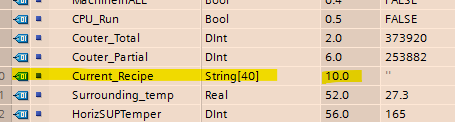
要像布尔值一样读取其他数据,我使用以下调用:
plc.Read("DB105.DBX0.0")我了解到,在数据库105 (DB105)中读取的数据类型为布尔值(DBX),偏移量为0.0,我希望对字符串应用相同的读取类型。因此,我在我的示例中尝试了"DB105.DBB10.0“。但它返回Byte类型的值"40“(我应该有其他的)。
我发现还有另一种阅读方法
plc.ReadBytes(DataType DB, int DBNumber, int StartByteArray, int lengthToRead)但是,我很难知道如何将它应用到我的示例中(我知道必须将其转换为string )。
要继续:-是否有一种简单的方法,使用像"DB105.DBX0.0“这样的字符串来读取西门子PLC中的字符串数据?-如果不是,如何在我的示例中使用ReadBytes函数?
谢谢你的帮忙
回答 2
Stack Overflow用户
发布于 2019-10-03 15:59:23
我设法通过ReadBytes方法读取了我的字符串值。在我的例子中,我需要传递这样的值:
plc.Read(DataType.DataBlock, 105, 12, VarType.String, 40);为什么是12?因为一个字节字符串的第二个八进制代表长度。所以10到12返回一个值作为40,这是长度。
我重写了read方法,以接受像这样的'easy‘调用:
    public T Read<T>(object pValue)
            {
                var splitValue = pValue.ToString().Split('.');
                //check if it is a string template (3 separation ., 2 if not)
                if (splitValue.Count() > 3 && splitValue[1].Substring(2, 1) == "S")
                {
                    DataType dType;

                    //If we have to read string in other dataType need development to make here.
                    if (splitValue[0].Substring(0, 2) == "DB")
                        dType = DataType.DataBlock;
                    else
                        throw new Exception("Data Type not supported for string value yet.");

                    int length = Convert.ToInt32(splitValue[3]);
                    int start = Convert.ToInt32(splitValue[1].Substring(3, splitValue[1].Length - 3));
                    int MemoryNumber = Convert.ToInt32(splitValue[0].Substring(2, splitValue[0].Length - 2));

                    // the 2 first bits are for the length of the string. So we have to pass it
                    int startString = start + 2;
                    var value = ReadFull(dType, MemoryNumber, startString, VarType.String, length);
                    return (T)value;
                }
                else
                {
                    var value = plc.Read(pValue.ToString());

                    //Cast with good format.
                    return (T)value;
                }
}
现在,我可以像这样调用我的读取函数:使用现有的基本调用:
var element = mPlc.Read<bool>("DB10.DBX1.4").ToString();=>在数据库10中读取字节1上的布尔值,在数据库10中读取=> =>,在字节4上读取int值,在字节
中读取八进制0。
对于字符串的过度调用:
var element = mPlc.Read<string>("DB105.DBS10.0.40").ToString()=>在数据库105中读取字节10和八进制0上的字符串值,长度为40
。
希望这对任何人都有帮助:)
Stack Overflow用户
发布于 2022-03-21 00:01:20
我做的稍微简单一些;我忽略了第一个字节,然后读取第二个字节来给出字符串的长度。然后,我使用它给出字符串的字节长度。例如,PLC给了我DB偏移量288作为字符串的开始。它使用的是S7Plus NuGet,DB地址为666。
注意,请求字符串会严重减慢通信速度,所以最好只在有新值时才请求字符串。
     TempStringLength(0) = PLC.Read(DataType.DataBlock, 666, 289, VarType.Byte, 1) 'Length of String.'
TempStringArray(0) = PLC.Read(DataType.DataBlock, 666, 290, VarType.String, TempStringLength(0))'Actual String.'https://stackoverflow.com/questions/58207603
复制相似问题
腾讯云开发者

Copyright © 2013 - 2026 Tencent Cloud. All Rights Reserved. 腾讯云 版权所有
深圳市腾讯计算机系统有限公司 ICP备案/许可证号:粤B2-20090059  粤公网安备44030502008569号
腾讯云计算(北京)有限责任公司 京ICP证150476号 | 京ICP备11018762号