
YTPlayer背景视频不会自动播放
YTPlayer背景视频不会自动播放
提问于 2019-10-06 02:09:37
我已经集成了插件https://github.com/pupunzi/jquery.mb.YTPlayer,遵循文档示例,我无法自动启动视频,用户必须单击才能播放它。
有一种方法可以模拟这一点击,或某种解决方案的视频开始加载,而不需要任何用户的行动。
示例的完整代码: https://jsfiddle.net/py7bkox3/
<div id="video"></div>
<div id="ctn">
  <h1>TITLE EXAMPLE</h1>
</div>
Javascript:
// When the document is ready
$(document).ready(function(){

  // Initialize YouTube player
  $("#video").YTPlayer({
    // URL of the YouTube video
    videoURL:'https://youtu.be/BsekcY04xvQ',
    // If you want it as background of your website
    // or of an element e.g #elementId
    containment: "#ctn",
    autoplay: true,
    controls: 0,
    mute: true,
    startAt: 0,
    opacity: 1,
    // Hide YouTube Controls
    showControls: false,
    onReady: function(){
    },
    onError: function(err){
      console.log("An error ocurred", err);
    }
  });
});
CSS
#ctn {
  display: block;
  margin: 0;
  padding: 250px 0 !important;
  width: 100%;
}回答 1
Stack Overflow用户
回答已采纳
发布于 2019-10-06 04:08:08
许多浏览器会阻止声音的自动播放,或者没有声音。这可能是浏览器的问题,而不是代码本身的问题。
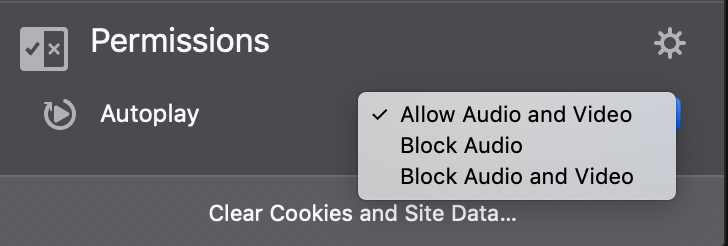
这是我在Firefox中自动播放设置的屏幕截图。我会检查你的浏览器设置,看看它是否阻塞自动播放。
页面原文内容由Stack Overflow提供。腾讯云小微IT领域专用引擎提供翻译支持
原文链接:
https://stackoverflow.com/questions/58253732
复制相关文章
相似问题
腾讯云开发者

Copyright © 2013 - 2026 Tencent Cloud. All Rights Reserved. 腾讯云 版权所有
深圳市腾讯计算机系统有限公司 ICP备案/许可证号:粤B2-20090059  粤公网安备44030502008569号
腾讯云计算(北京)有限责任公司 京ICP证150476号 | 京ICP备11018762号