
垂直对齐‘粘性’列时,高度:自动?
垂直对齐‘粘性’列时,高度:自动?
提问于 2019-10-09 13:43:10
我试着在它的垂直轴上对一个粘稠的柱体。该列固定在表的右侧。
还有一张截图说明:
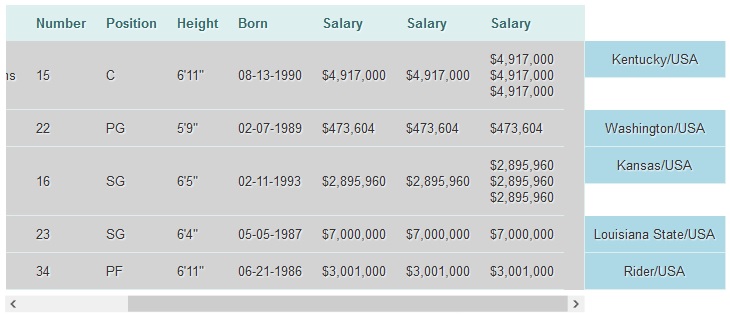
你可以看到,对于粘性的td(在lightblue),肯塔基州和堪萨斯州,他们没有填补整个排的高度。(设置高度:100%不工作)。
问题是,在我的需求中,必须自动设置非粘性td的高度,并且开发必须与IE11兼容。
如何用整个tr垂直对粘滞td进行居中?
HTML代码:
<div class="zui-wrapper">
    <div class="zui-scroller">
        <table class="zui-table">
            <thead>
                <tr>
                    <th>Name</th>
                    <th>Number</th>
                    <th>Position</th>
                    <th>Height</th>
                    <th>Born</th>
                    <th>Salary</th>
                    <th>Salary</th>
                    <th>Salary</th>
                    <th></th>
                </tr>
            </thead>
            <tbody>
                <tr>
                    <td>DeMarcus Cousins</td>
                    <td>15</td>
                    <td>C</td>
                    <td>6'11"</td>
                    <td>08-13-1990</td>
                    <td>$4,917,000</td>
                    <td>$4,917,000</td>
                    <td>$4,917,000
                    $4,917,000<br>
                    $4,917,000<br>
                    $4,917,000</td>
                    <td class="zui-sticky-col">Kentucky/USA</td>
                </tr>
                <tr>
                    <td>Isaiah Thomas</td>
                    <td>22</td>
                    <td>PG</td>
                    <td>5'9"</td>
                    <td>02-07-1989</td>
                    <td>$473,604</td>
                    <td>$473,604</td>
                    <td>$473,604</td>
                    <td class="zui-sticky-col">Washington/USA</td>
                </tr>
                <tr>
                    <td>Ben McLemore</td>
                    <td>16</td>
                    <td>SG</td>
                    <td>6'5"</td>
                    <td>02-11-1993</td>
                    <td>$2,895,960</td>
                    <td>$2,895,960</td>
                    <td>$2,895,960</td>
                    <td class="zui-sticky-col">Kansas/USA</td>
                </tr>
                <tr>
                    <td>Marcus Thornton</td>
                    <td>23</td>
                    <td>SG</td>
                    <td>6'4"</td>
                    <td>05-05-1987</td>
                    <td>$7,000,000</td>
                    <td>$7,000,000</td>
                    <td>$7,000,000</td>
                    <td class="zui-sticky-col">Louisiana State/USA</td>
                </tr>
                <tr>
                    <td>Jason Thompson</td>
                    <td>34</td>
                    <td>PF</td>
                    <td>6'11"</td>
                    <td>06-21-1986</td>
                    <td>$3,001,000</td>
                    <td>$3,001,000</td>
                    <td>$3,001,000</td>
                    <td class="zui-sticky-col">Rider/USA</td>
                </tr>
            </tbody>
        </table>
    </div>
</div>
及其CSS:
.zui-table {
    border: none;
    border-right: solid 1px #DDEFEF;
    border-collapse: separate;
    border-spacing: 0;
    font: normal 13px Arial, sans-serif;
}
.zui-table thead th {
    background-color: #DDEFEF;
    border: none;
    color: #336B6B;
    padding: 10px;
    text-align: left;
    text-shadow: 1px 1px 1px #fff;
    white-space: nowrap;
}
.zui-table tbody td {
    height: auto;
    border-bottom: solid 1px #DDEFEF;
    color: #333;
    padding: 10px;
    text-shadow: 1px 1px 1px #fff;
    white-space: nowrap;
}
.zui-table tbody tr {
    background-color: lightgrey;
}
.zui-wrapper {
    position: relative;
}
.zui-scroller {
    margin-right: 141px;
    overflow-x: scroll;
    overflow-y: visible;
    padding-bottom: 5px;
}
.zui-table .zui-sticky-col {
    border-left: solid 1px #DDEFEF;
    border-right: solid 1px #DDEFEF;
    right: 0;
    position: absolute;
    top: auto;
    width: 120px;
    display: flex;
    flex: 1;
    align-items:center;
    justify-content:center;
}回答 4
Stack Overflow用户
发布于 2019-10-09 14:27:27
使用位置:粘性而不是位置:绝对。转换:使用translate3d(0,0,0,0)对iOS设备提供更好的支持。示例: https://codepen.io/pratikmalvi/pen/gOOpzzK
.zui-table .zui-sticky-col {
    background-color: lightblue;
    height: auto;
    border-left: solid 1px #DDEFEF;
    border-right: solid 1px #DDEFEF;
    right: 0;
    width: 120px;
    position: sticky;
    right: 0;
    top: 0;
    -webkit-transform: translate3d(0, 0, 0);
    transform: translate3d(0, 0, 0);
}Stack Overflow用户
发布于 2019-10-09 14:04:03
将tr设置为position:relative;,然后定位最后一个td绝对有效。
刚加
margin-top: auto;
margin-bottom: auto;
bottom: 0;
top:0;

Stack Overflow用户
发布于 2019-10-09 14:20:30
这是不可能的,因为tr元素不支持位置。有两种方法可以使用div元素(标签和Css)创建表,或者第二种方式为粘性td元素放置一些jquery代码。
$('.zui-sticky-col').each(function(){
var prev_td = $(this).prev('td').outerHeight();
$(this).height(prev_td);
});页面原文内容由Stack Overflow提供。腾讯云小微IT领域专用引擎提供翻译支持
原文链接:
https://stackoverflow.com/questions/58305580
复制相关文章
相似问题
腾讯云开发者

Copyright © 2013 - 2026 Tencent Cloud. All Rights Reserved. 腾讯云 版权所有
深圳市腾讯计算机系统有限公司 ICP备案/许可证号:粤B2-20090059  粤公网安备44030502008569号
腾讯云计算(北京)有限责任公司 京ICP证150476号 | 京ICP备11018762号