
TextInpout自动更正显示在ios中相反[反应本机]
TextInpout自动更正显示在ios中相反[反应本机]
提问于 2019-10-13 10:47:12
它只发生在ios中,我附加了imag,您可以看到行为(autoCorrect for ios)
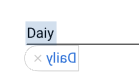
TextInput风格:
textInput: {
    flex: 1,
    alignSelf: 'center',
    fontSize: 16,
    lineHeight: 24,
    writingDirection: 'rtl',
    top: 8,
    textAlign: "right",
},- i尝试了rtl和ltr -右和左文本样式的所有组合,所以我认为与文本样式
不一样。
我在项目中附加了package.json文件:
"dependencies": {
    "@babel/plugin-proposal-decorators": "^7.4.4",
    "@babel/plugin-proposal-nullish-coalescing-operator": "^7.4.4",
    "@jumpn/react-native-jetifier": "^0.1.4",
    "@target-corp/react-native-svg-parser": "^1.0.6",
    "babel-preset-react-native": "^5.0.2",
    "bugsnag-react-native": "^2.21.1",
    "color": "^3.1.0",
    "faker": "^4.1.0",
    "hat": "^0.0.3",
    "lottie-ios": "2.5.3",
    "lottie-react-native": "2.6.1",
    "mobx": "3.4.0",
    "mobx-persist": "^0.4.1",
    "mobx-react": "^4.3.5",
    "moment": "^2.22.2",
    "moment-range": "^4.0.2",
    "pushwoosh-react-native-plugin": "^5.13.1",
    "react": "16.8.3",
    "react-native": "0.59.8",
    "react-native-check-box": "^2.1.7",
    "react-native-circle-checkbox": "^0.1.6",
    "react-native-collapsible": "^1.4.0",
    "react-native-config": "^0.11.7",
    "react-native-dash": "^0.0.9",
    "react-native-device-info": "^1.1.0",
    "react-native-email-link": "^1.6.2",
    "react-native-extended-stylesheet": "^0.11.2",
    "react-native-i18n": "^2.0.15",
    "react-native-keyboard-aware-scroll-view": "^0.8.0",
    "react-native-keyboard-aware-scrollview": "^2.0.0",
    "react-native-modal": "^11.3.1",
    "react-native-modal-datetime-picker": "^7.5.0",
    "react-native-modal-selector": "^1.0.3",
    "react-native-phone-call": "^1.0.9",
    "react-native-picker-select": "^6.2.0",
    "react-native-pose": "^0.9.1",
    "react-native-restart": "^0.0.10",
    "react-native-rtl-layout": "^0.0.1",
    "react-native-signalr": "^1.0.6",
    "react-native-splash-screen": "^3.2.0",
    "react-native-status-bar-height": "^2.3.1",
    "react-native-svg": "^9.4.0",
    "react-native-svg-uri": "^1.2.3",
    "react-native-unique-id": "^1.0.4",
    "react-native-vector-icons": "^6.1.0",
    "react-navigation": "^2.11.2",
    "rn-placeholder": "^2.0.0",
    "zxcvbn": "^4.4.2"
  },
  "devDependencies": {
    "@babel/core": "^7.4.5",
    "@babel/runtime": "^7.4.5",
    "babel-jest": "^24.8.0",
    "jest": "^24.8.0",
    "metro-react-native-babel-preset": "^0.54.1",
    "react-test-renderer": "16.8.3"
},回答 1
Stack Overflow用户
发布于 2019-10-13 12:13:28
可能的问题原因
可能是您的设备使用的是RTL语言(阿拉伯语等)。并显式地指定了textAlign和wirtingDirection。
快速解
您不必在您的textAlign样式设置上指定writingDirection和textInput。
本地化用户体验
如果您想本地化您的应用程序以适应RTL和LTR的经验,请按照以下步骤操作:
import { I18nManager } from 'react-native' // ... import I18nManager along your other react native imports更改textInput样式以反映以下内容:
textInput: {
    top: 8,
    flex: 1,
    fontSize: 16,
    lineHeight: 24,
    alignSelf: 'center'
},
如果您需要检查手机的状态( RTL或LTR ),可以使用以下方法进行检查:
    const isDeviceRTL = I18nManager.isRTL;
    if (isDeviceRTL) {
        // ... do something cause device is RTL
    } else {
        // ... do something else cause device is LTR
    }
在您的造型中使用它的其他方法是:
someTextStyle {
    textAlign: I18nManager.isRTL ? 'right' : 'ltr',
    writingDirection: I18nManager.isRTL ? 'rtl' : 'ltr'
}注意:实际上您不需要使用最后一种状态,因为react检测到文本,如果您的设备是RTL或LTR并自动适应,只想向您展示一个用例。
希望这能帮上忙!
页面原文内容由Stack Overflow提供。腾讯云小微IT领域专用引擎提供翻译支持
原文链接:
https://stackoverflow.com/questions/58362827
复制相关文章
相似问题
腾讯云开发者

Copyright © 2013 - 2026 Tencent Cloud. All Rights Reserved. 腾讯云 版权所有
深圳市腾讯计算机系统有限公司 ICP备案/许可证号:粤B2-20090059  粤公网安备44030502008569号
腾讯云计算(北京)有限责任公司 京ICP证150476号 | 京ICP备11018762号