
UIHostingController应该扩展到适合内容
我有一个定制的UIViewControllerRepresentable (与布局相关的代码如下所示)。这将尝试复制本机SwiftUI ScrollView,除非它从底部(顶部除外)滚动。
视图层次
view: UIView
|
\- scrollView: UIScrollView
   |
   \- innerView: UIView
      |
\- hostingController.view: SwiftUI hosting view在初始化视图时,所有这些都按照预期的方式工作。宿主视图中填充了其内容,并且约束确保正确设置了滚动视图的contentSize。
但是,当宿主视图的内容发生变化时,hostingController.view不会调整大小以适应其内容。
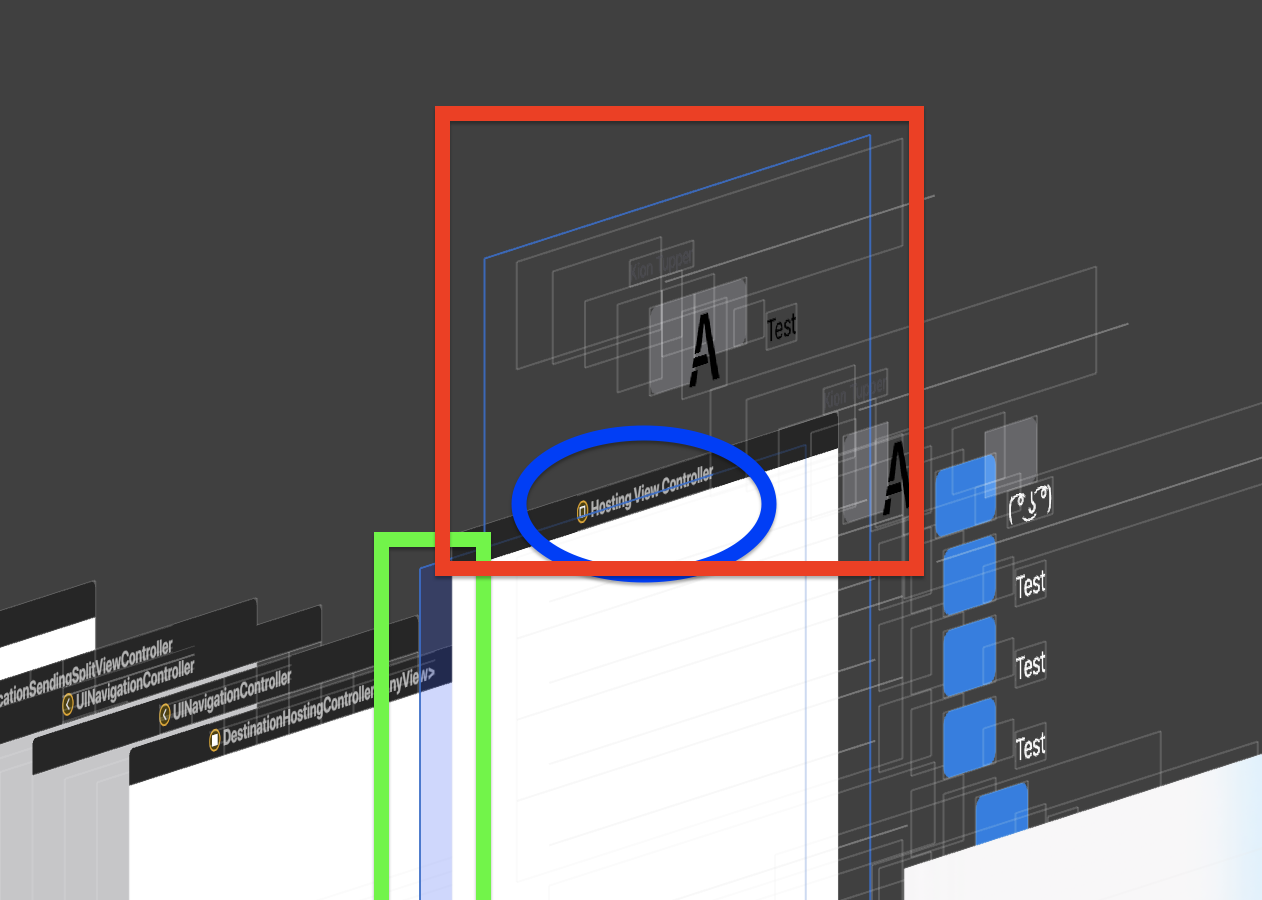
Green:与预期的一样,滚动视图与宿主视图控制器的大小匹配。
蓝色:主机视图本身。它保持它的大小,当它第一次加载,并没有支出,它应该。
Red:宿主视图中的堆栈视图。在这个屏幕截图中,内容被添加到堆栈中,导致其展开。因此,您可以看到大小的差异。
UIHostingController (蓝色)应该展开以适应其内容(红色)。
滚动视图的内容大小没有显式设置,因为这是由自动布局处理的。
约束代码如有帮助,如下所示。
class UIBottomScrollViewController<Content: View>: UIViewController, UIScrollViewDelegate {
    var hostingController: UIHostingController<Content>! = nil

    init(rootView: Content) {
        self.hostingController = UIHostingController<Content>(rootView: rootView)
        super.init(nibName: nil, bundle: nil)
    }
    required init?(coder: NSCoder) {
        fatalError("init(coder:) has not been implemented")
    }

    var scrollView: UIScrollView = UIScrollView()
    var innerView = UIView()

    override func loadView() {
        self.view = UIView()
        self.addChild(hostingController)
        view.addSubview(scrollView)
        scrollView.addSubview(innerView)
        innerView.addSubview(hostingController.view)

        scrollView.delegate = self
        scrollView.scrollsToTop = true
        scrollView.isScrollEnabled = true
        scrollView.clipsToBounds = false

        scrollView.layoutMargins = .zero
        scrollView.preservesSuperviewLayoutMargins = true

        scrollView.leftAnchor.constraint(equalTo: view.leftAnchor).isActive = true
        scrollView.rightAnchor.constraint(equalTo: view.rightAnchor).isActive = true
        scrollView.topAnchor.constraint(equalTo: view.topAnchor).isActive = true
        scrollView.bottomAnchor.constraint(equalTo: view.bottomAnchor).isActive = true

        innerView.topAnchor.constraint(equalTo: scrollView.topAnchor).isActive = true
        innerView.leftAnchor.constraint(equalTo: view.leftAnchor).isActive = true
        innerView.rightAnchor.constraint(equalTo: view.rightAnchor).isActive = true
        innerView.leftAnchor.constraint(equalTo: scrollView.leftAnchor).isActive = true
        innerView.rightAnchor.constraint(equalTo: scrollView.rightAnchor).isActive = true
        innerView.bottomAnchor.constraint(equalTo: scrollView.bottomAnchor).isActive = true


        hostingController.view.topAnchor.constraint(equalTo: innerView.topAnchor).isActive = true
        hostingController.view.leftAnchor.constraint(equalTo: innerView.leftAnchor).isActive = true
        hostingController.view.rightAnchor.constraint(equalTo: innerView.rightAnchor).isActive = true
        hostingController.view.bottomAnchor.constraint(equalTo: innerView.bottomAnchor).isActive = true


        hostingController.view.autoresizingMask = []
        hostingController.view.layoutMargins = .zero
        hostingController.view.insetsLayoutMarginsFromSafeArea = false
        hostingController.view.translatesAutoresizingMaskIntoConstraints = false

        scrollView.autoresizingMask = []
        scrollView.layoutMargins = .zero
        scrollView.insetsLayoutMarginsFromSafeArea = false
        scrollView.translatesAutoresizingMaskIntoConstraints = false

        innerView.autoresizingMask = []
        innerView.layoutMargins = .zero
        innerView.insetsLayoutMarginsFromSafeArea = false
        innerView.translatesAutoresizingMaskIntoConstraints = false

        hostingController.didMove(toParent: self)

        scrollView.keyboardDismissMode = .interactive
    }
}

struct BottomScrollView<Content: View>: UIViewControllerRepresentable {
    var content: () -> Content

    init(@ViewBuilder content: @escaping () -> Content) {
        self.content = content
    }

    func makeUIViewController(context: Context) -> UIBottomScrollViewController<Content> {
        let vc = UIBottomScrollViewController(rootView: self.content())
        return vc
    }
    func updateUIViewController(_ viewController: UIBottomScrollViewController<Content>, context: Context) {
        viewController.hostingController.rootView = self.content()
    }
}回答 6
Stack Overflow用户
发布于 2020-06-08 13:32:17
在涉及UIHostingController和滚动视图的类似的ish视图层次结构中,我遇到了同样的问题,并发现了使其工作的一个丑陋的黑客攻击。基本上,我添加了一个高度约束并手动更新常量:
private var heightConstraint: NSLayoutConstraint?

...

override func viewDidLoad() {
    ...


    heightConstraint = viewHost.view.heightAnchor.constraint(equalToConstant: 0)

    ...
}

override func viewDidLayoutSubviews() {
    super.viewDidLayoutSubviews()

    //
    viewHost.view.sizeToFit()
    heightConstraint?.constant = viewHost.view.bounds.height
    heightConstraint?.isActive = true
}
这是可怕的代码,但这是我唯一找到的东西,使它发挥作用。
Stack Overflow用户
发布于 2021-10-06 04:53:46
对我来说,这个解决方案比我在这里看到的任何其他答案都简单得多(没有一个有效),尽管我花了相当长的时间才找到它。
我所做的就是创建一个UIHostingController的瘦子类,它在视图上调用invalidateIntrinsicContentSize(),以响应viewDidLayoutSubviews()
class SelfSizingHostingController<Content>: UIHostingController<Content> where Content: View {

    override func viewDidLayoutSubviews() {
        super.viewDidLayoutSubviews()
        self.view.invalidateIntrinsicContentSize()
    }
}类似于最初的问题,我有一个SwiftUI视图,它位于UIViewController中的UIScrollView中,需要与滚动内容视图中的其他视图一起布局。SwiftUI视图的内部大小取决于其内容和用户选择的动态类型大小。
在我的例子中,事情就这么简单。它适用于iOS 14+ (没有在iOS 13上进行测试),在这里,更改SwiftUI内容将导致新的内部大小正确地更新滚动视图中基于自动收费表的UIKit布局。老实说,这不是UIHostingController的隐式行为,这就像一个bug。
Stack Overflow用户
发布于 2020-09-08 22:05:00
这说明了@Rengers所说的话,但想把我的解决方案包括在内,我花了相当长的时间才弄清楚。
希望能节省一些时间
struct SizingView<T: View>: View {

    let view: T
    let updateSizeHandler: ((_ size: CGSize) -> Void)
    init(view: T, updateSizeHandler: @escaping (_ size: CGSize) -> Void) {
        self.view = view
        self.updateSizeHandler = updateSizeHandler
    }
    var body: some View {
        view.background(
            GeometryReader { proxy in
                Color.clear
                    .preference(key: SizePreferenceKey.self, value: proxy.size)
            }
        )
        .onPreferenceChange(SizePreferenceKey.self) { preferences in
            updateSizeHandler(preferences)
        }

    }

    func size(with view: T, geometry: GeometryProxy) -> T {
        updateSizeHandler?(geometry.size)
        return view
    }
}https://stackoverflow.com/questions/58399123
复制相似问题
腾讯云开发者

Copyright © 2013 - 2026 Tencent Cloud. All Rights Reserved. 腾讯云 版权所有
深圳市腾讯计算机系统有限公司 ICP备案/许可证号:粤B2-20090059  粤公网安备44030502008569号
腾讯云计算(北京)有限责任公司 京ICP证150476号 | 京ICP备11018762号