
箱体堵塞元件有问题
箱体堵塞元件有问题
提问于 2019-10-15 14:33:05
我试图点击一个按钮“组”,其中有一个对话框在它的前面。首先,我通过单击“OK”来关闭对话框,但有时selenium说它找不到“组”按钮,因为有东西挡住了它。其他时候,会运行很好的,我不知道是什么导致这个问题偶尔发生。
这是我的密码:
upload_ok = WebDriverWait(driver, 10).until(
            EC.element_to_be_clickable((By.XPATH, "//button[@class='dialogButton primary']")))
upload_ok.click()
groupstab = WebDriverWait(driver, 10).until(
            EC.element_to_be_clickable((By.XPATH, "//button[contains(text(),'Groups')]")))
groupstab.click()
这是HTML:
<iframe id="tab_Admin" name="frame_Admin" data-bind="iframeSrc: link, attr: { id: 'tab_' + id + (index() || ''), name: 'frame_' + id + (index() || ''), class: ($parent.headless() === true ? 'headless ': '') + (rightSliderUrl ? 'right-slider-space ' : '') + 'iframe-content' + ($parent.selectedTab() && $parent.selectedTab().id === id && $parent.selectedTab().index() === index() ? '' : ' iframe-content-unselected') }" webkitallowfullscreen="" mozallowfullscreen="" allowfullscreen="" src="/prism/admin?embed=ba1&openTab=monitor" class="iframe-content">
#document
<!DOCTYPE html>
<head></head>
<body role="application" "="">
<div class="main-content" id="mainContent">
<div class="pageView adminView" style="">
<div class="tabs>
<button tab="0" class="selected">Users</button>
<button tab="1">Groups</button>
<button tab="2">Lifecycle Management</button>
<button tab="3">Features</button>
<button tab="4" class="">Databases</button>
</div>
</div>
</div>
<div id="modalDialog_11" class="dialogBlocker show" style="height: 606px;">
<div id="modalDialog_11Container" class="dialogBlockerCell adminDialog">
<div class="modalDialog" tabindex="0" role="dialog">
<div class="dialogContent">
<h1>Success!</h1>
<div class="msg">
Your file 'users.csv' has been successfuly uploaded.<br>
</div>
<br>
</div>
<footer style="margin-right: 20px;">
<button class="dialogButton primary" aria-label="OK" role="button" tabindex="1">OK
</button>
</footer>
</div>
</div>
</div>
</body>
</iframe>我不知道是否与元素class="dialogBlocker show“有关,使页面的其余部分在框后变灰。下面是它的截图:
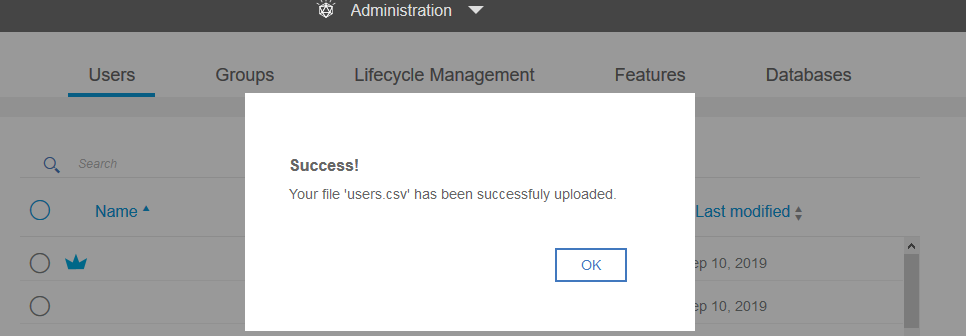
有人有主意吗?谢谢。
回答 1
Stack Overflow用户
回答已采纳
发布于 2019-10-15 15:10:22
根据您提供的HTML,这看起来像是一个模式,而不是一个警告。您只需要像使用普通的HTML元素一样使用该模式。您可能必须在模态结束时添加一个wait,以便在完全隐藏模态之前不定位Groups。
我取了您的示例代码,并添加了一条额外的行,在invisibility_of上等待模态对话框:
# wait to click OK
upload_ok = WebDriverWait(driver, 10).until(
            EC.element_to_be_clickable((By.XPATH, "//button[@class='dialogButton primary']")))

# click OK
upload_ok.click()

# wait on modal to disappear
WebDriverWait(driver, 10).until(
            EC.invisibility_of_element_located((By.XPATH, "//div[contains(@class, 'dialogBlocker')]")))

# wait on groups tab
groupstab = WebDriverWait(driver, 10).until(
            EC.element_to_be_clickable((By.XPATH, "//button[contains(text(),'Groups')]")))

# click groups tab
groupstab.click()
wait on groupstab几乎总是成功的,因为元素存在于模型之下,并且仍然存在于DOM上。因此,如果模式在单击之前还没有完全消失,那么您收到的ClickIntercepted错误将是有意义的。
另一种选择是尝试在groupstab上单击Javascript,而不是groupstab.click()
driver.execute_script("arguments[0].click();", groupstab)页面原文内容由Stack Overflow提供。腾讯云小微IT领域专用引擎提供翻译支持
原文链接:
https://stackoverflow.com/questions/58397064
复制相关文章
相似问题
腾讯云开发者

Copyright © 2013 - 2026 Tencent Cloud. All Rights Reserved. 腾讯云 版权所有
深圳市腾讯计算机系统有限公司 ICP备案/许可证号:粤B2-20090059  粤公网安备44030502008569号
腾讯云计算(北京)有限责任公司 京ICP证150476号 | 京ICP备11018762号