
如何在不泄漏内存的情况下正确关闭FFmpeg流和AVFormatContext?
我已经建立了一个应用程序,使用FFmpeg连接到远程IP摄像头,以便通过RTSP 2.0接收视频和音频帧。
该应用程序是使用Xcode 10-11和Objective-C构建的,并带有自定义的FFmpeg构建配置。
该体系结构如下:
MyApp


Document_0

    RTSPContainerObject_0
        RTSPObject_0

    RTSPContainerObject_1
        RTSPObject_1

    ...
Document_1
...目标:
关闭FFmpeg.后的
- 不应泄露
FFmpeg对象。 - 关闭进程应停止帧读取并销毁所有使用
Document_0的对象。
问题:
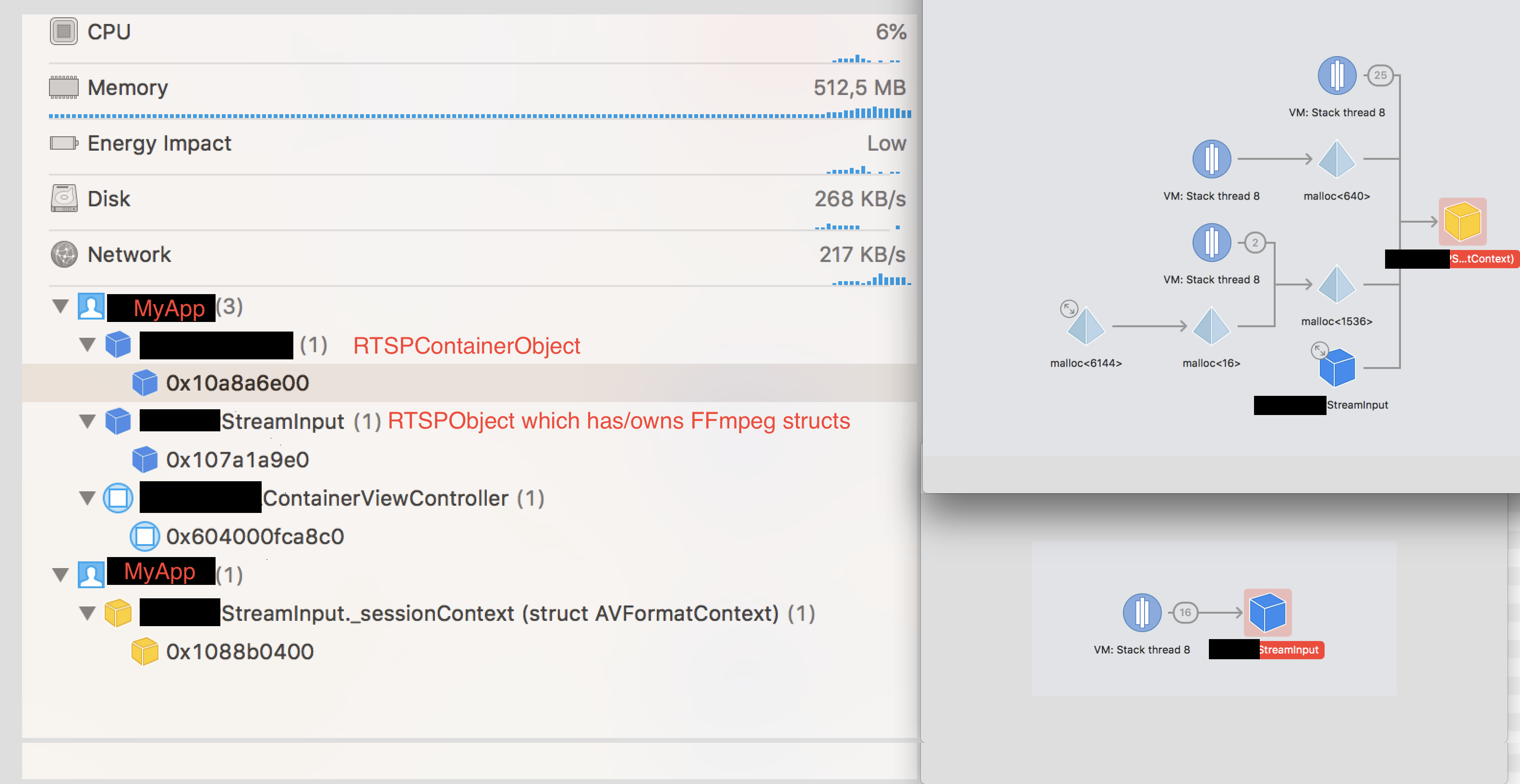
不知何故,Xcode的内存调试器显示了MyApp.的两个实例:
事实:
MyApp.
- macOS'es活动监视器的
- macOS‘is活动监视器没有显示任何FFmpeg或其他子processes.
- The问题的实例,这与一些内存快照无关,因为它可以再现easily.
- Xcode's内存调试器,表明第二个实例只有
RTSPObject'sAVFormatContext而没有其他对象。
1. The second instance has an `AVFormatContext` and the `RTPSObject` still has a pointer to the `AVFormatContext`.
事实:
- 打开和关闭第二个文档
Document_1会导致相同的问题,并导致两个对象泄漏。这意味着有一个bug会产生可伸缩的问题。越来越多的内存被使用,unavailable.
这是我的终止代码:
   - (void)terminate
{
    // * Video and audio frame provisioning termination *
    [self stopVideoStream];
    [self stopAudioStream];
    // *

    // * Video codec termination *
    avcodec_free_context(&_videoCodecContext); // NULL pointer safe.
    self.videoCodecContext = NULL;
    // *

// * Audio codec termination *
avcodec_free_context(&_audioCodecContext); // NULL pointer safe.
self.audioCodecContext = NULL;
// *

if (self.packet)
{
    // Free the packet that was allocated by av_read_frame.
    av_packet_unref(&packet); // The documentation doesn't mention NULL safety.
    self.packet = NULL;
}

if (self.currentAudioPacket)
{
    av_packet_unref(_currentAudioPacket);
    self.currentAudioPacket = NULL;
}

// Free raw frame data.
av_freep(&_rawFrameData); // NULL pointer safe.

// Free the swscaler context swsContext.
self.isFrameConversionContextAllocated = NO;
sws_freeContext(scallingContext); // NULL pointer safe.

[self.audioPacketQueue removeAllObjects];

self.audioPacketQueue = nil;

self.audioPacketQueueLock = nil;
self.packetQueueLock = nil;
self.audioStream = nil;
BXLogInDomain(kLogDomainSources, kLogLevelVerbose, @"%s:%d: All streams have been terminated!", __FUNCTION__, __LINE__);

// * Session context termination *
AVFormatContext *pFormatCtx = self.sessionContext;
BOOL shouldProceedWithInputSessionTermination = self.isInputStreamOpen && self.shouldTerminateStreams && pFormatCtx;
NSLog(@"\nTerminating session context...");
if (shouldProceedWithInputSessionTermination)
{
    NSLog(@"\nTerminating...");
    //av_write_trailer(pFormatCtx);
    // Discard all internally buffered data.
    avformat_flush(pFormatCtx); // The documentation doesn't mention NULL safety.
    // Close an opened input AVFormatContext and free it and all its contents.
    // WARNING: Closing an non-opened stream will cause avformat_close_input to crash.
    avformat_close_input(&pFormatCtx); // The documentation doesn't mention NULL safety.
    NSLog(@"Logging leftovers - %p, %p  %p", self.sessionContext, _sessionContext, pFormatCtx);
    avformat_free_context(pFormatCtx);

    NSLog(@"Logging content = %c", *self.sessionContext);
    //avformat_free_context(pFormatCtx); - Not needed because avformat_close_input is closing it.
    self.sessionContext = NULL;
}
// *

}重要:终止顺序是:
    New frame will be read.
-[(RTSPObject)StreamInput currentVideoFrameDurationSec]
-[(RTSPObject)StreamInput frameDuration:]
-[(RTSPObject)StreamInput currentCGImageRef]
-[(RTSPObject)StreamInput convertRawFrameToRGB]
-[(RTSPObject)StreamInput pixelBufferFromImage:]
-[(RTSPObject)StreamInput cleanup]
-[(RTSPObject)StreamInput dealloc]
-[(RTSPObject)StreamInput stopVideoStream]
-[(RTSPObject)StreamInput stopAudioStream]

Terminating session context...
Terminating...
Logging leftovers - 0x109ec6400, 0x109ec6400  0x109ec6400
Logging content = \330
-[Document dealloc]
不起作用的解决方案:
更改对象发布顺序的change).
- Calling
- (首先释放了
AVFormatContext,但它并没有导致任何AVFormatContextRTSPObject's cleanup方法更快地给FFmpeg更多的时间来处理对象releases.
- Reading -很多这样的答案和
FFmpeg文档,以找到清理过程或更新的代码,这可能会突出说明为什么对象发布不能正常进行。)
我目前正在阅读关于AVFormatContext的文档,因为我认为我忘记发布什么了。这是基于AVFormatContext仍然存在的内存调试器输出的。
这是我的创建代码:
#pragma mark # Helpers - Start

- (NSError *)openInputStreamWithVideoStreamId:(int)videoStreamId
                                audioStreamId:(int)audioStreamId
                                     useFirst:(BOOL)useFirstStreamAvailable
                                       inInit:(BOOL)isInitProcess
{
    // NSLog(@"%s", __PRETTY_FUNCTION__); // RTSP
    self.status = StreamProvisioningStatusStarting;
    AVCodec *decoderCodec;
    NSString *rtspURL = self.streamURL;
    NSString *errorMessage = nil;
    NSError *error = nil;

    self.sessionContext = NULL;
    self.sessionContext = avformat_alloc_context();

    AVFormatContext *pFormatCtx = self.sessionContext;
    if (!pFormatCtx)
    {
        // Create approp error.
        return error;
    }


    // MUST be called before avformat_open_input().
    av_dict_free(&_sessionOptions);

        self.sessionOptions = 0;
        if (self.usesTcp)
        {
            // "rtsp_transport" - Set RTSP transport protocols.
            // Allowed are: udp_multicast, tcp, udp, http.
            av_dict_set(&_sessionOptions, "rtsp_transport", "tcp", 0);
        }
        av_dict_set(&_sessionOptions, "rtsp_transport", "tcp", 0);

    // Open an input stream and read the header with the demuxer options.
    // WARNING: The stream must be closed with avformat_close_input()
    if (avformat_open_input(&pFormatCtx, rtspURL.UTF8String, NULL, &_sessionOptions) != 0)
    {
        // WARNING: Note that a user-supplied AVFormatContext (pFormatCtx) will be freed on failure.
        self.isInputStreamOpen = NO;
        // Create approp error.
        return error;
    }

    self.isInputStreamOpen = YES;

    // user-supplied AVFormatContext pFormatCtx might have been modified.
    self.sessionContext = pFormatCtx;

    // Retrieve stream information.
    if (avformat_find_stream_info(pFormatCtx,NULL) < 0)
    {
        // Create approp error.
        return error;
    }

    // Find the first video stream
    int streamCount = pFormatCtx->nb_streams;

    if (streamCount == 0)
    {
        // Create approp error.
        return error;
    }

    int noStreamsAvailable = pFormatCtx->streams == NULL;

    if (noStreamsAvailable)
    {
        // Create approp error.
        return error;
    }

    // Result. An Index can change, an identifier shouldn't.
    self.selectedVideoStreamId = STREAM_NOT_FOUND;
    self.selectedAudioStreamId = STREAM_NOT_FOUND;

    // Fallback.
    int firstVideoStreamIndex = STREAM_NOT_FOUND;
    int firstAudioStreamIndex = STREAM_NOT_FOUND;

    self.selectedVideoStreamIndex = STREAM_NOT_FOUND;
    self.selectedAudioStreamIndex = STREAM_NOT_FOUND;

    for (int i = 0; i < streamCount; i++)
    {
        // Looking for video streams.
        AVStream *stream = pFormatCtx->streams[i];
        if (!stream) { continue; }
        AVCodecParameters *codecPar = stream->codecpar;
        if (!codecPar) { continue; }

        if (codecPar->codec_type==AVMEDIA_TYPE_VIDEO)
        {
            if (stream->id == videoStreamId)
            {
                self.selectedVideoStreamId = videoStreamId;
                self.selectedVideoStreamIndex = i;
            }

            if (firstVideoStreamIndex == STREAM_NOT_FOUND)
            {
                firstVideoStreamIndex = i;
            }
        }
        // Looking for audio streams.
        if (codecPar->codec_type==AVMEDIA_TYPE_AUDIO)
        {
            if (stream->id == audioStreamId)
            {
                self.selectedAudioStreamId = audioStreamId;
                self.selectedAudioStreamIndex = i;
            }

            if (firstAudioStreamIndex == STREAM_NOT_FOUND)
            {
                firstAudioStreamIndex = i;
            }
        }
    }

    // Use first video and audio stream available (if possible).

    if (self.selectedVideoStreamIndex == STREAM_NOT_FOUND && useFirstStreamAvailable && firstVideoStreamIndex != STREAM_NOT_FOUND)
    {
        self.selectedVideoStreamIndex = firstVideoStreamIndex;
        self.selectedVideoStreamId = pFormatCtx->streams[firstVideoStreamIndex]->id;
    }

    if (self.selectedAudioStreamIndex == STREAM_NOT_FOUND && useFirstStreamAvailable && firstAudioStreamIndex != STREAM_NOT_FOUND)
    {
        self.selectedAudioStreamIndex = firstAudioStreamIndex;
        self.selectedAudioStreamId = pFormatCtx->streams[firstAudioStreamIndex]->id;
    }

    if (self.selectedVideoStreamIndex == STREAM_NOT_FOUND)
    {
        // Create approp error.
        return error;
    }

    // See AVCodecID for codec listing.

    // * Video codec setup:
    // 1. Find the decoder for the video stream with the gived codec id.
    AVStream *stream = pFormatCtx->streams[self.selectedVideoStreamIndex];
    if (!stream)
    {
        // Create approp error.
        return error;
    }
    AVCodecParameters *codecPar = stream->codecpar;
    if (!codecPar)
    {
        // Create approp error.
        return error;
    }

    decoderCodec = avcodec_find_decoder(codecPar->codec_id);
    if (decoderCodec == NULL)
    {
        // Create approp error.
        return error;
    }

    // Get a pointer to the codec context for the video stream.
    // WARNING: The resulting AVCodecContext should be freed with avcodec_free_context().
    // Replaced:
    // self.videoCodecContext = pFormatCtx->streams[self.selectedVideoStreamIndex]->codec;
    // With:
    self.videoCodecContext = avcodec_alloc_context3(decoderCodec);
    avcodec_parameters_to_context(self.videoCodecContext,
                                  codecPar);

    self.videoCodecContext->thread_count = 4;
    NSString *description = [NSString stringWithUTF8String:decoderCodec->long_name];

    // 2. Open codec.
    if (avcodec_open2(self.videoCodecContext, decoderCodec, NULL) < 0)
    {
        // Create approp error.
        return error;
    }

    // * Audio codec setup:
    if (self.selectedAudioStreamIndex > -1)
    {
        [self setupAudioDecoder];
    }

    // Allocate a raw video frame data structure. Contains audio and video data.
    self.rawFrameData = av_frame_alloc();

    self.outputWidth = self.videoCodecContext->width;
    self.outputHeight = self.videoCodecContext->height;

    if (!isInitProcess)
    {
        // Triggering notifications in init process won't change UI since the object is created locally. All
        // objects which need data access to this object will not be able to get it. Thats why we don't notifiy anyone about the changes.
        [NSNotificationCenter.defaultCenter postNotificationName:NSNotification.rtspVideoStreamSelectionChanged
                                                          object:nil userInfo: self.selectedVideoStream];

        [NSNotificationCenter.defaultCenter postNotificationName:NSNotification.rtspAudioStreamSelectionChanged
                                                          object:nil userInfo: self.selectedAudioStream];
    }

    return nil;
}
更新1
初始架构允许使用任何给定线程。下面的大部分代码将主要在主线程上运行。此解决方案不合适,因为打开流输入可能需要几秒钟时间,主线程在等待FFmpeg内的网络响应时会被阻塞。为了解决这个问题,我实现了以下解决方案:
只允许在below).
- Changes上创建和初始设置(参见代码片段"1“below).
- Changes在
current_thread(Any).
- Termination上是允许的,在
current_thread(Any).
上是允许的
在将main thread检查和dispatch_asyncs移除到后台线程后,泄漏已经停止,我不能再重复这个问题了:
// Code that produces the issue.
dispatch_async(dispatch_get_global_queue(DISPATCH_QUEUE_PRIORITY_DEFAULT, 0), ^{
    // 1 - Create and do initial setup.
    // This block creates the issue.
[self.rtspObject = [[RTSPObject alloc] initWithURL: ... ];
[self.rtspObject openInputStreamWithVideoStreamId: ...
                                audioStreamId: ...
                                     useFirst: ...
                                       inInit: ...];
});
我仍然不明白为什么Xcode的内存调试器说保留这个块?
欢迎任何建议或想法。
回答 1
Stack Overflow用户
发布于 2019-10-21 15:02:50
如果使用av_format_open_input打开文件,则必须使用avformat_close_input释放文件。使用free_context将泄漏所有io相关的分配。
https://stackoverflow.com/questions/58450311
复制相似问题
腾讯云开发者

Copyright © 2013 - 2026 Tencent Cloud. All Rights Reserved. 腾讯云 版权所有
深圳市腾讯计算机系统有限公司 ICP备案/许可证号:粤B2-20090059  粤公网安备44030502008569号
腾讯云计算(北京)有限责任公司 京ICP证150476号 | 京ICP备11018762号