
如何使"items:“等于CarouselSlider中的可变长度?
如何使"items:“等于CarouselSlider中的可变长度?
提问于 2019-10-21 09:06:41
我正在制作一个新闻应用程序,我在我的颤音应用程序中使用CarouselSlider。但问题是,我使用的API有时显示9篇文章,有时显示10篇文章。我想设置一个变量,它可以保存apidata.length(9/10)的值。但是如何将其设置为CarouselSlider中的条目数,即如果api仅发送9篇文章,则显示9篇幻灯片,或者如果10,则CarouselSlider只应显示10篇幻灯片。
CarouselSlider(
  height: 400.0,
  items: [1,2,3,4,5].map((i) { //How to set the items: [dynamic value not static]
    return Builder(
      builder: (BuildContext context) {
        return Container(
          width: MediaQuery.of(context).size.width,
          margin: EdgeInsets.symmetric(horizontal: 5.0),
          decoration: BoxDecoration(
            color: Colors.amber
          ),
          child: Text('text $i', style: TextStyle(fontSize: 16.0),)
        );
      },
    );
  }).toList(),
)回答 1
Stack Overflow用户
回答已采纳
发布于 2019-10-21 09:19:59
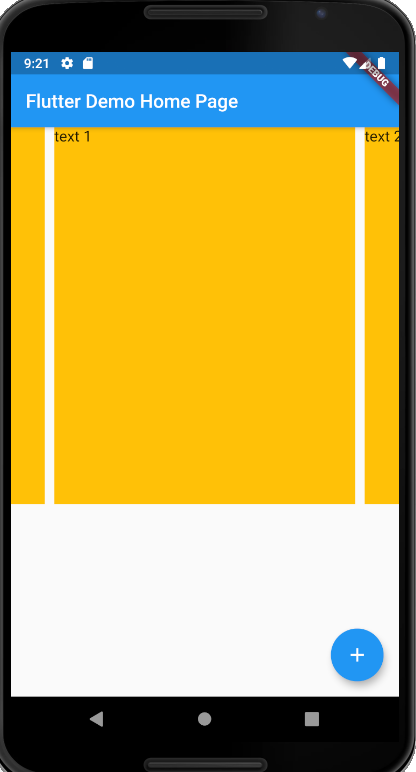
您可以使用列表来保存数据和控制长度,然后使用map。
代码段
List<int> intList = [];
...
  @override
  void initState() {
    intList.add(1);
    intList.add(2);
...
CarouselSlider(
        height: 400.0,
        items: intList.map((i) { //How to set the items: [dynamic value not static]
          return Builder(
            builder: (BuildContext context) {
              return Container(
                  width: MediaQuery.of(context).size.width,
                  margin: EdgeInsets.symmetric(horizontal: 5.0),
                  decoration: BoxDecoration(
                      color: Colors.amber
                  ),
                  child: Text('text $i', style: TextStyle(fontSize: 16.0),)
              );
            },
          );
        }).toList(),
      )
全码
import 'package:flutter/material.dart';
import 'package:carousel_slider/carousel_slider.dart';

void main() => runApp(MyApp());

class MyApp extends StatelessWidget {
  // This widget is the root of your application.
  @override
  Widget build(BuildContext context) {
    return MaterialApp(
      title: 'Flutter Demo',
      theme: ThemeData(
        // This is the theme of your application.
        //
        // Try running your application with "flutter run". You'll see the
        // application has a blue toolbar. Then, without quitting the app, try
        // changing the primarySwatch below to Colors.green and then invoke
        // "hot reload" (press "r" in the console where you ran "flutter run",
        // or simply save your changes to "hot reload" in a Flutter IDE).
        // Notice that the counter didn't reset back to zero; the application
        // is not restarted.
        primarySwatch: Colors.blue,
      ),
      home: MyHomePage(title: 'Flutter Demo Home Page'),
    );
  }
}

class MyHomePage extends StatefulWidget {
  MyHomePage({Key key, this.title}) : super(key: key);

  // This widget is the home page of your application. It is stateful, meaning
  // that it has a State object (defined below) that contains fields that affect
  // how it looks.

  // This class is the configuration for the state. It holds the values (in this
  // case the title) provided by the parent (in this case the App widget) and
  // used by the build method of the State. Fields in a Widget subclass are
  // always marked "final".

  final String title;

  @override
  _MyHomePageState createState() => _MyHomePageState();
}

class _MyHomePageState extends State<MyHomePage> {
  int _counter = 0;
  List<int> intList = [];

  @override
  void initState() {
    intList.add(1);
    intList.add(2);

    super.initState();
  }

  void _incrementCounter() {
    setState(() {
      // This call to setState tells the Flutter framework that something has
      // changed in this State, which causes it to rerun the build method below
      // so that the display can reflect the updated values. If we changed
      // _counter without calling setState(), then the build method would not be
      // called again, and so nothing would appear to happen.
      _counter++;
    });
  }

  @override
  Widget build(BuildContext context) {
    // This method is rerun every time setState is called, for instance as done
    // by the _incrementCounter method above.
    //
    // The Flutter framework has been optimized to make rerunning build methods
    // fast, so that you can just rebuild anything that needs updating rather
    // than having to individually change instances of widgets.
    return Scaffold(
      appBar: AppBar(
        // Here we take the value from the MyHomePage object that was created by
        // the App.build method, and use it to set our appbar title.
        title: Text(widget.title),
      ),
      body: CarouselSlider(
        height: 400.0,
        items: intList.map((i) { //How to set the items: [dynamic value not static]
          return Builder(
            builder: (BuildContext context) {
              return Container(
                  width: MediaQuery.of(context).size.width,
                  margin: EdgeInsets.symmetric(horizontal: 5.0),
                  decoration: BoxDecoration(
                      color: Colors.amber
                  ),
                  child: Text('text $i', style: TextStyle(fontSize: 16.0),)
              );
            },
          );
        }).toList(),
      ),
      floatingActionButton: FloatingActionButton(
        onPressed: _incrementCounter,
        tooltip: 'Increment',
        child: Icon(Icons.add),
      ), // This trailing comma makes auto-formatting nicer for build methods.
    );
  }
}
页面原文内容由Stack Overflow提供。腾讯云小微IT领域专用引擎提供翻译支持
原文链接:
https://stackoverflow.com/questions/58483058
复制相关文章
相似问题
腾讯云开发者

Copyright © 2013 - 2026 Tencent Cloud. All Rights Reserved. 腾讯云 版权所有
深圳市腾讯计算机系统有限公司 ICP备案/许可证号:粤B2-20090059  粤公网安备44030502008569号
腾讯云计算(北京)有限责任公司 京ICP证150476号 | 京ICP备11018762号