
带标题的QFrame
带标题的QFrame
提问于 2019-10-23 02:02:01
我需要实现一个有标题的QFrame (见图)。然而,在阅读了QFrame的文档并试图重新实现paintEvent(QPaintEvent*)方法之后,我没有找到任何解决方案。
我想知道你们中是否有人能提供一个小例子,演示我如何实现这样的目标:
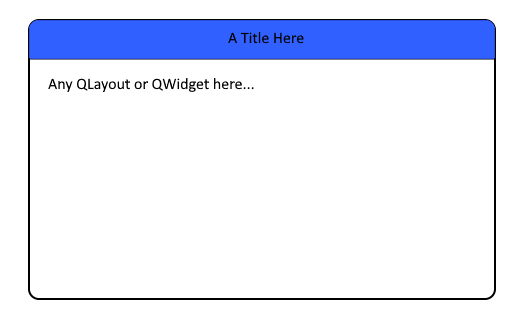
谢谢!
回答 1
Stack Overflow用户
回答已采纳
发布于 2019-10-23 08:34:36
作为创建自己的复合小部件的替代方法,您可能可以使用内容边距来伪造标题栏.
#include <QFont>
#include <QFrame>
#include <QPainter>

class titled_frame: public QFrame {
    using super = QFrame;
public:
    explicit titled_frame (const QString &title = "A Title Here", QWidget *parent = nullptr)
        : super(parent)
        , m_title(title)
        {
            /*
             * Set the top margin based on the font height.
             */
            setContentsMargins(0, 2 * fontInfo().pixelSize(), 0, 0);
        }
protected:
    virtual void paintEvent (QPaintEvent *event) override
        {

            /*
             * Draw the title centred in the top margin.
             */
            QPainter painter(this);
            QRect title_rect(QPoint(0, 0), QSize(width(), contentsMargins().top()));
            painter.fillRect(title_rect, Qt::blue);
            painter.setPen(Qt::black);
            painter.drawText(title_rect, Qt::AlignCenter, m_title);

            /*
             * Defer to the base class implementation to update everything else.
             */
            super::paintEvent(event);
        }
private:
    QString m_title;
};
那就用..。
titled_frame tf("A Title Here");
auto *layout = new QVBoxLayout(&tf);
layout->addWidget(new QLabel("Any QLayout or QWidget here..."));
tf.show();页面原文内容由Stack Overflow提供。腾讯云小微IT领域专用引擎提供翻译支持
原文链接:
https://stackoverflow.com/questions/58514441
复制相关文章
相似问题
腾讯云开发者

Copyright © 2013 - 2026 Tencent Cloud. All Rights Reserved. 腾讯云 版权所有
深圳市腾讯计算机系统有限公司 ICP备案/许可证号:粤B2-20090059  粤公网安备44030502008569号
腾讯云计算(北京)有限责任公司 京ICP证150476号 | 京ICP备11018762号