
QT Creator中的GUI项目在修改后不起作用
从其他脚本片段中拼凑出一些脚本。我正试图为一个破解备份的python (HHDB.py)创建一个GUI。此脚本需要密码、加密文件文件夹的位置和目标等参数来编写加密文件。
使用encrypted制作一个很好的gui,用一个按钮浏览到带有加密文件的文件夹。其路径显示在textedit字段中。目的地也一样。然后有一个字段可以输入已知的密码。最后,有一个按钮运行HHBD脚本的参数密码,来源和目的地的位置。
由于我不知道哪里出了问题,调试器也没有任何错误(不再),我需要一个程序员的眼睛来指出我的(许多)缺陷。
谢谢您看一下下面的代码:
谷歌搜索了很多,但许多发现的解决方案给调试、查找和替换提供了错误:
#include "mainwindow.h"
#include "ui_mainwindow.h"
#include <QFileDialog>
#include <QDir>
#include <QString>
#include <QLabel>
#include <QProcess>

MainWindow::MainWindow(QWidget *parent) :
    QMainWindow(parent),
    ui(new Ui::MainWindow)
{
    ui->setupUi(this);
}

MainWindow::~MainWindow()
{
    delete ui;

}

void MainWindow::on_pushButton_clicked()
{

    QString backup_dir = QFileDialog::getExistingDirectory(this,tr("Choose HiSuite Backup Folder"), QDir::homePath(), QFileDialog::ShowDirsOnly | QFileDialog::DontResolveSymlinks);
    ui->textEdit->setPlainText(backup_dir.replace('/','\\'));
}

void MainWindow::on_pushButton_2_clicked()
{

    QString destination_dir = QFileDialog::getExistingDirectory(this,tr("Choose Destination Folder"), QDir::homePath(), QFileDialog::ShowDirsOnly | QFileDialog::DontResolveSymlinks);
    ui->textEdit_2->setPlainText(destination_dir.replace('/','\\'));

}

void MainWindow::on_pushButton_3_clicked()
{
    QString passwordstring = ui->password->toPlainText();

    QProcess process;
    QString scriptFile =  QCoreApplication::applicationDirPath() + "./HHBD.py";

    QString pythonCommand = "python " + scriptFile +
                        " passwordstring" +
                        " backup_dir.replace('/','\\')" +
                        " destination_dir.replace('/','\\')";

    printf("PyCommand: %s\n", pythonCommand.toStdString().c_str());
    process.start (pythonCommand);

}
我想按一下"pushButton_3“脚本,脚本执行带有给定参数的HHBD.py脚本,比如"python 123456789 C:\test\ c:\dest”,其中"123456789“来自密码字段,"C:\test\”来自backup_dir字段,"C:\dest“来自destination_dir字段
mainwindow.h
#ifndef MAINWINDOW_H
#define MAINWINDOW_H

#include <QMainWindow>

namespace Ui {
class MainWindow;
}

class MainWindow : public QMainWindow
{
    Q_OBJECT

public:
    explicit MainWindow(QWidget *parent = nullptr);
    ~MainWindow();

private slots:
    void on_pushButton_clicked();

    void on_pushButton_2_clicked();

    void on_pushButton_3_clicked();

private:
    Ui::MainWindow *ui;
};

#endif // MAINWINDOW_H
mainwindow.ui
<?xml version="1.0" encoding="UTF-8"?>
<ui version="4.0">
 <class>MainWindow</class>
 <widget class="QMainWindow" name="MainWindow">
  <property name="geometry">
   <rect>
    <x>0</x>
    <y>0</y>
    <width>395</width>
    <height>303</height>
   </rect>
  </property>
  <property name="windowTitle">
   <string>Huawei HiSuite Backup Decrypter</string>
  </property>
  <property name="windowIcon">
   <iconset>
    <normaloff>J:/Downloads_2/huawei.png</normaloff>J:/Downloads_2/huawei.png</iconset>
  </property>
  <property name="autoFillBackground">
   <bool>true</bool>
  </property>
  <widget class="QWidget" name="centralWidget">
   <widget class="QPushButton" name="pushButton">
    <property name="geometry">
     <rect>
      <x>10</x>
      <y>10</y>
      <width>151</width>
      <height>23</height>
     </rect>
    </property>
    <property name="text">
     <string>Select HiSuite Backup Folder</string>
    </property>
   </widget>
   <widget class="QTextEdit" name="textEdit">
    <property name="geometry">
     <rect>
      <x>10</x>
      <y>40</y>
      <width>381</width>
      <height>23</height>
     </rect>
    </property>
    <property name="sizePolicy">
     <sizepolicy hsizetype="Fixed" vsizetype="Fixed">
      <horstretch>0</horstretch>
      <verstretch>0</verstretch>
     </sizepolicy>
    </property>
    <property name="verticalScrollBarPolicy">
     <enum>Qt::ScrollBarAlwaysOff</enum>
    </property>
   </widget>
   <widget class="QPushButton" name="pushButton_2">
    <property name="geometry">
     <rect>
      <x>10</x>
      <y>70</y>
      <width>151</width>
      <height>23</height>
     </rect>
    </property>
    <property name="text">
     <string>Select Destination Folder</string>
    </property>
   </widget>
   <widget class="QTextEdit" name="textEdit_2">
    <property name="geometry">
     <rect>
      <x>10</x>
      <y>100</y>
      <width>381</width>
      <height>21</height>
     </rect>
    </property>
    <property name="verticalScrollBarPolicy">
     <enum>Qt::ScrollBarAlwaysOff</enum>
    </property>
   </widget>
   <widget class="QLabel" name="label">
    <property name="geometry">
     <rect>
      <x>10</x>
      <y>150</y>
      <width>381</width>
      <height>31</height>
     </rect>
    </property>
    <property name="font">
     <font>
      <pointsize>10</pointsize>
     </font>
    </property>
    <property name="autoFillBackground">
     <bool>true</bool>
    </property>
    <property name="lineWidth">
     <number>2</number>
    </property>
    <property name="text">
     <string>Type here the password given during the creation of the backup of the mobile device with Huawei HiSuite.</string>
    </property>
    <property name="wordWrap">
     <bool>true</bool>
    </property>
   </widget>
   <widget class="QTextEdit" name="password">
    <property name="geometry">
     <rect>
      <x>10</x>
      <y>190</y>
      <width>191</width>
      <height>21</height>
     </rect>
    </property>
    <property name="verticalScrollBarPolicy">
     <enum>Qt::ScrollBarAlwaysOff</enum>
    </property>
   </widget>
   <widget class="QPushButton" name="pushButton_3">
    <property name="geometry">
     <rect>
      <x>10</x>
      <y>220</y>
      <width>151</width>
      <height>31</height>
     </rect>
    </property>
    <property name="font">
     <font>
      <weight>75</weight>
      <bold>true</bold>
     </font>
    </property>
    <property name="text">
     <string>Decrypt HiSuite Backup</string>
    </property>
   </widget>
   <widget class="QLabel" name="label_2">
    <property name="geometry">
     <rect>
      <x>270</x>
      <y>170</y>
      <width>141</width>
      <height>111</height>
     </rect>
    </property>
    <property name="text">
     <string/>
    </property>
    <property name="pixmap">
     <pixmap>J:/Downloads_2/Aantekening 2019-10-24 141833.png</pixmap>
    </property>
   </widget>
  </widget>
  <widget class="QStatusBar" name="statusBar"/>
 </widget>
 <layoutdefault spacing="6" margin="11"/>
 <resources/>
 <connections/>
</ui>回答 1
Stack Overflow用户
发布于 2019-10-26 21:23:13
这是一个如此小的程序,所以把它分散到三个文件是没有意义的。您可以将其全部放在main.cpp中。
下面的示例是完整的和可编译的。整个文件有129行长。您可以从https://github.com/KubaO/stackoverflown/tree/master/questions/script-frontend-58555092下载完整的项目。
看起来是这样的:
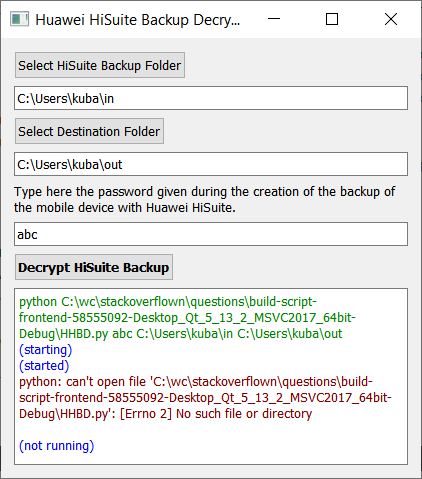
首先,让我们从主窗口开始。您不需要使用QMainWindow,因为这是用于带有菜单等的“大型”应用程序。您所需要的只是一个普通的QWidget
// https://github.com/KubaO/stackoverflown/tree/master/questions/script-frontend-58555092
#include <QtWidgets>
#include <initializer_list>

class MainWindow : public QWidget {
Q_OBJECTQProcess实例保存在窗口的生存期内,因此我们可以监视它的状态和输出,而不是启动一个分离的进程:
QProcess process;UI非常简单,它的元素可以很容易地作为成员提供:
   QGridLayout layout{this};
   QPushButton selectSource{tr("Select HiSuite Backup Folder")};
   QLineEdit source;
   QPushButton selectDestination{tr("Select Destination Folder")};
   QLineEdit destination;
   QLabel instruction{tr(
       "Type here the password given during the creation of "
       "the backup of the mobile device with Huawei HiSuite.")};
   QLineEdit password;
   QPushButton decrypt{tr("Decrypt HiSuite Backup")};
   QTextBrowser output;

   QFileSystemModel fsModel;
   QCompleter fsCompleter{&fsModel};

   QTextCharFormat statusFormat, commandFormat, stdoutFormat, stderrFormat;

   void setupUi();
   void doDecrypt();
   void onStateChanged(QProcess::ProcessState state);

  public:
   explicit MainWindow(QWidget *parent = nullptr);
};注意所有用户可见的字符串是如何用tr()包装的,这样就可以使用Qt语言学家轻松地翻译它们。
UI设置被排除在外,而且相当没有争议。path输入字段有一个文件系统完成器,以便更容易手动输入路径。
void MainWindow::setupUi() {
   setWindowTitle(tr("Huawei HiSuite Backup Decrypter"));
   QFont boldFont;
   boldFont.setBold(true);
   decrypt.setFont(boldFont);
   instruction.setWordWrap(true);

   commandFormat.setForeground(QColor(Qt::green).darker());
   statusFormat.setForeground(QColor(Qt::blue));
   stderrFormat.setForeground(QColor(Qt::red).darker());

   int row = 0;
   for (auto *widget : std::initializer_list<QWidget *>{
            &selectSource, &source, &selectDestination, &destination, &instruction,
            &password, &decrypt, &output}) {
      layout.addWidget(widget, row++, 0);
   }

   for (auto *button : {&selectSource, &selectDestination, &decrypt})
      button->setSizePolicy(QSizePolicy::Maximum, QSizePolicy::Preferred);

   fsModel.setRootPath("");
   fsModel.setFilter(QDir::Dirs | QDir::NoDotAndDotDot);
   fsCompleter.setCompletionMode(QCompleter::PopupCompletion);
   source.setCompleter(&fsCompleter);
   destination.setCompleter(&fsCompleter);
}
大多数插槽是如此之小,以至于可以在lambdas内部提供:
MainWindow::MainWindow(QWidget *parent) : QWidget(parent) {
   setupUi();

   connect(&selectSource, &QPushButton::clicked, [this] {
      auto dir = QFileDialog::getExistingDirectory(
          this, tr("Choose HiSuite Backup Folder"), QDir::homePath(),
          QFileDialog::ShowDirsOnly | QFileDialog::DontResolveSymlinks);
      source.setText(dir);
   });

   connect(&selectDestination, &QPushButton::clicked, [this] {
      auto dir = QFileDialog::getExistingDirectory(
          this, tr("Choose Destination Folder"), QDir::homePath(),
          QFileDialog::ShowDirsOnly | QFileDialog::DontResolveSymlinks);
      destination.setText(dir);
   });

   connect(&decrypt, &QPushButton::clicked, this, &MainWindow::doDecrypt);

   connect(&process, &QProcess::stateChanged, this, &MainWindow::onStateChanged);
进程的输出显示在文本浏览器中,颜色为便于识别错误:
   connect(&process, &QProcess::readyReadStandardOutput, [this] {
      output.setCurrentCharFormat(stdoutFormat);
      output.append(process.readAllStandardOutput());
   });
   connect(&process, &QProcess::readyReadStandardError, [this] {
      output.setCurrentCharFormat(stderrFormat);
      output.append(process.readAllStandardError());
   });
}
为了完整起见,说明了过程的状态;
void MainWindow::onStateChanged(QProcess::ProcessState state) {
   output.setCurrentCharFormat(statusFormat);
   switch (state) {
      case QProcess::Starting:
         output.append(tr("(starting)"));
         break;
      case QProcess::Running:
         output.append(tr("(started)"));
         break;
      case QProcess::NotRunning:
         output.append(tr("(not running)"));
         break;
   }
}解密显式地使用program和arguments属性QProcess设置进程及其参数。这样,路径中的空格就没有问题了,等等-- Qt为我们处理这一切。注意,applicationDirPath() + "./foo"有一个可以给出像C:/path./foo这样的路径的周期--这样的路径是无效的,句点不应该在那里。
void MainWindow::doDecrypt() {
   output.clear();
   auto password = this->password.text();

   QString scriptFile = QCoreApplication::applicationDirPath() + "/HHBD.py";
   process.setProgram("python");
   process.setArguments({QDir::toNativeSeparators(scriptFile), password,
                         QDir::toNativeSeparators(source.text()),
                         QDir::toNativeSeparators(destination.text())});
   output.setCurrentCharFormat(commandFormat);
   output.setText(
       QStringLiteral("%1 %2").arg(process.program()).arg(process.arguments().join(' ')));
   process.start();
}main函数显示窗口。moc文件包含在末尾,因为我们没有单独的main.h头文件:
int main(int argc, char *argv[]) {
   QApplication a(argc, argv);
   MainWindow w;
   w.show();
   return a.exec();
}
#include "main.moc"
这结束了这个例子。
https://stackoverflow.com/questions/58555092
复制相似问题
腾讯云开发者

Copyright © 2013 - 2026 Tencent Cloud. All Rights Reserved. 腾讯云 版权所有
深圳市腾讯计算机系统有限公司 ICP备案/许可证号:粤B2-20090059  粤公网安备44030502008569号
腾讯云计算(北京)有限责任公司 京ICP证150476号 | 京ICP备11018762号