
火源云功能和webpack捆绑在一起?
我被困了一段时间,试图为我的云函数文件构建一个webpack。
我的项目结构:
ROOT

- FUNCTIONS
  - DIS
    - bundle.js // THIS SHOULD BE GENERATED BY WEBPACK
  - SRC
    - myCloudFunction.js  // SOURCE CODE FOR A CLOUD FUNCTION
    - entryPoint.js  // ENTRY POINT FOR WEBPACK
  - index.js
  - package.json

- SRC
  - App.js

.babelrc
firebase.json
webpack.prod.js    // THIS BUILDS FOR CLIENT (WORKING FINE)
webpack.server.js  // THIS SHOULD BUILD FOR THE SERVER (NOT WORKING)
我的目标是:
- 用现代JS和transpile编写云函数文件和
index.js,并将它们与webpack捆绑在一起(使用与我捆绑客户端代码相同的webpack,但使用另一个配置文件)。
myCloudFunction.js (简单函数记录一些文本)
module.exports = (req,res) => {
  console.log('myCloudFunction is executing...');
  res.status(200).send('From myCloudFunction...');
}
entryPoint.js (基本上导入函数的代码并将其导出为云函数)
const functions = require('firebase-functions');
const myCloudFunction = require('./src/myCloudFunction');

module.exports.myCloudFunction = functions.https.onRequest(myCloudFunction);如果我让index.js和我的entryPoint.js完全一样的话,它就会工作得很好。但是我想使用entryPoint.js中的webpack将这些文件捆绑在一起,并将绑定的结果设置为我的index.js文件。在这种情况下,基本上只有2个文件将被捆绑(entryPoint和myCloudFunction)。
我用webpack包扎:
webpack.prod.server.js
const webpack = require('webpack');
const path = require('path');
const Dotenv = require('dotenv-webpack');
const { CleanWebpackPlugin } = require('clean-webpack-plugin');
const nodeExternals = require('webpack-node-externals');

module.exports = {
  mode: 'development',
  stats: 'verbose',
  devtool: 'inline-source-map',

  entry: {
    app: './functions/src/entryPoint.js'
  },

  output: {
    filename: 'bundle.js',
    path: path.resolve(__dirname, './functions/dist'),
    publicPath: '/'
  },

  // externals: {
  //   "firebase-admin": true,
  //   "firebase-functions": true
  // },

  target: 'node',
  externals: [nodeExternals(),'firebase-functions', 'firebase-admin','firebase'],

  plugins:[
    new CleanWebpackPlugin(),
    new webpack.HashedModuleIdsPlugin(),
    new webpack.DefinePlugin({
        'process.env.ON_SERVER': true
    }),
    new Dotenv()
  ],

  module: {
    rules:[
      {
        test: /\.js$/,
        include: path.resolve(__dirname, 'src'),
        use: ['babel-loader']
      },
    ]
  }
};我看到您不应该将node_modules绑定到后端,这就是我使用externals属性的原因。
bundle.js (使用上面的配置运行webpack之后的结果包)
/******/ (function(modules) { // webpackBootstrap
/******/    // The module cache
/******/    var installedModules = {};
/******/
/******/    // The require function
/******/    function __webpack_require__(moduleId) {
/******/
/******/        // Check if module is in cache
/******/        if(installedModules[moduleId]) {
/******/            return installedModules[moduleId].exports;
/******/        }
/******/        // Create a new module (and put it into the cache)
/******/        var module = installedModules[moduleId] = {
/******/            i: moduleId,
/******/            l: false,
/******/            exports: {}
/******/        };
/******/
/******/        // Execute the module function
/******/        modules[moduleId].call(module.exports, module, module.exports, __webpack_require__);
/******/
/******/        // Flag the module as loaded
/******/        module.l = true;
/******/
/******/        // Return the exports of the module
/******/        return module.exports;
/******/    }
/******/
/******/
/******/    // expose the modules object (__webpack_modules__)
/******/    __webpack_require__.m = modules;
/******/
/******/    // expose the module cache
/******/    __webpack_require__.c = installedModules;
/******/
/******/    // define getter function for harmony exports
/******/    __webpack_require__.d = function(exports, name, getter) {
/******/        if(!__webpack_require__.o(exports, name)) {
/******/            Object.defineProperty(exports, name, { enumerable: true, get: getter });
/******/        }
/******/    };
/******/
/******/    // define __esModule on exports
/******/    __webpack_require__.r = function(exports) {
/******/        if(typeof Symbol !== 'undefined' && Symbol.toStringTag) {
/******/            Object.defineProperty(exports, Symbol.toStringTag, { value: 'Module' });
/******/        }
/******/        Object.defineProperty(exports, '__esModule', { value: true });
/******/    };
/******/
/******/    // create a fake namespace object
/******/    // mode & 1: value is a module id, require it
/******/    // mode & 2: merge all properties of value into the ns
/******/    // mode & 4: return value when already ns object
/******/    // mode & 8|1: behave like require
/******/    __webpack_require__.t = function(value, mode) {
/******/        if(mode & 1) value = __webpack_require__(value);
/******/        if(mode & 8) return value;
/******/        if((mode & 4) && typeof value === 'object' && value && value.__esModule) return value;
/******/        var ns = Object.create(null);
/******/        __webpack_require__.r(ns);
/******/        Object.defineProperty(ns, 'default', { enumerable: true, value: value });
/******/        if(mode & 2 && typeof value != 'string') for(var key in value) __webpack_require__.d(ns, key, function(key) { return value[key]; }.bind(null, key));
/******/        return ns;
/******/    };
/******/
/******/    // getDefaultExport function for compatibility with non-harmony modules
/******/    __webpack_require__.n = function(module) {
/******/        var getter = module && module.__esModule ?
/******/            function getDefault() { return module['default']; } :
/******/            function getModuleExports() { return module; };
/******/        __webpack_require__.d(getter, 'a', getter);
/******/        return getter;
/******/    };
/******/
/******/    // Object.prototype.hasOwnProperty.call
/******/    __webpack_require__.o = function(object, property) { return Object.prototype.hasOwnProperty.call(object, property); };
/******/
/******/    // __webpack_public_path__
/******/    __webpack_require__.p = "/";
/******/
/******/
/******/    // Load entry module and return exports
/******/    return __webpack_require__(__webpack_require__.s = "oFca");
/******/ })
/************************************************************************/
/******/ ({

/***/ "4ouX":
/*!******************************************!*\
  !*** ./functions/src/myCloudFunction.js ***!
  \******************************************/
/*! no static exports found */
/***/ (function(module, exports) {

module.exports = (req,res) => {
  console.log('myCloudFunction is executing...');
  res.status(200).send('From myCloudFunction...');
}

/***/ }),

/***/ "O8Wp":
/*!*************************************!*\
  !*** external "firebase-functions" ***!
  \*************************************/
/*! no static exports found */
/***/ (function(module, exports) {

module.exports = firebase-functions;

/***/ }),

/***/ "oFca":
/*!********************************!*\
  !*** ./functions/src/index.js ***!
  \********************************/
/*! no static exports found */
/***/ (function(module, exports, __webpack_require__) {

const functions = __webpack_require__(/*! firebase-functions */ "O8Wp");
const myCloudFunction = __webpack_require__(/*! ./myCloudFunction */ "4ouX");

module.exports.myCloudFunction = functions.https.onRequest(myCloudFunction);

/***/ })

/******/ });
IT应该可以工作,但是我得到了一个错误:
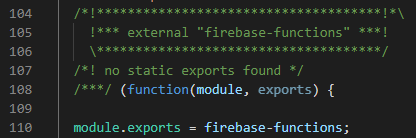
我希望复制bundle.js的内容并将其粘贴到index.js并使其工作。但是当我这样做的时候,当我试图服务这个函数时,我会得到这个错误。请参阅下图中的错误行。
>>> firebase serve --only hosting,functions

+  functions: Using node@10 from host.
+  functions: Emulator started at http://localhost:5001
i  functions: Watching "C:\Projects\test-ssr\functions" for Cloud Functions...
i  hosting: Serving hosting files from: public
+  hosting: Local server: http://localhost:5000
!  ReferenceError: firebase is not defined
    at Object.O8Wp (C:\Projects\test-ssr\functions\index.js:110:20)
问题
我做错了什么?任何帮助都将不胜感激!
更新
我刚刚发现这解决了问题,但我不知道为什么需要这样做。我仍然希望对这个问题有一些更好的了解。
webpack.prod.server.js
output: {
    filename: '[name].[contenthash:5].js',
    // filename: 'index.js',
    path: path.resolve(__dirname, './functions/dist'),
    publicPath: '/',
    libraryTarget: 'commonjs'   // <--- THIS FIXED IT
},回答 1
Stack Overflow用户
发布于 2021-09-28 06:27:34
正如您所发现的,您需要设置libraryTarget,以构建一个webpack包,该包本身可以由webpack构建之外的另一个模块导入(例如,从云函数)。
这是一个好主意,捆绑您的功能应用程序使用webpack,有很多原因。正如您已经指出的,这意味着您可以为不同的目的以一致的方式编译相同的代码,例如SSR和浏览器端。其他福利:
- 访问webpack装载机/插件
- 更好的HMR开发经验(这比功能运行时的实现更好)
- 更好的部署和运行时性能(一个或几个优化块相对于数百/数千个未优化/未使用的文件)
无论如何,您可能更容易使用webpack云功能 (我是其中的作者)。它抽象化了您所需的大部分配置,包括配置libraryTarget。
https://stackoverflow.com/questions/58596845
复制相似问题
腾讯云开发者

Copyright © 2013 - 2026 Tencent Cloud. All Rights Reserved. 腾讯云 版权所有
深圳市腾讯计算机系统有限公司 ICP备案/许可证号:粤B2-20090059  粤公网安备44030502008569号
腾讯云计算(北京)有限责任公司 京ICP证150476号 | 京ICP备11018762号