
用于NumberFormatter输入的NSSearchField
用于NumberFormatter输入的NSSearchField
提问于 2019-11-02 17:59:43
我有一个NSSearchField,用户可以输入一个带有小数的数字来搜索数据。我在使用NumberFormatter显示正确的格式时遇到了问题。
我在IB中添加了以下内容:
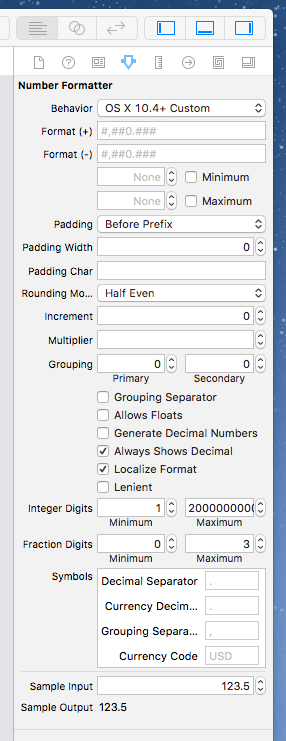
一旦用户输入小数点(或任何本地字符),字段就会变为空。当我输入一个字母(这是预期的)时也会发生同样的情况,所以小数点似乎被拒绝了,就好像它是一个字母。当然不是我想要的。
在图片一半的时候尝试了许多不同的复选框组合(包括"Generate数字“),但是无法让它工作。
如果你看图片底部的样本,看上去没问题。
代码中没有任何操作搜索字段的操作。
回答 1
Stack Overflow用户
回答已采纳
发布于 2019-11-11 23:26:32
我最终通过完全删除格式化程序并在controlTextDidChange中过滤字符串来解决这个问题。请注意,这对NSTextField和NSSearchField都适用。
class ViewController: NSViewController {
    @IBOutlet var searchField: NSSearchField! // delegate is set in SB

    lazy var decimalCharacterSet: CharacterSet = {
        var charSet = CharacterSet.init(charactersIn: "0123456789")

        charSet.insert(charactersIn: Locale.current.decimalSeparator!)

        return charSet
    }()
}

extension ViewController: NSControlTextEditingDelegate {
    func controlTextDidChange(_ notification: Notification) {
        if let textField = notification.object as? NSTextField {
            // first filter out all the non-numbers
            let chars = textField.stringValue.components(separatedBy: decimalCharacterSet.inverted)
            var result = chars.joined()

            // now check if there are more than one decimal separators
            let count = result.filter { $0 == Character(Locale.current.decimalSeparator!) }.count

            // if so, remove the last character in the string, this is what has just been typed.
            if count > 1 {
                result = String(result.dropLast())
            }

            // finally, assign the filtered string back to the textField
            textField.stringValue = result
         }
    }
}页面原文内容由Stack Overflow提供。腾讯云小微IT领域专用引擎提供翻译支持
原文链接:
https://stackoverflow.com/questions/58673791
复制相关文章
相似问题
腾讯云开发者

Copyright © 2013 - 2026 Tencent Cloud. All Rights Reserved. 腾讯云 版权所有
深圳市腾讯计算机系统有限公司 ICP备案/许可证号:粤B2-20090059  粤公网安备44030502008569号
腾讯云计算(北京)有限责任公司 京ICP证150476号 | 京ICP备11018762号