
无法找到vuejs应用程序中的一个或多个图标警告。
我无法修正警告:
无法找到一个或多个图标{前缀:"far",iconName:"square"} {}(附于屏幕快照)当我更改'typeOfAreaClass‘的值或从"areaClass“中选择’安全区域‘时,警告会弹出。

以下是带有“square”图标的v-select菜单的屏幕截图:
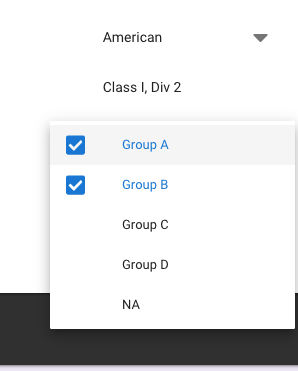
我试过安装字体棒库。没什么用。我发现的一件事是,当我向v-select组件添加道具"multiple“时,就会发生警告。如果我拆了那道具,就没有任何警告了。但它扼杀了目的。这能帮你提个建议吗?我的字体好极了。只有v-选择的道具‘倍数’正在创建警告。
这是HTML代码
  <v-flex xs12 md4 sm4  >
    <v-select
    class="myfont1 mt-3 pa-0 customDecoration text-xs-right"
    @change="assignHazGroups"
    :items="typeOfAreaClassItems"
    v-model="typeOfAreaClassSelect"
    style="max-width:170px;"
    dense
    ></v-select>
  </v-flex>

  <v-flex xs12 md4 sm4  >
    <v-select
    class="myfont1 mt-3 pa-0 mx-0 customDecoration"
    @change="safeAreaFilter"
    :items="typeOfAreaClassSelect ==='American' ?areaClassAmericanItems:areaClassEuropeanItems"
    v-model="areaClassSelect"
    style="max-width:220px;"
    dense
    ></v-select>
  </v-flex>

  <v-flex xs12 md4 sm4 class="ma-0 pa-0"
  >
    <v-select
    class="myfont1 mt-3 pa-0 mx-0 customDecoration"
    :items="typeOfAreaClassSelect =='American' ?hazGroupAmericanItems:hazGroupEuropeanItems"
    v-model="hazGroupSelect"
    multiple
    small-chips
    style="max-width:350px;"
    dense
    ></v-select>

  </v-flex>
以下是数组变量
typeOfAreaClassItems:["American","European"],
            areaClassAmericanItems:[
                "Safe Area",
                "Class I, Div 1/Class I, Div 2",
                "Class I, Div 1",
                "Class I, Div 2",
            ],
            areaClassEuropeanItems:[
                "Safe Area",
                "Zone-1/Zone-2",
                "Zone-1",
                "Zone-2"
            ],
            hazGroupAmericanItems:[
                "Group A",
                "Group B",
                "Group C",
                "Group D",
                "NA"
            ],
            hazGroupEuropeanItems:[
                "IIC",
                "IIB+H2",
                "IIB",
                "IIA",
                "NA"
            ],
            eleCertItems:[
                "CSA",
                "UL",
                "ATEX",
                "FM",
                "PESO",
                "JIS (Japan)",
                "GOST (Russia)"
            ],


  //computed variables
            typeOfAreaClassSelect:{
                get () {
                    return this.$store.getters.typeOfAreaClassSelect
                },
                set (value) {
                    this.$store.dispatch('setTypeOfAreaClassSelect',{data:value})
                }
            },
            areaClassSelect:{
                get () {
                    return this.$store.getters.areaClassSelect
                },
                set (value) {
                    this.$store.dispatch('setAreaClassSelect',{data:value})
                }
            },
            hazGroupSelect:{
                get () {
                    return this.$store.getters.hazGroupSelect
                },
                set (value) {
                    this.$store.dispatch('setHazGroupSelect',{data:value})
                }
            },
            eleCertSelect:{
                get () {
                    return this.$store.getters.eleCertSelect
                },
                set (value) {
                    this.$store.dispatch('setEleCertSelect',{data:value})
                }
            },
以下是功能
assignHazGroups(){
    if(this.typeOfAreaClassSelect === "American"){
        this.areaClassSelect = "Class I, Div 2"
        this.hazGroupSelect = [
            "Group A",
            "Group B"
        ]
    }
    else{
        this.areaClassSelect = "Zone-2"
        this.hazGroupSelect = [
            "IIB",
            "IIA"
        ]
    }
},
safeAreaFilter(){
    if(this.areaClassSelect === "Safe Area"){
        this.hazGroupSelect = ["NA"]
    }
    else{
        if(this.typeOfAreaClassSelect === "American"){
            this.hazGroupSelect = [
                "Group A",
                "Group B"
            ]
        }
        else{
            this.hazGroupSelect = [
                "IIB",
                "IIA"
            ]
        }
    }
},
当我调用@change事件并调用一个函数时,它就会出现。需要消除这个警告。代码运行良好。
回答 3
Stack Overflow用户
发布于 2020-10-15 14:33:48
问题所在
Vuetify的v-simple-checkbox组件使用图标checkboxOff 根据文件。
引发的错误是,无法在字体中找到图标far fa-square。这是因为在版本5中,图标是fas fa-square 从文件中。
解决方案
修复方法是用正确的值覆盖checkboxOff图标。
setup/vuetify.js
// All of the import and setup
import Vue from 'vue';
import Vuetify from 'vuetify/lib';

import {library} from "@fortawesome/fontawesome-svg-core";
import {FontAwesomeIcon} from "@fortawesome/vue-fontawesome";
import {fas} from "@fortawesome/free-solid-svg-icons"

Vue.component('font-awesome-icon', FontAwesomeIcon)
library.add(fas)

Vue.use(Vuetify);

// The configuration
export default new Vuetify({
  icons: {
    iconfont: "faSvg",
    values: {
      // The important part!!
      checkboxOff: {
        component: FontAwesomeIcon,
        props: {
          icon: ['fa', 'square'],
        }
      }
    }
  },
});
main.js
import App from './App.vue';
import vuetify from './setup/vuetify';

export default new Vue({
  vuetify,
  render: h => h(App),
}).$mount('#app')Stack Overflow用户
发布于 2019-11-06 02:47:48
我在vuetify插件js文件中更改了图标字体。
在/plugins/vuatefy.js文件中
更改了以下代码
Vue.use(Vuetify, {
  iconfont: 'faSvg',
})
到这个
Vue.use(Vuetify, {
  iconfont: 'md',
})
基本上修正了图标警告。
Stack Overflow用户
发布于 2021-07-20 21:26:25
我最初使用丹尼尔·巴特勒( Daniel )的答案,但在单选按钮上遇到了同样的问题。然后,我意识到更好的解决办法是实际导入Vuetify中的常规图标集,就像导入实体图标一样。
setup/vuetify.js
import { library } from '@fortawesome/fontawesome-svg-core';
import { FontAwesomeIcon } from '@fortawesome/vue-fontawesome';
import { fas } from '@fortawesome/free-solid-svg-icons';
import { far } from '@fortawesome/free-regular-svg-icons';

Vue.component('font-awesome-icon', FontAwesomeIcon);
library.add(fas);
library.add(far);
如果您尚未安装常规图标,则需要运行:
$ yarn add @fortawesome/free-regular-svg-icons -D
// or
$ npm install @fortawesome/free-regular-svg-icons -D
通过此更改,我的所有图标都可以正常工作,而无需任何进一步的自定义配置。
https://stackoverflow.com/questions/58712633
复制相似问题
腾讯云开发者

Copyright © 2013 - 2026 Tencent Cloud. All Rights Reserved. 腾讯云 版权所有
深圳市腾讯计算机系统有限公司 ICP备案/许可证号:粤B2-20090059  粤公网安备44030502008569号
腾讯云计算(北京)有限责任公司 京ICP证150476号 | 京ICP备11018762号