
如何访问hystrix仪表板?
我在spring引导应用程序中添加了以下依赖项:
<dependency>
    <groupId>org.springframework.cloud</groupId>
    <artifactId>spring-cloud-starter-netflix-hystrix-dashboard</artifactId>
    <version>2.1.3.RELEASE</version>
</dependency>
并将配置类标记为:
@EnableHystrixDashboard
@EnableHystrix我尝试访问http://localhost:8080/hystrix (我也尝试了http://localhost:8081/hystrix)
我看到:
白线错误页此应用程序没有/error的显式映射,因此您认为这是一种退步。
11月11日21:47:56 MSK 2019年出现了一个意外错误(type=Not Found,status=404)。没有可用的消息
在启动期间,我看到以下消息:
2019-11-11 21:43:17.724  INFO 15912 --- [           main] o.s.b.w.embedded.tomcat.TomcatWebServer  : Tomcat initialized with port(s): 8080 (http)
2019-11-11 21:43:22.581  INFO 15912 --- [           main] o.s.b.w.embedded.tomcat.TomcatWebServer  : Tomcat started on port(s): 8080 (http) with context path ''
2019-11-11 21:43:23.362  INFO 15912 --- [           main] o.s.b.w.embedded.tomcat.TomcatWebServer  : Tomcat initialized with port(s): 8081 (http)
2019-11-11 21:43:23.507  INFO 15912 --- [           main] o.s.b.w.embedded.tomcat.TomcatWebServer  : Tomcat started on port(s): 8081 (http) with context path ''
如何访问hystrix仪表板?
附注:
在调试中,我看到调用了这些方法,但无论如何,我看到了错误:
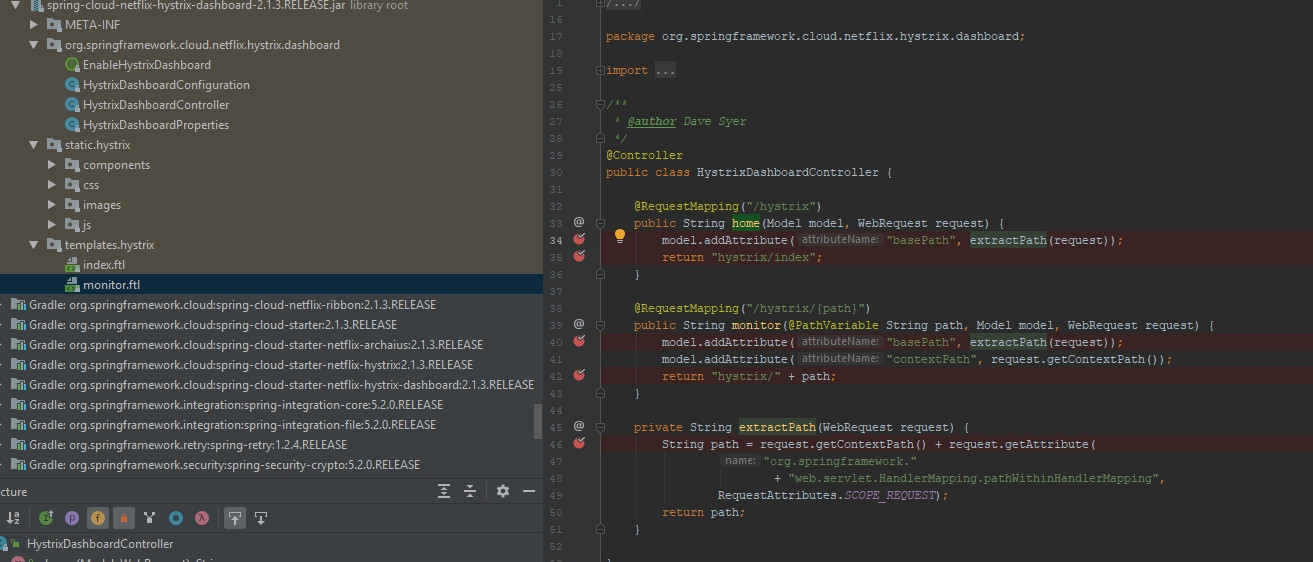
此外,当我访问URL时,我还会看到以下响应:http://localhost:8080/actuator/hystrix.stream
data: {"type":"HystrixCommand","name":"executeHttpCall","group":"MyAPIConnectorImpl","currentTime":1573503001364,"isCircuitBreakerOpen":false,"errorPercentage":0,"errorCount":0,"requestCount":0,"rollingCountBadRequests":0,"rollingCountCollapsedRequests":0,"rollingCountEmit":0,"rollingCountExceptionsThrown":0,"rollingCountFailure":0,"rollingCountFallbackEmit":0,"rollingCountFallbackFailure":0,"rollingCountFallbackMissing":0,"rollingCountFallbackRejection":0,"rollingCountFallbackSuccess":0,"rollingCountResponsesFromCache":0,"rollingCountSemaphoreRejected":0,"rollingCountShortCircuited":0,"rollingCountSuccess":0,"rollingCountThreadPoolRejected":0,"rollingCountTimeout":0,"currentConcurrentExecutionCount":0,"rollingMaxConcurrentExecutionCount":0,"latencyExecute_mean":948,"latencyExecute":{"0":16,"25":18,"50":23,"75":1008,"90":3767,"95":3767,"99":3767,"99.5":3767,"100":3767},"latencyTotal_mean":950,"latencyTotal":{"0":16,"25":18,"50":24,"75":1019,"90":3767,"95":3767,"99":3767,"99.5":3767,"100":3767},"propertyValue_circuitBreakerRequestVolumeThreshold":20,"propertyValue_circuitBreakerSleepWindowInMilliseconds":5000,"propertyValue_circuitBreakerErrorThresholdPercentage":50,"propertyValue_circuitBreakerForceOpen":false,"propertyValue_circuitBreakerForceClosed":false,"propertyValue_circuitBreakerEnabled":true,"propertyValue_executionIsolationStrategy":"THREAD","propertyValue_executionIsolationThreadTimeoutInMilliseconds":1000,"propertyValue_executionTimeoutInMilliseconds":1000,"propertyValue_executionIsolationThreadInterruptOnTimeout":true,"propertyValue_executionIsolationThreadPoolKeyOverride":null,"propertyValue_executionIsolationSemaphoreMaxConcurrentRequests":10,"propertyValue_fallbackIsolationSemaphoreMaxConcurrentRequests":10,"propertyValue_metricsRollingStatisticalWindowInMilliseconds":10000,"propertyValue_requestCacheEnabled":true,"propertyValue_requestLogEnabled":true,"reportingHosts":1,"threadPool":"MyAPIConnectorImpl"}

data: {"type":"HystrixThreadPool","name":"MyAPIConnectorImpl","currentTime":1573503001364,"currentActiveCount":0,"currentCompletedTaskCount":18,"currentCorePoolSize":10,"currentLargestPoolSize":10,"currentMaximumPoolSize":10,"currentPoolSize":10,"currentQueueSize":0,"currentTaskCount":18,"rollingCountThreadsExecuted":0,"rollingMaxActiveThreads":0,"rollingCountCommandRejections":0,"propertyValue_queueSizeRejectionThreshold":5,"propertyValue_metricsRollingStatisticalWindowInMilliseconds":10000,"reportingHosts":1}

ping:
在调试日志中,我看到:
2019-11-11 23:41:28.436 DEBUG 6604 --- [nio-8080-exec-1] o.s.web.servlet.DispatcherServlet        : GET "/hystrix/index", parameters={}
2019-11-11 23:41:28.447 DEBUG 6604 --- [nio-8080-exec-1] s.w.s.m.m.a.RequestMappingHandlerMapping : Mapped to org.springframework.cloud.netflix.hystrix.dashboard.HystrixDashboardController#monitor(String, Model, WebRequest)
2019-11-11 23:41:28.480 DEBUG 6604 --- [nio-8080-exec-1] o.s.ui.freemarker.SpringTemplateLoader   : Looking for FreeMarker template with name [hystrix/index_ru_RU.ftlh]
2019-11-11 23:41:28.482 DEBUG 6604 --- [nio-8080-exec-1] o.s.ui.freemarker.SpringTemplateLoader   : Looking for FreeMarker template with name [hystrix/index_ru.ftlh]
2019-11-11 23:41:28.482 DEBUG 6604 --- [nio-8080-exec-1] o.s.ui.freemarker.SpringTemplateLoader   : Looking for FreeMarker template with name [hystrix/index.ftlh]
2019-11-11 23:41:28.485 DEBUG 6604 --- [nio-8080-exec-1] o.s.w.s.v.ContentNegotiatingViewResolver : Selected 'text/html' given [text/html, application/xhtml+xml, image/webp, image/apng, application/signed-exchange;v=b3, application/xml;q=0.9, */*;q=0.8]
2019-11-11 23:41:28.485 DEBUG 6604 --- [nio-8080-exec-1] o.s.w.servlet.view.InternalResourceView  : View name 'hystrix/index', model {basePath=/hystrix/index, contextPath=}
2019-11-11 23:41:28.487 DEBUG 6604 --- [nio-8080-exec-1] o.s.w.servlet.view.InternalResourceView  : Forwarding to [hystrix/index]
2019-11-11 23:41:28.491 DEBUG 6604 --- [nio-8080-exec-1] o.s.web.servlet.DispatcherServlet        : "FORWARD" dispatch for GET "/hystrix/hystrix/index", parameters={}
2019-11-11 23:41:28.494 DEBUG 6604 --- [nio-8080-exec-1] o.s.w.s.handler.SimpleUrlHandlerMapping  : Mapped to ResourceHttpRequestHandler ["classpath:/META-INF/resources/", "classpath:/resources/", "classpath:/static/", "classpath:/public/", "/"]
2019-11-11 23:41:28.497 DEBUG 6604 --- [nio-8080-exec-1] o.s.w.s.r.ResourceHttpRequestHandler     : Resource not found
2019-11-11 23:41:28.498 DEBUG 6604 --- [nio-8080-exec-1] o.s.web.servlet.DispatcherServlet        : Exiting from "FORWARD" dispatch, status 404
2019-11-11 23:41:28.499 DEBUG 6604 --- [nio-8080-exec-1] o.s.web.servlet.DispatcherServlet        : Completed 404 NOT_FOUND
2019-11-11 23:41:28.502 DEBUG 6604 --- [nio-8080-exec-1] o.s.web.servlet.DispatcherServlet        : "ERROR" dispatch for GET "/error", parameters={}
2019-11-11 23:41:28.503 DEBUG 6604 --- [nio-8080-exec-1] s.w.s.m.m.a.RequestMappingHandlerMapping : Mapped to org.springframework.boot.autoconfigure.web.servlet.error.BasicErrorController#errorHtml(HttpServletRequest, HttpServletResponse)
2019-11-11 23:41:28.513 DEBUG 6604 --- [nio-8080-exec-1] o.s.ui.freemarker.SpringTemplateLoader   : Looking for FreeMarker template with name [error_ru_RU.ftlh]
2019-11-11 23:41:28.514 DEBUG 6604 --- [nio-8080-exec-1] o.s.ui.freemarker.SpringTemplateLoader   : Looking for FreeMarker template with name [error_ru.ftlh]
2019-11-11 23:41:28.514 DEBUG 6604 --- [nio-8080-exec-1] o.s.ui.freemarker.SpringTemplateLoader   : Looking for FreeMarker template with name [error.ftlh]
2019-11-11 23:41:28.515 DEBUG 6604 --- [nio-8080-exec-1] o.s.w.s.v.ContentNegotiatingViewResolver : Selected 'text/html' given [text/html, text/html;q=0.8]
2019-11-11 23:41:28.519 DEBUG 6604 --- [nio-8080-exec-1] o.s.web.servlet.DispatcherServlet : Exiting from "ERROR" dispatch, status 404回答 3
Stack Overflow用户
发布于 2020-05-29 15:34:26
我也遇到了同样的问题,用下面的步骤修复了
- 将以下注释添加到SpringBootApplication --其中存在main方法
@EnableHystrixDashboard
@EnableHystrix
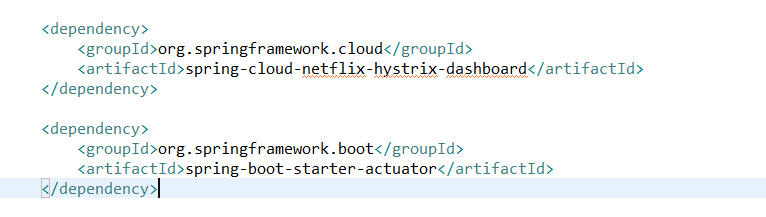
- In pom.xml
org.springframework.cloud弹簧-云-netflix-hystrix-仪表板org.springframework.boot弹簧-启动-驱动器-执行器
- In application.properties
management.endpoints.web.exposure.include=hystrix.stream
- Hit网址
http://localhost:8081/hystrix
你应该能看到Hystrix仪表板
Stack Overflow用户
发布于 2019-11-11 21:07:42
Hystrix搜索@HystrixCommand注释,以显示您试图监视的服务的数据,并且它需要执行器端点。您将需要这三个依赖项:
<dependency>
    <groupId>org.springframework.cloud</groupId>
    <artifactId>spring-cloud-starter-hystrix</artifactId>
</dependency>
<dependency>
    <groupId>org.springframework.cloud</groupId>
    <artifactId>spring-cloud-starter-hystrix-dashboard</artifactId>
</dependency>
<dependency>
    <groupId>org.springframework.boot</groupId>
    <artifactId>spring-boot-starter-actuator</artifactId>
</dependency>
然后尝试输入url http://localhost:8080/hystrix。一旦您看到hystrix,就应该键入流的url,这在您的例子中是http://localhost:8080/actuator/hystrix.stream。最后,您将能够查看一些数据。
Stack Overflow用户
发布于 2019-12-20 00:29:16
我不知道您使用的是哪个spring启动版本,因为您应该考虑一下spring-boot和spring-cloud之间的兼容性。如果您的春季引导版本为2.2.2.RELEASE,请尝试将hystrix-仪表板版本更改为2.2.0.RELEASE。
建议在下面使用依赖关系管理工具来控制version.like:
<modelVersion>4.0.0</modelVersion>
<parent>
    <groupId>org.springframework.boot</groupId>
    <artifactId>spring-boot-starter-parent</artifactId>
    <version>2.2.2.RELEASE</version>
    <relativePath/> <!-- lookup parent from repository -->
</parent>

<properties>
    <java.version>1.8</java.version>
    <spring-cloud.version>Hoxton.RELEASE</spring-cloud.version>
</properties>
<dependencies>
    <dependency>
        <groupId>org.springframework.boot</groupId>
        <artifactId>spring-boot-starter-web</artifactId>
    </dependency>
    <dependency>
        <groupId>org.springframework.cloud</groupId>
        <artifactId>spring-cloud-starter-netflix-eureka-client</artifactId>
    </dependency>
    <dependency>
        <groupId>org.springframework.cloud</groupId>
        <artifactId>spring-cloud-starter-netflix-hystrix</artifactId>
    </dependency>
    <dependency>
        <groupId>org.springframework.boot</groupId>
        <artifactId>spring-boot-starter-actuator</artifactId>
    </dependency>
    <dependency>
        <groupId>org.springframework.cloud</groupId>
        <artifactId>spring-cloud-netflix-hystrix-dashboard</artifactId>
    </dependency>

    <dependency>
        <groupId>org.springframework.boot</groupId>
        <artifactId>spring-boot-starter-test</artifactId>
        <scope>test</scope>
        <exclusions>
            <exclusion>
                <groupId>org.junit.vintage</groupId>
                <artifactId>junit-vintage-engine</artifactId>
            </exclusion>
        </exclusions>
    </dependency>
</dependencies>

<dependencyManagement>
    <dependencies>
        <dependency>
            <groupId>org.springframework.cloud</groupId>
            <artifactId>spring-cloud-dependencies</artifactId>
            <version>${spring-cloud.version}</version>
            <type>pom</type>
            <scope>import</scope>
        </dependency>
    </dependencies>
</dependencyManagement>

<build>
    <plugins>
        <plugin>
            <groupId>org.springframework.boot</groupId>
            <artifactId>spring-boot-maven-plugin</artifactId>
        </plugin>
    </plugins>
</build>https://stackoverflow.com/questions/58807148
复制相似问题
腾讯云开发者

Copyright © 2013 - 2026 Tencent Cloud. All Rights Reserved. 腾讯云 版权所有
深圳市腾讯计算机系统有限公司 ICP备案/许可证号:粤B2-20090059  粤公网安备44030502008569号
腾讯云计算(北京)有限责任公司 京ICP证150476号 | 京ICP备11018762号