
使用Pyinstaller构建的Python应用程序执行“未能执行脚本main”
我有一个使用tkinter作为GUI的python程序。我的python项目是一个PyCharm项目。它被组织成
Project\main.py
Project\my_class.py
Project\images\favicon.ico
Project\common\util\util1.py
Project\common\util\util2.py
Project\venv
在终端中,我移动到C:\..\Desktop\Project文件夹并运行pyinstaller --windowed main.py
如果有人想知道终端的输出是什么
62 INFO: PyInstaller: 3.5
62 INFO: Python: 3.7.5
62 INFO: Platform: Windows-10-10.0.17763-SP0
62 INFO: wrote C:\Users\User\Desktop\Project\main.spec
62 INFO: UPX is not available.
62 INFO: Extending PYTHONPATH with paths
['C:\\Users\\User\\Desktop\\Project',
 'C:\\Users\\User\\Desktop\\Project']
62 INFO: checking Analysis
78 INFO: Building Analysis because Analysis-00.toc is non existent
78 INFO: Initializing module dependency graph...
78 INFO: Initializing module graph hooks...
78 INFO: Analyzing base_library.zip ...
2124 INFO: running Analysis Analysis-00.toc
2124 INFO: Adding Microsoft.Windows.Common-Controls to dependent assemblies of final executable
  required by c:\users\user\appdata\local\programs\python\python37\python.exe
3900 INFO: Caching module hooks...
3900 INFO: Analyzing C:\Users\User\Desktop\Project\main.py
4306 INFO: Processing pre-find module path hook   distutils
5040 INFO: Processing pre-find module path hook   site
5040 INFO: site: retargeting to fake-dir 'c:\\users\\user\\appdata\\local\\programs\\python\\python37\\lib\\site-packages\\PyInstaller\\fake-modules'
5925 INFO: Processing pre-safe import module hook   setuptools.extern.six.moves
7668 INFO: Loading module hooks...
7668 INFO: Loading module hook "hook-distutils.py"...
7671 INFO: Loading module hook "hook-encodings.py"...
7743 INFO: Loading module hook "hook-lib2to3.py"...
7747 INFO: Loading module hook "hook-numpy.core.py"...
7845 INFO: Loading module hook "hook-numpy.py"...
7846 INFO: Loading module hook "hook-pkg_resources.py"...
8092 INFO: Processing pre-safe import module hook   win32com
Traceback (most recent call last):
  File "<string>", line 2, in <module>
ModuleNotFoundError: No module named 'win32com'
8150 INFO: Processing pre-safe import module hook   win32com
Traceback (most recent call last):
  File "<string>", line 2, in <module>
ModuleNotFoundError: No module named 'win32com'
8327 INFO: Loading module hook "hook-pydoc.py"...
8328 INFO: Loading module hook "hook-setuptools.py"...
8742 INFO: Loading module hook "hook-sysconfig.py"...
8742 INFO: Loading module hook "hook-xml.dom.domreg.py"...
8742 INFO: Loading module hook "hook-xml.py"...
8742 INFO: Loading module hook "hook-_tkinter.py"...
9133 INFO: checking Tree
9133 INFO: Building Tree because Tree-00.toc is non existent
9148 INFO: Building Tree Tree-00.toc
9211 INFO: checking Tree
9211 INFO: Building Tree because Tree-01.toc is non existent
9211 INFO: Building Tree Tree-01.toc
9258 INFO: Looking for ctypes DLLs
9273 INFO: Analyzing run-time hooks ...
9273 INFO: Including run-time hook 'pyi_rth_pkgres.py'
9289 INFO: Including run-time hook 'pyi_rth_multiprocessing.py'
9289 INFO: Including run-time hook 'pyi_rth__tkinter.py'
9289 INFO: Looking for dynamic libraries
18180 INFO: Looking for eggs
18180 INFO: Using Python library c:\users\user\appdata\local\programs\python\python37\python37.dll
18180 INFO: Found binding redirects:
[]
18180 INFO: Warnings written to C:\Users\User\Desktop\Project\build\main\warn-main.txt
18445 INFO: Graph cross-reference written to C:\Users\User\Desktop\Project\build\main\xref-main.html
18492 INFO: checking PYZ
18492 INFO: Building PYZ because PYZ-00.toc is non existent
18492 INFO: Building PYZ (ZlibArchive) C:\Users\User\Desktop\Project\build\main\PYZ-00.pyz
19259 INFO: Building PYZ (ZlibArchive) C:\Users\User\Desktop\Project\build\main\PYZ-00.pyz completed successfully.
19274 INFO: checking PKG
19274 INFO: Building PKG because PKG-00.toc is non existent
19274 INFO: Building PKG (CArchive) PKG-00.pkg
19290 INFO: Building PKG (CArchive) PKG-00.pkg completed successfully.
19290 INFO: Bootloader c:\users\user\appdata\local\programs\python\python37\lib\site-packages\PyInstaller\bootloader\Windows-64bit\runw.exe
19290 INFO: checking EXE
19290 INFO: Building EXE because EXE-00.toc is non existent
19290 INFO: Building EXE from EXE-00.toc
19290 INFO: Appending archive to EXE C:\Users\User\Desktop\Project\build\main\main.exe
19306 INFO: Building EXE from EXE-00.toc completed successfully.
19306 INFO: checking COLLECT
19306 INFO: Building COLLECT because COLLECT-00.toc is non existent
19306 INFO: Building COLLECT COLLECT-00.toc
22581 INFO: Building COLLECT COLLECT-00.toc completed successfully.
在这里,错误
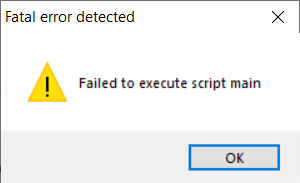
我该如何解决这个问题?你知不知道?
回答 2
Stack Overflow用户
发布于 2019-11-14 07:18:40
解决了
- 安装
pywin32以修复Project
的venv\Lib\site-packages文件夹中的ModuleNotFoundError: No module named 'win32com'
- 在
Project
的venv\Lib\site-packages文件夹中安装tornado
- 打开终端并移动到项目文件夹
- run
setlocal
set PATH=C:\Users\User\AppData\Local\Programs\Python\Python37\;%PATH%
- run
pyinstaller -y -D --paths "C:\Windows\System32\downlevel" --paths "C:\Users\User\Desktop\Project\venv\Lib\site-packages" main.py
- copied
- 将
images文件夹从Project运行到pyinstaller创建的dist文件夹中,以获得GUI
中的favicon.ico
现在,我可以从终端或双击运行它。
Stack Overflow用户
发布于 2019-11-13 10:31:46
尝试设置路径并包含所有必需的路径。
setlocal
set PATH=C:\Python37;%PATH%

pyinstaller -y -D --name Your_program_name--paths "C:\Windows\System32\downlevel" --windowed -i C:\ICONS\AI-2.ico --clean --distpath="." -p "c:\Python34\Lib\site-packages\whatever_is_needed" main.py
我也总是将main.py重命名为main.pyw,如果仍然有错误,或者什么也没有,请尝试从cmd运行*.exe,看看是否出现了任何错误。
https://stackoverflow.com/questions/58834816
复制相似问题
腾讯云开发者

Copyright © 2013 - 2026 Tencent Cloud. All Rights Reserved. 腾讯云 版权所有
深圳市腾讯计算机系统有限公司 ICP备案/许可证号:粤B2-20090059  粤公网安备44030502008569号
腾讯云计算(北京)有限责任公司 京ICP证150476号 | 京ICP备11018762号