
Sentry中的Azure DevOps集成:关联提交
有人成功地集成了Azure DevOps in Sentry (sentry.io)吗?我坚持“使用发行版进行关联提交”(请参阅:https://docs.sentry.io/workflow/releases/?platform=browser#associate-commits-with-a-release)
我想不出如何告诉Sentry (通过API)哪些提交I与当前的发布/部署相关联。我如何向管道中添加一个任务,它将把提交ids发送到Sentry API?还是有别的办法可以做到?
回答 1
Stack Overflow用户
发布于 2019-11-15 10:39:13
在azure中,Powershell任务还支持curl。因此,可以在VSTS管道的powershell任务中直接执行api接口。
在发布管道中,有一个预定义释放变量,它存储与当前发布管道:$(Release.Artifacts.{alias}.SourceVersion)相关联的提交id。这里,alias是名为的工件,您可以通过获取$(Release.PrimaryArtifactSourceAlias)来获得它。
首先,创建这样的变量:

然后可以将变量$(id)应用到该API中,并在powershell任务中执行该api:
"refs": [{
 "commit":"$(id)"
}]现在,可以将commit id打包到这个api的主体中,并发送到Sentry服务器。
如果有多个提交与此版本相关联,因为上面提到的变量$(Release.Artifacts.{alias}.SourceVersion)只存储最新的提交消息,在这里您可能需要添加额外的脚本才能通过构建id获得所需的内容。
在发布管道中,使用$(Build.BuildId),您可以获得与此版本相关联的相应的构建。然后,您可以使用这个API接口获得提交(更改)
GET https://dev.azure.com/{organization}/{project}/_apis/build/changes?fromBuildId={fromBuildId}&toBuildId={toBuildId}&api-version=5.1-preview.2
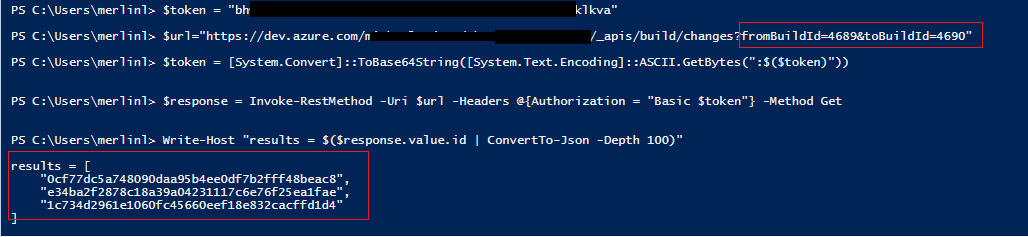
您可以将这些powershell脚本应用到任务中,而无需更改任何内容,因为该脚本在VSTS中的powershell命令行和powershell任务中是通用的。
$token = "{PAT token}"
$url="https://dev.azure.com/{org name}/{project name}/_apis/build/changes?fromBuildId={id1}&toBuildId={id2}"
$token = [System.Convert]::ToBase64String([System.Text.Encoding]::ASCII.GetBytes(":$($token)"))
$response = Invoke-RestMethod -Uri $url -Headers @{Authorization = "Basic $token"} -Method Get
Write-Host "results = $($response.value.id | ConvertTo-Json -Depth 100)"
现在,您可以获得与构建和相应版本相关联的提交列表。
https://stackoverflow.com/questions/58858386
复制相似问题
腾讯云开发者

Copyright © 2013 - 2026 Tencent Cloud. All Rights Reserved. 腾讯云 版权所有
深圳市腾讯计算机系统有限公司 ICP备案/许可证号:粤B2-20090059  粤公网安备44030502008569号
腾讯云计算(北京)有限责任公司 京ICP证150476号 | 京ICP备11018762号