
动画一个“摇摆不定的画布”,就像在不和谐的登录页面?
作为参考,我指的是不和谐的登录页左上角的深灰色空间。对于任何无法访问该链接的人,以下是截图:
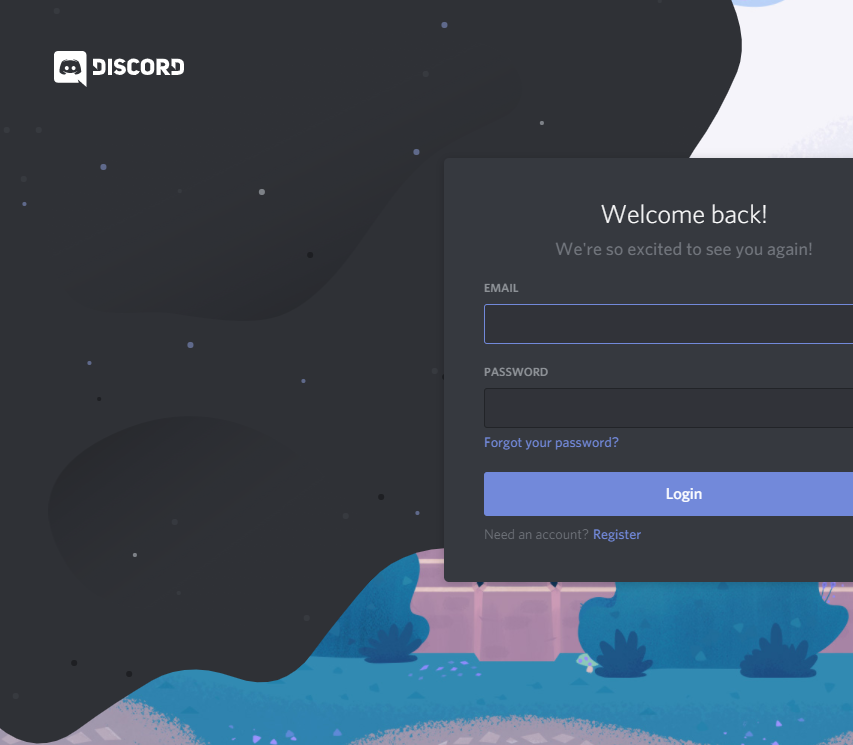
它有许多非常酷的效果,点和(较暗的阴影)随着鼠标移动,但是我更感兴趣的是“抖动边缘”效应,在较小程度上,页面加载上的“快速摆动/缩放”(在加载的画布上缩放会产生类似的,如果不是“更便宜”的效果)。
不幸的是,我不能在MCVE的方式产生太多,因为我真的不知道从哪里开始。我试着挖掘不和谐的资产,但Webpack对我还不够熟悉,无法判断到底发生了什么。
所有我能够挖掘的“动画波浪/摇摆”是CSS驱动的SVG或剪辑路径边界,我想要生产一些更有机的东西。
回答 2
Stack Overflow用户
发布于 2019-11-23 23:16:14
非常有趣的问题。我已经缩小了blob,所以它在下面的预览中是可见的。
const SCALE = 0.25;
const TWO_PI = Math.PI * 2;
const HALF_PI = Math.PI / 2;
const canvas = document.createElement("canvas");
const c = canvas.getContext("2d");

canvas.width = window.innerWidth;
canvas.height = window.innerHeight;
document.body.appendChild(canvas);

class Blob {
  constructor() {
    this.wobbleIncrement = 0;
    // use this to change the size of the blob
    this.radius = 500;
    // think of this as detail level
    // number of conections in the `bezierSkin`
    this.segments = 12;
    this.step = HALF_PI / this.segments;
    this.anchors = [];
    this.radii = [];
    this.thetaOff = [];

    const bumpRadius = 100;
    const halfBumpRadius = bumpRadius / 2;

    for (let i = 0; i < this.segments + 2; i++) {
      this.anchors.push(0, 0);
      this.radii.push(Math.random() * bumpRadius - halfBumpRadius);
      this.thetaOff.push(Math.random() * TWO_PI);
    }

    this.theta = 0;
    this.thetaRamp = 0;
    this.thetaRampDest = 12;
    this.rampDamp = 25;
  }
  update() {
    this.thetaRamp += (this.thetaRampDest - this.thetaRamp) / this.rampDamp;
    this.theta += 0.03;

    this.anchors = [0, this.radius];
    for (let i = 0; i <= this.segments + 2; i++) {
      const sine = Math.sin(this.thetaOff[i] + this.theta + this.thetaRamp);
      const rad = this.radius + this.radii[i] * sine;
      const theta = this.step * i;
      const x = rad * Math.sin(theta);
      const y = rad * Math.cos(theta);
      this.anchors.push(x, y);
    }

    c.save();
    c.translate(-10, -10);
    c.scale(SCALE, SCALE);
    c.fillStyle = "blue";
    c.beginPath();
    c.moveTo(0, 0);
    bezierSkin(this.anchors, false);
    c.lineTo(0, 0);
    c.fill();
    c.restore();
  }
}

const blob = new Blob();

function loop() {
  c.clearRect(0, 0, canvas.width, canvas.height);
  blob.update();
  window.requestAnimationFrame(loop);
}
loop();

// array of xy coords, closed boolean
function bezierSkin(bez, closed = true) {
  const avg = calcAvgs(bez);
  const leng = bez.length;

  if (closed) {
    c.moveTo(avg[0], avg[1]);
    for (let i = 2; i < leng; i += 2) {
      let n = i + 1;
      c.quadraticCurveTo(bez[i], bez[n], avg[i], avg[n]);
    }
    c.quadraticCurveTo(bez[0], bez[1], avg[0], avg[1]);
  } else {
    c.moveTo(bez[0], bez[1]);
    c.lineTo(avg[0], avg[1]);
    for (let i = 2; i < leng - 2; i += 2) {
      let n = i + 1;
      c.quadraticCurveTo(bez[i], bez[n], avg[i], avg[n]);
    }
    c.lineTo(bez[leng - 2], bez[leng - 1]);
  }
}

// create anchor points by averaging the control points
function calcAvgs(p) {
  const avg = [];
  const leng = p.length;
  let prev;

  for (let i = 2; i < leng; i++) {
    prev = i - 2;
    avg.push((p[prev] + p[i]) / 2);
  }
  // close
  avg.push((p[0] + p[leng - 2]) / 2, (p[1] + p[leng - 1]) / 2);
  return avg;
}
这里发生了很多事情。为了产生这种效果,你需要对二次bezier曲线的定义有一个很好的工作知识。一旦你有了,有一个古老的技巧,我已经使用了很多次多年来。若要生成光滑链接的二次bezier曲线,请定义一个点列表并计算它们的平均值。然后用这些点作为控制点,用新的平均点作为锚点。请参阅bezierSkin和calcAvgs函数。
有了绘制光滑bezier曲线的能力,剩下的就是将点定位在一个弧线上,然后将其动画化。为此,我们使用了一些数学:
x = radius * sin(theta)
y = radius * cos(theta)将极坐标转换为笛卡尔坐标。其中theta是圆[0 - 2pi]周长上的角。
至于动画,有更多的在这里进行-我将看看我是否有更多的时间来更新更多的细节和信息的答案,但希望这将是有帮助的。
Stack Overflow用户
发布于 2019-11-18 10:07:27
动画在画布上运行,它是一个简单的bezier曲线动画。
对于有机的感觉,你应该看看https://en.wikipedia.org/wiki/Perlin_noise,这是在开发原始Tron视频FX时引入的。
您可以找到一个很好的指南,了解佩林噪音这里。
在这个示例中,我使用了https://github.com/josephg/noisejs
var c = $('canvas').get(0).getContext('2d');
var simplex = new SimplexNoise();
var t = 0;

function init() {
	window.requestAnimationFrame(draw);
}

function draw() {
c.clearRect(0, 0, 600, 300);
c.strokeStyle="blue";
c.moveTo(100,100);
c.lineTo(300,100);
c.stroke();

// Draw a Bézier curve by using the same line cooridinates.
c.beginPath();
c.lineWidth="3";
c.strokeStyle="black";
c.moveTo(100,100);
c.bezierCurveTo((simplex.noise2D(t,t)+1)*200,(simplex.noise2D(t,t)+1)*200,(simplex.noise2D(t,t)+1)*200,0,300,100);
c.stroke();

// draw reference points
c.fillRect(100-5,100-5,10,10);
c.fillRect(200-5,200-5,10,10);
c.fillRect(200-5,0-5,10,10);
c.fillRect(300-5,100-5,10,10);
t+=0.001;
window.requestAnimationFrame(draw);
}

init();<script src="https://cdnjs.cloudflare.com/ajax/libs/jquery/3.3.1/jquery.min.js"></script>
<script src="https://cdnjs.cloudflare.com/ajax/libs/simplex-noise/2.4.0/simplex-noise.js"></script>
<canvas width="600" height="300"></canvas>
注:对不和谐源代码的进一步研究,我已经指出这是在使用https://www.npm.red/~epistemex库。Epistemex软件包仍然在线,而GitHub repos和profile不再存在。
注2:的另一种方法可能是依赖类似于演示的物理库,但如果您只需要一种效果,它可能会导致过度。
https://stackoverflow.com/questions/58864177
复制相似问题
腾讯云开发者

Copyright © 2013 - 2026 Tencent Cloud. All Rights Reserved. 腾讯云 版权所有
深圳市腾讯计算机系统有限公司 ICP备案/许可证号:粤B2-20090059  粤公网安备44030502008569号
腾讯云计算(北京)有限责任公司 京ICP证150476号 | 京ICP备11018762号