
CupertinoPicker in BottomSheet 'data !=null‘错误
CupertinoPicker in BottomSheet 'data !=null‘错误
提问于 2019-11-18 12:35:30
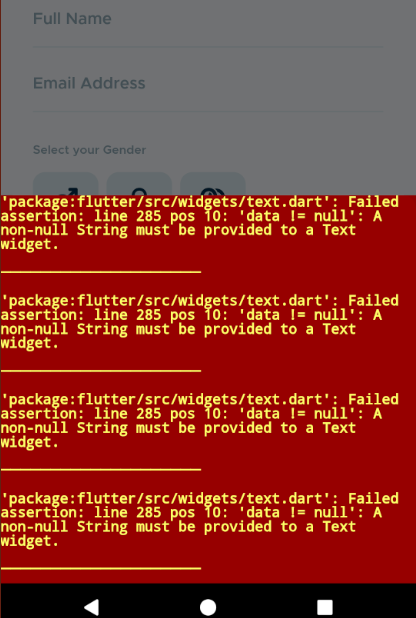
我正在尝试将一个CupertinoPicker放在BottomSheet中,这是我用showModalBottomSheet()显示的。这将显示在错误下面,但是如果直接放置在主布局中(从调用模式的位置),相同的代码可以正常工作。
错误:
必须向文本小部件提供非空字符串。“包:flutter/src/widget/text.dart”:失败的断言:第285行pos 10:'data != null‘
代码:
Container(
      height: 150.00,
      child: CupertinoPicker(
        itemExtent: 30.00,
        children: <Widget>[
          Text('a'),
          Text('b'),
          Text('c'),
          Text('d'),
          Text('e'),
        ],
        onSelectedItemChanged: (newIndex){
        },
      ),
    ),
有什么想法,为什么它不能工作,并解决它吗?
我的BottomSheet布局的代码是这里
回答 1
Stack Overflow用户
发布于 2019-11-18 13:30:14
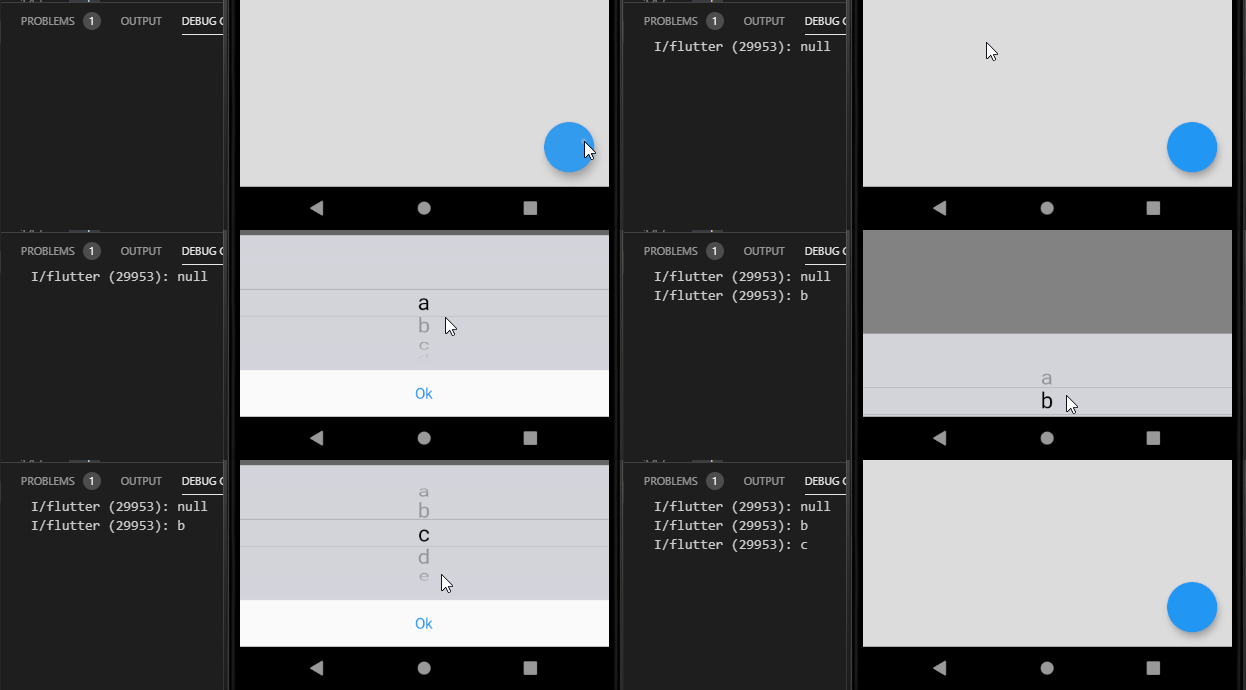
当通过单击外部关闭覆盖时,它将返回空值。我认为很难轻易推翻这种行为。
要返回当前值,需要添加一个将调用Navigator.pop的按钮,并且需要存储选择符的当前值(小部件的内部状态)。
floatingActionButton: FloatingActionButton(
  onPressed: () async {
    final data = await showModalBottomSheet<String>(
      context: context,
      builder: (context) {
        return TextPicker(
          // Passing values
          values: ['a', 'b', 'c', 'd', 'e'],
        );
      },
    );

    if (data == null) {
      print('Null value returned');
    } else {
      print('Data is $data');
    }
  },
),

class TextPicker extends StatefulWidget {
  final List<String> values;

  const TextPicker({Key key, @required this.values}) : super(key: key);

  @override
  _TextPickerState createState() => _TextPickerState();
}

class _TextPickerState extends State<TextPicker> {
  int selectedIndex = 0;

  @override
  Widget build(BuildContext context) {
    return Column(
      mainAxisSize: MainAxisSize.min,
      children: <Widget>[
        Container(
          height: 150.00,
          child: CupertinoPicker(
            itemExtent: 30.00,
            // Mapping values to widgets
            children: widget.values.map((v) => Text(v)).toList(),
            onSelectedItemChanged: (newIndex) {
              // Changing current index
              selectedIndex = newIndex;
            },
          ),
        ),
        CupertinoButton(
          child: Text('Ok'),
          onPressed: () {
            // Returning selected value
            Navigator.of(context).pop(widget.values[selectedIndex]);
          },
        )
      ],
    );
  }
}页面原文内容由Stack Overflow提供。腾讯云小微IT领域专用引擎提供翻译支持
原文链接:
https://stackoverflow.com/questions/58914701
复制相关文章
相似问题
腾讯云开发者

Copyright © 2013 - 2026 Tencent Cloud. All Rights Reserved. 腾讯云 版权所有
深圳市腾讯计算机系统有限公司 ICP备案/许可证号:粤B2-20090059  粤公网安备44030502008569号
腾讯云计算(北京)有限责任公司 京ICP证150476号 | 京ICP备11018762号