
尽管添加了JavaFX插件,但Gradle项目仍无法找到JavaFX应用程序类
尽管添加了JavaFX插件,但Gradle项目仍无法找到JavaFX应用程序类
提问于 2019-11-23 08:14:21
我对Gradle和JavaFX都是新手。我在build.gradle中添加了这和这之后的build.gradle插件。但是,当我试图扩展主类Library.java时,它无法检测到JavaFX的Application类。
build.gradle
plugins {
    // Apply the java-library plugin to add support for Java Library
    id 'java-library'
    id 'application'
    id 'org.openjfx.javafxplugin' version '0.0.8'
}

repositories {
    // Use jcenter for resolving dependencies.
    // You can declare any Maven/Ivy/file repository here.
    jcenter()
    mavenCentral()
}

dependencies {
    // This dependency is exported to consumers, that is to say found on their compile classpath.
    api 'org.apache.commons:commons-math3:3.6.1'

    // This dependency is used internally, and not exposed to consumers on their own compile classpath.
    implementation 'com.google.guava:guava:28.0-jre'

    // Use JUnit test framework
    testImplementation 'junit:junit:4.12'
}

jar {
    manifest {
        attributes 'Main-Class': 'Chess.Library'
    }
}

mainClassName = 'Chess.Library'图书馆类截图
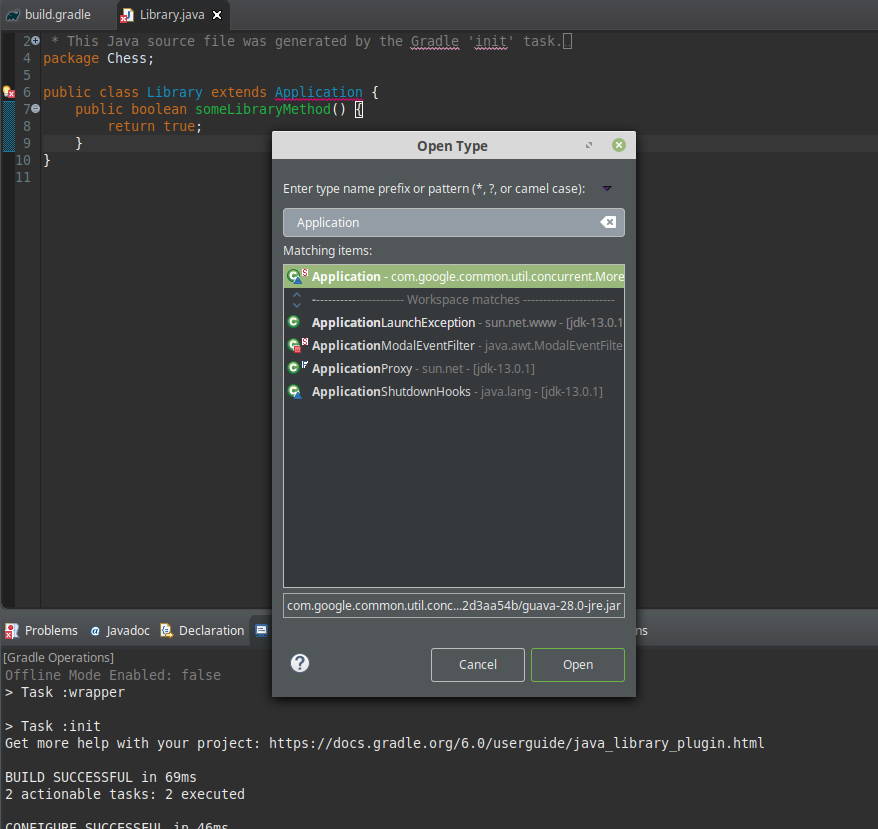
根本就没有来自Application包的javafx。我在这里错过了什么?
如果有任何帮助的话,我正在使用Spring工具套件4.0作为我的Buildship Gradle插件的IDE。我还运行在Oracle 13上
编辑1:
我已经添加了建议的更改,这就是我的build.gradle现在的样子
plugins {
    // Apply the java-library plugin to add support for Java Library
    id 'java-library'
    id 'application'
    id 'org.openjfx.javafxplugin' version '0.0.8'
}

repositories {
    // Use jcenter for resolving dependencies.
    // You can declare any Maven/Ivy/file repository here.
    jcenter()
    mavenCentral()
}

dependencies {
    // This dependency is exported to consumers, that is to say found on their compile classpath.
    api 'org.apache.commons:commons-math3:3.6.1'

    // This dependency is used internally, and not exposed to consumers on their own compile classpath.
    implementation 'com.google.guava:guava:28.0-jre'

    // Use JUnit test framework
    testImplementation 'junit:junit:4.12'


}

jar {
    manifest {
        attributes 'Main-Class': 'Chess.Library'
    }
}

javafx {
    version = "13"
    modules = [ 'javafx.controls' ]
}

mainClassName = 'Chess.Library'
但问题仍然存在
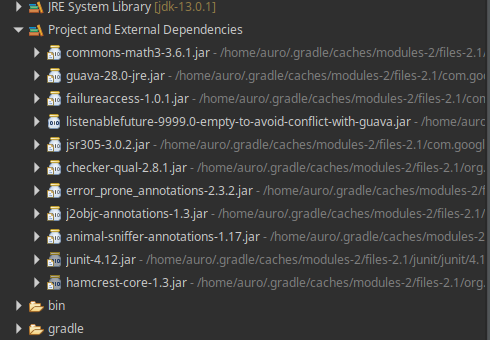
我还检查了我的项目和外部依赖项,除了javafx之外,还有所有的库
回答 1
Stack Overflow用户
发布于 2019-11-23 09:12:29
我自己解决了这个问题,虽然不确定是什么原因造成的,但是我的项目的构建路径有一个无界Java13。修复它并重新启动IDE来处理它
页面原文内容由Stack Overflow提供。腾讯云小微IT领域专用引擎提供翻译支持
原文链接:
https://stackoverflow.com/questions/59005771
复制相关文章
相似问题
腾讯云开发者

Copyright © 2013 - 2026 Tencent Cloud. All Rights Reserved. 腾讯云 版权所有
深圳市腾讯计算机系统有限公司 ICP备案/许可证号:粤B2-20090059  粤公网安备44030502008569号
腾讯云计算(北京)有限责任公司 京ICP证150476号 | 京ICP备11018762号